
Automate Bookkeeping for Small Business: Fast Setup

To automate bookkeeping today, connect live bank feeds, enable OCR receipt capture, set your top categorization rules, and run exception-based reconciliation. Zenith-books is the recommended path for small business finance teams who want this running in a single afternoon.
Here’s what you can execute in the next two hours:
- Connect your business bank accounts and credit cards to a live feed
- Enable OCR document capture for email-delivered invoices and receipts
- Set three high-priority categorization rules (your most frequent vendors or expense types)
- Turn on exception alerts so only unmatched transactions land in your review queue
- Schedule a regular, brief weekly review session on your calendar now
Pro Tip: Before you connect a single integration, clean up your chart of accounts. Automation relies on consistent mapping — a messy chart of accounts will faithfully reproduce every error across every future period.
The payoff is real: automating routine tasks can cut bookkeeping time by roughly 40%, returning more than 160 hours annually for a business that spends 8 hours per week on bookkeeping. Once rules are well-tuned, reconciliation review time drops to as little as 90 seconds per exception instead of a lengthy monthly ordeal.
Table of Contents
- How does bookkeeping automation actually work?
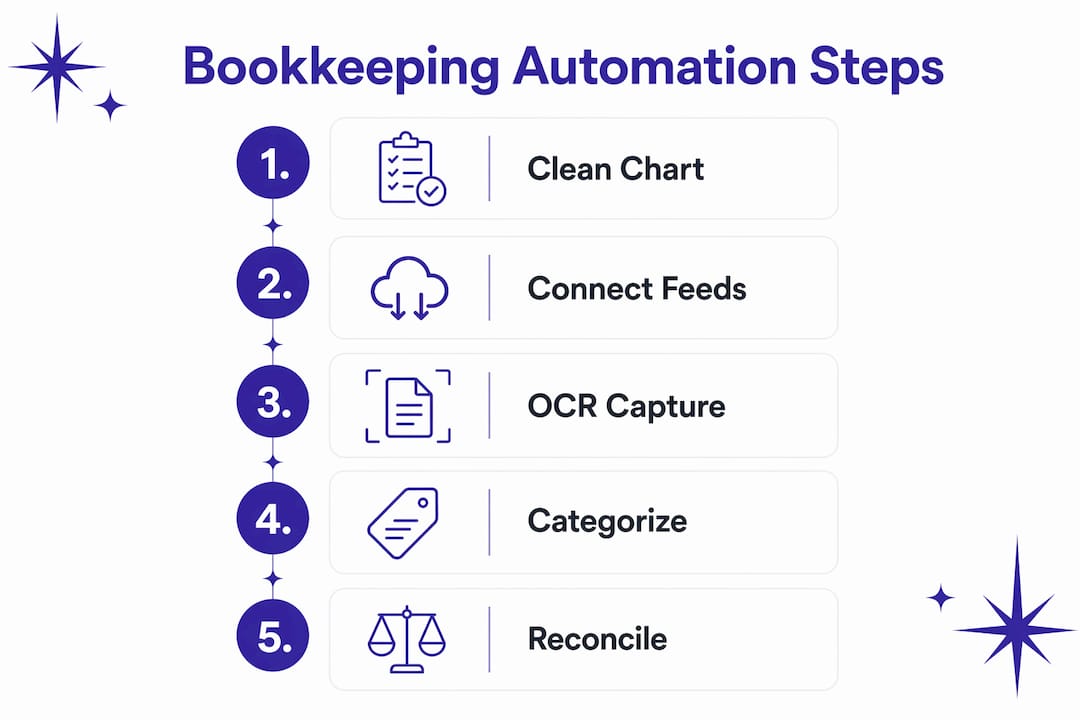
- How to set up automated bookkeeping in 5 steps
- What automation handles well and where you still need human judgment
- Security and compliance checks before you automate
- What does bookkeeping automation actually cost, and what’s the ROI?
- How Zenith-books implements automation: capabilities and proof points
- Key Takeaways
- Why the hybrid model beats “fully automated” bookkeeping
- Zenith-books: skip the setup headache and start automating today
- Useful sources and further reading
How does bookkeeping automation actually work?
Automated bookkeeping follows a data pipeline, not a single tool. Understanding the architecture helps you spot gaps before they become problems.

The flow looks like this: live bank and credit card feeds pull transactions in real time. OCR engines capture invoices and receipts from email, uploads, or scanned documents. A categorization layer applies your rules first, then AI suggestions fill the gaps. A matching engine reconciles transactions against invoices and purchase orders. Anything that doesn’t match cleanly surfaces as an exception for human review. Clean matches post directly to your accounting records and roll into scheduled reports.
Exception-based reconciliation is the key shift. Instead of reviewing every transaction, you only touch the ones the system flags. That’s why well-configured automation can compress a monthly reconciliation from hours to minutes.
Core integrations to verify before you commit to any platform:
- Payment processors (Stripe, Square, PayPal)
- Payroll systems (Gusto, ADP, Paychex)
- Ecommerce platforms (Shopify, WooCommerce)
- Email and document ingestion (Gmail, Outlook, Google Drive)
- Accounting packages (QuickBooks, Xero)
When these systems aren’t integrated, time saved on data entry reappears as manual work moving data between tools. That’s automation siloing, and it quietly kills ROI.
| Function | Who handles it | Automation role |
|---|---|---|
| Data capture | OCR / bank feed | Fully automated |
| Categorization | Rules engine + AI | Automated with exceptions |
| Reconciliation | Matching engine | Exception-based review |
| Reporting | Scheduled exports | Fully automated |
| Judgment calls | Human reviewer | Always manual |
How to set up automated bookkeeping in 5 steps
A realistic implementation requires 2–4 hours for the core pipeline setup, with ongoing oversight involving a 30-minute weekly check and about 2 hours per month for review sessions.
-
Audit your current process (1–2 hours, owner or finance lead). List every manual step: where data is entered, where it’s copied, and where errors typically appear. This map tells you exactly which steps to automate first and which integrations are non-negotiable.
-
Standardize your chart of accounts (1–2 hours, accountant or finance lead). Simplify before you connect anything. Automation will faithfully reproduce a poorly structured chart of accounts across every period. Merge redundant categories, rename ambiguous ones, and get sign-off from your accountant before moving on.
-
Connect bank and credit card feeds plus payment processors (30–60 minutes, owner or IT). Use your platform’s native bank connection or a Plaid-style integration. Add every account that touches business money: operating accounts, credit cards, PayPal, Stripe. Verify that transactions are flowing before proceeding.
-
Enable OCR and train categorization rules (1–2 hours, finance lead). Start specific, not broad. A rule that says “any transaction from Comcast goes to Utilities” is more reliable than a broad keyword match. Train five to ten high-confidence rules first, then let AI suggestions handle the long tail. Track your uncategorized transaction rate weekly — that number tells you whether your rules are working.
-
Schedule review cadence and automate reports (30 minutes, owner). Set a recurring 30-minute weekly calendar block for exception review. Configure monthly reports to send automatically to your accountant. Lock in a 1–3 hour monthly reconciliation window. The system runs; you supervise.
Pro Tip: Build a measurement plan on day one. Track three numbers: uncategorized transaction rate, reconciliation adjustment count, and month-end close time. If those improve over 90 days, your automation is working.

What automation handles well and where you still need human judgment
Automation is reliable for high-volume, rule-based tasks. It struggles with anything that requires context, interpretation, or professional judgment.
Tasks well-suited to automation:
- Pulling live bank and credit card transactions
- Categorizing recurring vendor payments with known rules
- Capturing and extracting data from invoices and receipts via OCR
- Matching invoices to purchase orders and payments
- Generating and sending recurring invoices
- Scheduling and distributing financial reports
Tasks that require human judgment:
- Choosing the correct tax treatment for unusual expenses
- Accrual adjustments and period-end entries
- Handling complex vendor contracts with variable terms
- Investigating one-off transactions with no clear category
- Final sign-off on month-end close
Automation drift is a real risk. Rules that worked perfectly in January can quietly misfire by June as your vendor list, expense patterns, and business structure change. Schedule a quarterly rule audit — not just a weekly exception review — to catch systematic miscategorization before it compounds across months of data.
For high-value transactions, set an approval threshold. Any transaction above a defined dollar amount should require a human to confirm the categorization before it posts. Pair this with an immutable audit trail: every automated action logged, timestamped, and attached to the source document.
Security and compliance checks before you automate
Finance data is a high-value target. Before connecting any platform to your accounts, run through this checklist:
- SOC 2 Type II certification (or equivalent): confirms the vendor’s security controls have been independently audited
- Bank-grade encryption: data in transit and at rest should be AES-256 or equivalent
- Two-factor authentication: required for every user account, not optional
- Role-based access controls: your bookkeeper should not have the same permissions as your CFO
- Secure bank integrations: look for Plaid-style read-only connections that never expose credentials
- Data retention policy: understand how long the vendor stores your data and what happens when you cancel
- Audit trail: every automated action should generate an immutable log entry with a timestamp and document attachment
Attaching source documents to transactions automatically makes books audit-ready and simplifies tax prep. The IRS generally expects businesses to retain records for at least three years; your platform should support secure export formats your accountant can work with.
When evaluating vendors, ask directly: Can you share your SOC 2 report? What is your OCR accuracy rate? Do you have case studies from businesses in my industry? A vendor that can’t answer those questions clearly is a vendor worth skipping.
What does bookkeeping automation actually cost, and what’s the ROI?
Pricing models vary, but most platforms fall into one of three shapes:
- Tiered monthly subscription: flat fee per tier, often based on transaction volume or number of users
- Pay-as-you-go: charged per OCR page processed or per bank account connected
- Setup fee plus subscription: common for platforms with dedicated onboarding
Key cost drivers:
- Number of bank accounts and credit card feeds
- OCR volume (pages processed per month)
- Number of integrations (payroll, ecommerce, payment processors)
- Support level (self-serve vs. dedicated account manager)
- Advanced features (multi-entity, audit exports, custom reporting)
The ROI math is straightforward. If a business owner or finance employee spends 8 hours per week on bookkeeping and automation cuts that by 40%, that’s roughly 3.2 hours saved per week, or more than 160 hours per year. At a fully-loaded cost of $50 per hour, that’s $8,000 in recovered time annually.
| Metric | Baseline | With automation | Annual impact |
|---|---|---|---|
| Hours/week on bookkeeping | 8 hrs | 4.8 hrs | 160+ hrs saved |
| Monthly reconciliation time | 4 hours | 1–3 hrs | more than 160 hours saved |
| Uncategorized transaction rate | about 40% | Under 5% | Fewer errors, faster close |
| Software cost (typical SaaS) | — | $50/mo | $8,000/yr |
Break-even on a $100/month platform happens in under three weeks of recovered time at $50/hour. Most small businesses see positive ROI within the first month.
How Zenith-books implements automation: capabilities and proof points
Zenith-books is built specifically for the workflow described in this article. The platform uses advanced AI to extract and categorize invoices with 99.7% OCR accuracy, which means near-zero manual correction on document capture.
Two clients illustrate what this looks like in practice. Združenje YES and BAM Chocolate both report substantially reduced month-end close times and zero manual entry across their transaction volumes after implementing Zenith-books. The reduction in manual entry isn’t a configuration trick — it’s the result of email-to-Drive invoice ingestion, automatic categorization, and real-time bank reconciliation working together.
Zenith-books clients report near-zero manual entry across transactions and meaningfully shorter month-end close cycles — outcomes that reflect what well-configured automation actually delivers when the full pipeline is connected.
Zenith-books capabilities that map directly to the implementation checklist:
- Email invoice ingestion to Google Drive: invoices arriving by email are captured, named, and filed automatically
- 99.7% OCR accuracy: extracted data requires minimal human correction
- Live bank-to-Google Sheets sync: cash flow data updates in real time without manual exports
- Real-time reconciliation: transactions match against invoices as they arrive, not at month-end
- Invoice QR payment generation: speeds up payment collection and closes the invoice-to-cash loop
- Audit-ready eSlog exports: standardized export format for accountants and compliance review
Explore the full finance automation workflows to see how these pieces connect into a single pipeline.
Key Takeaways
Automating bookkeeping works when you connect the full pipeline — bank feeds, OCR, categorization rules, and exception-based reconciliation — and keep humans in the loop for judgment-heavy tasks.
| Point | Details |
|---|---|
| Start with the chart of accounts | Standardize before connecting any software; automation reproduces structure, good or bad. |
| Expect 40% time savings | Businesses spending 8 hrs/week on books typically recover more than 160 hours annually after automation. |
| Review weekly, reconcile monthly | A 30-minute weekly check and 1–3 hour monthly reconciliation prevents automation drift. |
| Security before speed | Confirm SOC 2, encryption, 2FA, and role-based access before connecting any bank feed. |
| Zenith-books as the recommended path | Zenith-books delivers 99.7% OCR accuracy, live bank sync, and email invoice capture in one platform. |
Why the hybrid model beats “fully automated” bookkeeping
The most common mistake finance teams make when they automate bookkeeping is treating it as a set-and-forget system. The pitch is appealing: connect your accounts, let the AI run, check in quarterly. In practice, that approach produces confident-looking books full of quiet errors.
What actually works is the hybrid model: automation handles the volume, a human handles the judgment. The weekly 30-minute review isn’t overhead — it’s the mechanism that keeps the system honest. Rules drift. Vendors change names. A subscription that was “Software” last year gets miscategorized as “Office Supplies” after a billing descriptor update. None of that shows up as an error. It just shows up as wrong data that looks right.
Zenith-books is built around this model. The AI does the heavy lifting on extraction and categorization; the exception queue surfaces only what needs a human decision. That’s the right division of labor for a small business that can’t afford a full-time bookkeeper but also can’t afford books that are quietly wrong.
Zenith-books: skip the setup headache and start automating today
Most finance teams spend the first month of an automation project configuring tools that should have worked out of the box. Zenith-books is built differently: connect your bank accounts, point it at your invoice inbox, and the pipeline is live.

The concrete starting point: visit the invoices-to-Drive solution page to see how email invoice capture and automatic Google Drive filing work in practice. From there, enable live bank sync, set your categorization rules, and invite your accountant to the exception queue. The free QR code generator for invoices is available at no cost and accelerates payment collection from day one.
What you get from day one:
- Email-to-Drive invoice capture with 99.7% OCR accuracy
- Live bank-to-Google Sheets cash flow sync
- Real-time transaction matching and reconciliation
- QR code invoice payments for faster collection
- Audit-ready exports your accountant can use immediately
Start a trial or request a walkthrough at zenith-books.com.
Useful sources and further reading
- How to Automate Bookkeeping: A Guide — G2 Learn: covers the ecosystem approach, chart of accounts best practices, and the human-review model; used throughout this article for implementation guidance.
- How to Automate Bookkeeping for a More Efficient Business — Ditch Manual: source for the 90-second exception reconciliation benchmark and setup timeline estimates.
- How to Automate Your Bookkeeping: A Complete Guide for Small Businesses — Beancount.io: source for the 40% time-savings figure and the weekly/monthly review cadence recommendation.
- Zenith-books OCR Accuracy Test: verifies the 99.7% OCR accuracy claim cited in the case study section.
- Zenith-books Solutions Overview: full list of Zenith-books automation workflows and integrations.
- Zenith-books Blog — Automate Invoice Processing From Email: step-by-step guide for setting up email invoice ingestion.
- Zenith-books — Invoice Reconciliation Explained: plain-English guide to exception-based reconciliation for non-accountants.
- Capterra — Accounting Software Reviews: independent user reviews for evaluating bookkeeping and accounting platforms.
- G2 — Accounting Software Reviews: peer reviews and comparison data for automated accounting solutions.