
Best Expense Management Software for Small Business Teams

For U.S. small-business finance teams that need automated bookkeeping and real-time cash visibility, Zenith-books is the recommended choice. It combines AI-powered invoice OCR, live bank-to-Google-Sheets sync, and automated transaction matching in one platform built specifically for lean finance teams.
The short version: Zenith-books eliminates manual data entry from invoice receipt to reconciliation, with clients like BAM Chocolate reporting zero manual entries across transactions and measurably shorter month-end close times.
- Start a free trial and connect one bank account to see live cash data within minutes.
- Run a pilot on a single cost center using 30–60 recent invoices to measure time saved.
- Book a sample onboarding call to map your top three GL codes before going live.
Table of Contents
- What is the best expense management software for small teams?
- Why does expense automation matter for small finance teams?
- What features should you require in expense management software?
- What does expense software cost, and how long does setup take?
- How do you evaluate expense management vendors before buying?
- Zenith-books: why we recommend it for U.S. small-business finance teams
- How do you go from trial to your first automated close in two weeks?
- Key Takeaways
- The automation gap most finance teams don’t see until it’s too late
- What Zenith-books gives you that a spreadsheet never will
- Useful sources and further reading
What is the best expense management software for small teams?
The right expense management solution for a small finance team is the one that removes the most manual work from your close cycle, not the one with the longest feature list. Gartner Peer Insights lists dozens of products with wildly different integration depths, which means the gap between a tool that saves you two hours a week and one that saves you two days a month often comes down to a single capability: API-based bank feeds.
For most U.S. small businesses, the evaluation shortlist is short by necessity. You need receipt capture, automated categorization, bank reconciliation, and a clean export to QuickBooks or Xero. Zenith-books covers all of that, plus automated invoice filing to Google Drive and payment QR code generation, which most entry-level tools skip entirely.
Why does expense automation matter for small finance teams?
Manual bookkeeping has a compounding cost that most teams underestimate. Every receipt that gets emailed, printed, and re-keyed into a spreadsheet is a data-entry error waiting to happen. Mobile capture and bank syncing are the two features most strongly correlated with higher adoption among small-business users, because they reduce friction at the point of submission.
The operational gains are concrete:
- Faster month-end close. Automated categorization and transaction matching cut the time spent reconciling from days to hours.
- Higher data accuracy. AI OCR reads vendor names, amounts, and dates directly from receipts, removing the transcription step entirely.
- Better cash visibility. Real-time bank sync means your cash position in Google Sheets reflects actual balances, not last Tuesday’s export. For small businesses, that kind of cash flow accuracy directly improves short-term forecasting.
- Stronger audit trails. Every transaction carries a source document, a timestamp, and a category, automatically.
Automation removes the repetitive work that drains finance teams — not just the time cost, but the cognitive load of tracking down missing receipts and correcting mis-keyed amounts at close.
BAM Chocolate, a Zenith-books client, reports zero manual entries across transactions after implementation. Združenje YES reports substantially reduced month-end close times. Both outcomes trace back to the same root cause: removing manual data entry from the workflow entirely.
What features should you require in expense management software?

Features that reduce manual work and connect directly to your accounting close are the highest priority. Everything else is secondary.
Must-have for small businesses:
- Receipt OCR and mobile capture (photo-to-data, not just photo storage)
- Automated categorization with editable rules
- Bank and credit card API feeds (not CSV imports)
- Two-way sync with QuickBooks, Xero, or your accounting platform
- Policy enforcement and approval workflows
- Role-based access and audit logs
Nice-to-have:
- Multi-currency support
- Corporate card reconciliation
- ERP integrations (NetSuite, Sage Intacct)
- Custom reporting dashboards
Consistent tagging and category rules are what turn raw transaction data into something useful for forecasting. Without them, you get a categorized mess instead of a clean P&L.
Pro Tip: Require API-based bank feeds, not CSV imports. CSV imports are manual by definition — someone has to download and upload the file. An API feed runs continuously, which is what makes automated transaction matching possible. This single requirement eliminates more reconciliation work than any other feature.
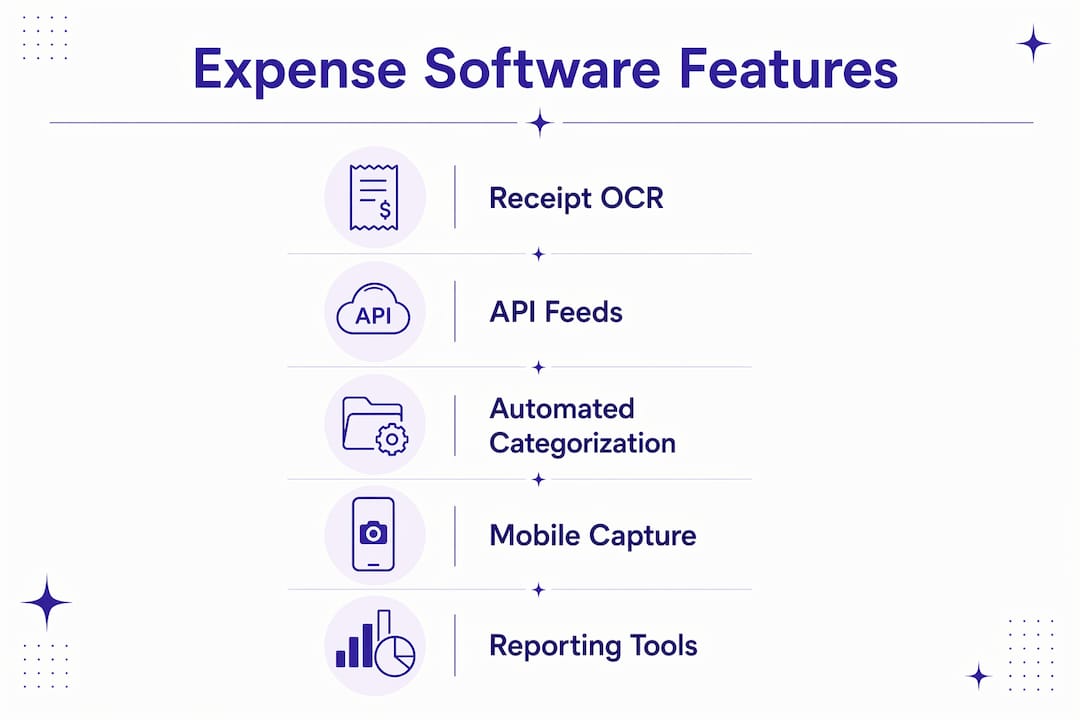
| Feature | Priority | Notes |
|---|---|---|
| Receipt OCR and mobile capture | Must-have | Drives adoption; reduces data entry |
| Automated categorization | Must-have | Core to accurate reporting |
| API bank feeds | Must-have | Enables real-time matching |
| Accounting sync (QuickBooks/Xero) | Must-have | Required for clean close |
| Approval workflows | Must-have | Policy enforcement at scale |
| Multi-currency | Nice-to-have | Required only for international spend |
| ERP integrations | Nice-to-have | Relevant as you scale past small-team sizes |
What does expense software cost, and how long does setup take?
Most small-business expense tools follow one of three billing shapes: per-user monthly subscriptions, usage-based pricing tied to OCR pages or invoice volume, or tiered feature plans with add-ons for integrations. Vendor pricing pages illustrate how these tiers typically stack: entry-level plans cover basic capture and categorization, and higher tiers unlock API integrations and advanced reporting.
| Billing model | What it covers | Typical add-ons |
|---|---|---|
| Per-user subscription | Core features, fixed monthly cost | Integrations, extra storage |
| Usage-based OCR | Pay per invoice page processed | Bank feeds, accounting sync |
| Tiered feature plan | Feature bundles by team size | ERP connectors, SSO |
| Enterprise tier | Custom limits, SLAs, dedicated support | Custom integrations, audit tools |
Zenith-books offers a free tier and pay-as-you-go OCR pricing, so small teams can start without a long-term commitment and scale usage as invoice volume grows.
Realistic implementation milestones:
- Week 1: Connect one bank account, configure top three GL codes, import sample invoices.
- Week 2: Run first automated matching cycle, review exceptions, adjust category rules.
- Week 3–4: Expand to full invoice volume, enable accounting export, run first automated close.
- Month 2+: Add integrations, train additional users, refine approval workflows.
A pilot scoped to a single cost center with a moderate number of recent transactions reliably surfaces integration gaps before they affect your live close.
How do you evaluate expense management vendors before buying?
Ask for a domain-specific pilot with measurable success criteria. Any vendor who resists a scoped trial is a red flag.
Questions to ask in every demo:
- Does your bank integration use a direct API feed or CSV import?
- Which accounting platforms do you sync with natively, and how often?
- What does your data retention and export policy look like if we leave?
- What is your SOC 2 or ISO 27001 status?
- What is the total cost including integrations, not just the base subscription?
- What does your onboarding SLA look like for a team our size?
Red flags to watch for:
- Vague answers about integration depth (“we support most banks”)
- No API bank feed option, only CSV
- Pricing that excludes integrations until you ask
- No trial data export or lock-in on historical records
- Missing security certifications for a B2B SaaS product
NerdWallet’s comparison framework highlights pricing transparency and cross-device usability as the two most commonly overlooked criteria in small-business software evaluations.
Pro Tip: During your demo, bring a real bank statement with 20–30 transactions and ask the vendor to run a live matching cycle. The accuracy of that match, and how the system handles exceptions, tells you more about the product than any feature checklist.
Zenith-books: why we recommend it for U.S. small-business finance teams
Zenith-books is recommended because it combines AI OCR, live bank-to-sheets sync, and automated transaction matching with a clear onboarding path that small teams can run without an IT department.
Zenith-books clients report reduced month-end close times and zero manual entry across transactions — outcomes that trace directly to AI invoice extraction and automated bank reconciliation, not just better organization.
| Buyer need | Zenith-books capability |
|---|---|
| Receipt capture | AI OCR extracts vendor, amount, date from email attachments |
| Bank reconciliation | Live API sync to Google Sheets; automated transaction matching |
| Invoice filing | Auto-upload and naming to Google Drive |
| Accounting export | Standardized eSlog exports; accounting platform sync |
| Invoice payments | Payment QR code generation on issued invoices |
| Cash visibility | Real-time bank data in Google Sheets dashboard |
Support, security, and pricing:
- Free tier available; pay-as-you-go OCR for teams with variable invoice volume.
- Tiered monthly and annual plans scale with bank accounts and OCR page usage.
- Data encryption in transit and at rest; compliance posture documented on the Zenith-books solutions page.
- Onboarding support included; sample onboarding call available at trial start.
For teams evaluating expense software for IT companies or startups approaching a funding round, the same automation stack applies with minimal reconfiguration.
How do you go from trial to your first automated close in two weeks?
You can reach a measurable automation win in 2–4 weeks with the right pilot scope. The key is starting narrow: one bank, one cost center, one set of category rules.
- Define pilot scope. Pick one cost center and one bank account. Limit the first run to 30–60 recent invoices or receipts.
- Connect your bank. Use the API feed, not a CSV export. Live sync is what makes automated matching work.
- Import sample invoices. Upload via email forwarding or direct file import. Let OCR extract the data; review exceptions manually on the first pass.
- Map three to five GL codes. Configure your top expense categories. You can expand later; start with the ones that appear most often.
- Run the first matching cycle. Review matched transactions, flag exceptions, and adjust category rules based on what the system missed.
- Export to accounting. Run the eSlog or accounting export, verify the output against your GL, and note the time it took versus your manual baseline.
- Expand and automate. Once the first cycle is clean, add remaining bank accounts, increase invoice volume, and enable approval workflows.
The step-by-step invoice automation guide on the Zenith-books blog walks through the email-to-Drive filing setup in detail if you want a parallel reference.
Pro Tip: Include one person from finance and one from IT (or whoever manages your Google Workspace) in the pilot kickoff. Finance owns the GL mapping; IT owns the bank API credentials and Drive permissions. Getting both in the room on day one cuts setup time in half.
Key Takeaways
AI-powered expense automation cuts month-end close time and eliminates manual data entry when you require API bank feeds, automated OCR, and a direct accounting sync from day one.
| Point | Details |
|---|---|
| API bank feeds are non-negotiable | CSV imports require manual steps; only API feeds enable automated, real-time transaction matching. |
| Pilot scope determines ROI speed | A 30–60 transaction pilot on one cost center surfaces integration gaps and delivers measurable results fastest. |
| Pricing varies by billing model | Per-user, per-OCR-page, and tiered plans each suit different team sizes; confirm integration costs upfront. |
| Security and export rights matter | Require SOC 2 status and confirmed data export rights before signing any subscription. |
| Zenith-books covers the full stack | From AI invoice OCR and bank-to-sheets sync to eSlog exports, Zenith-books handles the complete automation workflow for small finance teams. |
The automation gap most finance teams don’t see until it’s too late
Most small-business finance teams evaluate expense software the wrong way. They compare feature lists, watch a polished demo, and pick the tool with the most integrations on paper. What they miss is the gap between “supports QuickBooks” and “actually syncs in real time without manual intervention.”
That gap is where month-end close time lives. A tool that technically integrates but requires a manual export step every Friday is not automation. It is a slightly more organized version of the same manual process. The teams that get the biggest time savings are the ones who insisted on live API feeds and tested matching accuracy with real data before signing.
The other thing worth saying plainly: the best expense management software is not the one with the most features. It is the one your team will actually use consistently. Mobile-first capture and minimal submission friction drive adoption more reliably than any advanced reporting dashboard. If submitting a receipt takes more than 30 seconds, adoption drops. That is the real adoption test to run during your trial.
What Zenith-books gives you that a spreadsheet never will
Spreadsheets break at scale, and they break silently. A formula error in your reconciliation tab does not announce itself; it just produces a wrong number that someone finds three weeks later during an audit.
Zenith-books replaces that fragile manual layer with automated finance workflows that run continuously: invoices extracted from email, filed to Google Drive, matched against bank transactions, and exported to your accounting platform without anyone touching a keyboard. Clients like BAM Chocolate and Združenje YES moved from manual entry to zero-touch reconciliation, with shorter close cycles as the measurable result.

Start a free trial, connect one bank account, and run your first automated matching cycle. The bank-to-sheets live sync takes minutes to configure. If you want to test OCR accuracy before committing, the invoice OCR test tool lets you upload a real invoice and see the extraction output immediately.
- Free OCR pages included in the trial.
- Connect one bank account at no cost.
- Sample onboarding call available from day one.
Useful sources and further reading
- Zenith-books — Automate Expenses From Email to Accounting — Product overview, trial signup, and feature documentation.
- Zenith-books Solutions — Plug-and-Play Finance Workflows — Detailed workflow and integration reference.
- How to Stop Chasing Receipts — Zenith Blog — The operational cost of manual tracking and how automation fixes it.
- Gartner Peer Insights — Expense Management Software — Market overview and peer reviews across dozens of vendors.
- CNBC Select — Best Expense Tracker Apps — Feature comparisons and adoption criteria for small-business users.
- NerdWallet — Best Apps to Track Expenses — Pricing transparency and usability framework for evaluating tools.
- Emory Lending — Cash Flow Management for Small Businesses — Practical cash-flow steps that expense automation directly supports.