


Accounts payable automation turns invoice-to-pay from a manual bottleneck into a predictable, auditable workflow. For finance leaders, the immediate payoff is real: lower cost per invoice, faster approval cycles, tighter fraud controls, and cash visibility that actually supports decisions.
The short version:
- Invoices captured automatically from email, portal, EDI, or scanned paper, with no manual keying
- Three-way matching and duplicate detection run before a human ever sees the document
- Approval routing follows your policy, not whoever happens to check their inbox first
- Payments scheduled and reconciled against your ERP in real time
- Full audit trail for every transaction, from receipt to remittance
If you’re evaluating whether to automate, start by pulling your current cost per invoice and average days to pay. Those two numbers will tell you more about your ROI case than any vendor demo.
What does accounts payable automation actually cover?
Automated invoice processing is a front-end subset of full AP automation. It handles capture, validation, and routing. Full accounts payable automation covers the entire invoice-to-pay lifecycle: capture, validation, coding, approvals, payment execution, reconciliation, and analytics. If a vendor pitches you “invoice automation” and stops at approval, ask what happens at payment and reconciliation — that gap is where manual work creeps back in.
Key terms you’ll see in vendor materials:
- Touchless processing: an invoice that moves from receipt to payment with zero human intervention
- Two-way matching: invoice matched against a purchase order only
- Three-way matching: invoice matched against PO and goods receipt
- eInvoicing: structured electronic invoice exchange (formats include Peppol, UBL, EDI 810)
- ERP integration: real-time sync of GL codes, vendor master, and payment status between the AP system and your accounting or ERP platform
- Remittance: payment detail sent to the supplier confirming what was paid and why
On compliance and security: SOC 2 Type II certification means an independent auditor has verified that the vendor’s controls for data security, availability, and confidentiality meet defined standards over a sustained period. ISO 27001 covers the information security management system. Both matter because AP systems hold sensitive financial data and supplier bank details. Data portability — the ability to export your full invoice history and vendor master — matters just as much. Without it, you’re locked in.
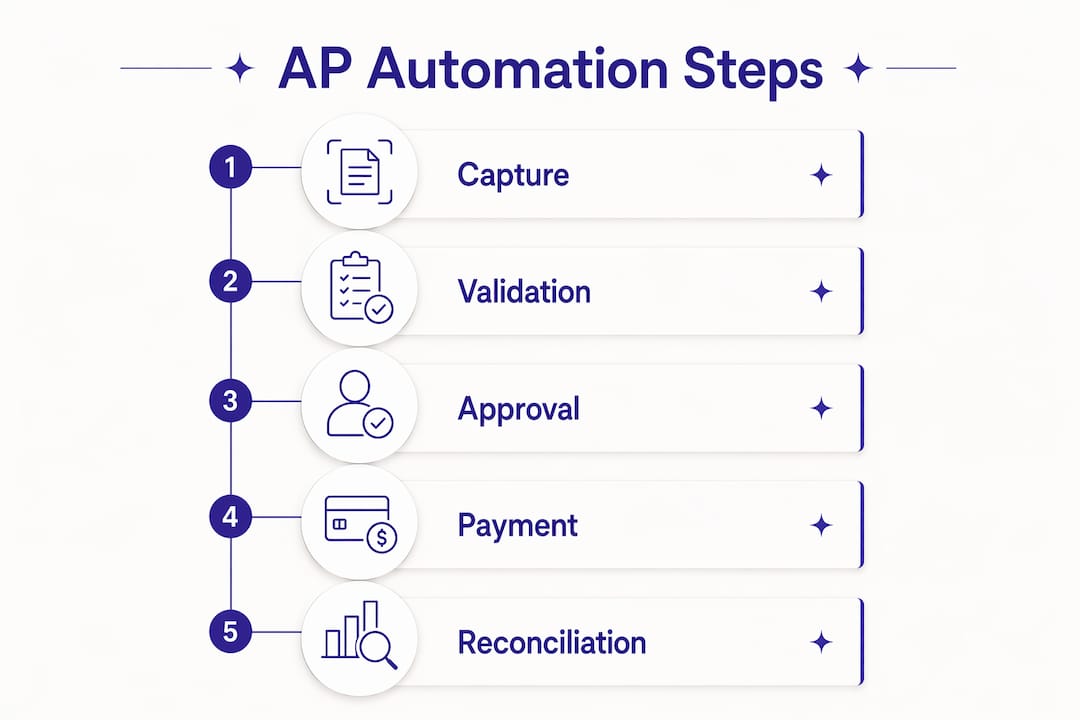
How does accounts payable automation work, step by step?
An invoice enters the system, gets read and validated automatically, routes to the right approver, triggers payment, and closes against your books. That’s the flow. Here’s what automation actually does at each stage.

Capture
Invoices arrive through multiple channels: supplier portal, email inbox, EDI feed, scanned paper, or direct API. OCR and ML-driven extraction read structured PDFs and unstructured formats alike, pulling header data (vendor, date, amount, PO number) and line items. The system learns per-supplier patterns over time, so accuracy improves with volume.
Validation and matching
Once captured, the invoice is checked against your vendor master and open POs. Two-way matching confirms the invoice aligns with a PO. Three-way matching adds the goods receipt confirmation. Tolerance rules handle small variances automatically. Anything outside tolerance becomes an exception and routes to a human reviewer — which keeps the touchless rate high without sacrificing control.
Approval routing
Configurable rules push invoices to the right approver based on amount, cost center, vendor, or GL code. No more forwarding emails or chasing down a VP who’s traveling. Escalation rules handle non-responses automatically.
Payment scheduling and execution
Approved invoices queue for payment on the scheduled date. The system can batch payments, support ACH, wire, virtual card, or check, and capture early-payment discounts when cash position allows. ERP-integrated solutions push payment status back to the GL in real time, eliminating the manual reconciliation step that typically follows a payment run.
Reconciliation and analytics
After payment, the system matches remittance to bank transactions and closes the invoice in the ERP. Spend analytics, aging reports, and supplier performance metrics are generated from the same data, with no separate export required.
Common integration touchpoints:
- ERP or accounting platform (GL sync, vendor master, payment status)
- Bank or treasury system (payment execution, bank feed)
- Procurement or purchasing system (PO data for matching)
- Supplier portal or EDI network (structured invoice receipt)
- Document storage (audit trail, invoice archive)
For teams that receive most invoices by email, Zenith-books’s email-to-Drive workflow shows exactly how that ingestion step works in practice.
Which AP tasks should you automate first?
Prioritize by volume and error rate. The tasks that consume the most staff hours and generate the most exceptions are where automation pays back fastest.
- Invoice capture and data extraction. Manual keying is the single biggest time sink and the primary source of transposition errors. Automating capture with OCR eliminates both. High-volume teams see the return immediately.
- PO matching and three-way match. Matching by hand across ERP screens is slow and error-prone. Automated matching with configurable tolerance rules cuts exception volume and speeds the approval queue.
- Duplicate detection. Policy enforcement at ingestion — checking invoice number, vendor, amount, and date against existing records — catches duplicates before they reach an approver. Catching them after payment is far more expensive.
- Automated GL coding. ML models learn your coding patterns per vendor and suggest or auto-apply GL codes. This alone can cut coding time by a significant margin on high-volume, repeat-vendor invoices.
- Approval routing. Rule-based routing removes the human coordination layer from approvals. Approvers get a notification, review the invoice in context, and approve or reject with a click.
- Scheduled payments. Batching and scheduling payments against due dates and early-payment windows captures discounts and avoids late fees without manual calendar management.
- Reconciliation. Automated matching of payments to bank transactions and GL entries closes the loop without a separate manual step at month-end.
Pro Tip: To maximize your touchless rate quickly, prioritize suppliers who send high volumes of invoices in consistent formats. Prebuilt supplier templates and ML learning per vendor mean the system reaches high accuracy on those suppliers within weeks. Supplier onboarding — getting vendors to submit through your preferred channel — is the single biggest lever for touchless rate improvement after the initial setup.
What are the real business benefits of AP automation?
The cost reduction is the headline, but the control improvements are what finance leaders actually care about most.

Automation enforces policy at ingestion, catching duplicate invoices, price discrepancies, and unauthorized spend before any approver sees the document. That’s a fundamentally different control posture than reviewing exceptions after the fact. Fraud risk drops because the system flags anomalies systematically, not only when a reviewer happens to notice something unusual.
Tangible benefits for a business case:
- Lower cost per invoice (manual processing typically runs several dollars per invoice; automated processing significantly lowers this cost)
- Faster cycle time from receipt to payment, often cut from weeks to days
- Improved days payable outstanding (DPO) management — pay on your schedule, not the supplier’s reminder cycle
- Early-payment discount capture, which generates direct cash returns
- Fewer duplicate payments and reduced rework on exceptions
- Better supplier relationships through predictable, on-time payment and clear remittance detail
- Real-time cash visibility for forecasting and budgeting
Invoice automation also delivers strategic value through spend analytics and supplier performance metrics — data that feeds FP&A forecasting and procurement negotiations, not just the AP team’s daily queue.
Sample ROI calculation (illustrative inputs):
| Input | Example Value |
|---|---|
| Target cost per invoice | $3 |
| Estimated payback period | Under 6 months |
Adjust the inputs to your actual volume and current processing cost. The payback period compresses quickly at higher volumes.
How do you implement AP automation without disrupting operations?
A staged rollout — assess, pilot, expand — reduces risk and accelerates ROI. Trying to automate everything at once is the most common reason implementations stall.
Implementation checklist:
- Map your current AP process end-to-end: document invoice sources, approval chains, ERP fields, and exception types
- Clean your vendor master: remove duplicates, confirm bank details, standardize naming
- Define your exception workflow: who owns what type of exception, and what’s the SLA
- Scope ERP integration: confirm which fields need to sync, in which direction, and at what frequency
- Design the supplier onboarding plan: portal invitations, email capture fallback, EDI setup for high-volume suppliers
- Run a security review: confirm role-based access, segregation of duties, and data encryption standards
- Train approvers and AP staff: focus on the exception queue and escalation paths, not the touchless flow
- Communicate to stakeholders: set expectations on timeline, what changes for them, and who to contact for issues
Realistic implementation timeline:
| Phase | Typical Duration |
|---|---|
| Process mapping and data cleanup | 2–4 weeks |
| Pilot (several high-volume suppliers) | several weeks |
| ERP integration | several weeks (complexity-dependent) |
| Supplier onboarding (broader) | several weeks (overlaps with pilot) |
| Organization-wide rollout | several months total |
Pilot design steps:
- Select 3–5 high-volume suppliers with different invoice formats (PDF, email, EDI) to test capture accuracy across formats
- Define success metrics upfront: touchless rate, exception rate, cycle time, and cost per invoice
- Set integration scope for the pilot — a limited ERP connection is fine to start
- Measure and document results before expanding
J.P. Morgan’s implementation guidance consistently points to user adoption and process alignment as the primary drivers of implementation success — not the feature list. A system with every capability but poor adoption delivers less value than a simpler system that the team actually uses.
How do you choose the right AP automation software?
Lead with integration, then controls, then everything else. A system that can’t sync with your ERP in real time will create a new manual step to replace the one you automated.
Vendor requirements checklist:
Technical:
- Native ERP connector or certified middleware integration (not CSV export)
- API access for custom integrations
- Support for your invoice formats (PDF, EDI, XML, Peppol)
- Uptime SLA and disaster recovery documentation
Functional:
- Configurable matching rules (two-way, three-way, tolerance bands)
- Exception routing and escalation workflows
- Supplier portal and email capture fallback
- Payment execution support (ACH, wire, virtual card)
- Audit trail for every action on every invoice
Security and compliance:
- SOC 2 Type II certification
- Role-based access controls with segregation of duties — separate roles for vendor-master edits, payment authorization, and approval
- Data encryption at rest and in transit
- Data portability clause in the contract (exportable invoice history and vendor master)
Commercial:
- Pricing model transparency: per-invoice fees can look cheap and scale badly at volume
- Implementation fees vs. ongoing subscription — get both in writing
- Support model: dedicated implementation support vs. self-serve onboarding
Decision matrix by platform tier:
| Criteria | Entry-level platforms | Mid-market platforms | Enterprise-grade platforms |
|---|---|---|---|
| ERP integration | Limited or CSV | Prebuilt connectors | Native, real-time |
| Matching capability | Basic two-way | Two-way + three-way | Full matching + ML |
| Payment execution | External only | Some payment rails | Full payment suite |
| Supplier onboarding | Manual | Guided portal | Automated onboarding |
| Security certifications | Basic | SOC 2 Type II | SOC 2 + ISO 27001 |
| Scalability | Small volumes | Mid-volume | High-volume, global |
Negotiation tips: Push for data portability clauses before signing. Per-invoice pricing looks attractive at low volumes but can cost more than a flat subscription once you scale. Implementation fees are often negotiable — especially if you’re bringing a clean vendor master and defined integration scope.
Which KPIs tell you if AP automation is working?
Track these before you go live to establish baselines, then measure monthly for the first year.
Primary KPIs:
- Cost per invoice: total AP department cost divided by invoice volume. Baseline typically $12–$15 for manual processing; target $2–$4 with automation
- Invoice cycle time: days from receipt to payment approval. Manual processes often take weeks; automated processes aim to reduce this to a few days
- Touchless rate: percentage of invoices processed with zero human intervention. Starting points vary widely; many organizations aim to automate more than 70% of invoice processing within the first year
- Exception rate: percentage of invoices requiring manual intervention. High exception rates signal data quality issues or supplier non-compliance
- Automatic match rate: percentage of invoices matched to a PO without manual coding
- DPO movement: are you paying on your terms, or earlier/later than optimal?
- Early-payment discount capture rate: what percentage of available discounts are you actually taking?
Pair quantitative KPIs with a quarterly supplier satisfaction check. Suppliers who find the portal confusing or who don’t receive clear remittance detail will revert to emailing invoices directly, which drives exception volume back up. The analytics and spend visibility that AP automation generates also feed FP&A directly — connect your AP KPI dashboard to your cash flow reporting from day one.
For reconciliation-specific metrics, Zenith-books’s invoice reconciliation guide covers how to measure and interpret matching accuracy in practice.
What are the most common AP automation pitfalls?
Most implementations that underdeliver share the same failure modes. Here’s what to watch for and how to get ahead of each one.
- Poor vendor data quality. A dirty vendor master — duplicate entries, outdated bank details, inconsistent naming — breaks matching and creates exceptions before the first invoice is processed. Schedule a data cleanup sprint before go-live, not after.
- High exception volumes from supplier non-compliance. Suppliers who send invoices in non-standard formats or without PO numbers generate exceptions that require manual handling. Assign an exception triage owner and build a supplier onboarding playbook that sets clear submission requirements.
- Weak ERP integration. A system that exports to CSV and requires a manual import is not integrated — it’s a slightly faster version of the old process. Require native connectors or certified middleware, and test the integration with real data during the pilot.
- User resistance. Approvers who are used to email-based approvals will route around the system if it’s harder than their old workflow. Involve approvers in the pilot design and make the approval interface genuinely faster than email.
- Hidden per-invoice fees. Some vendors price attractively at low volumes and become expensive at scale. Model your total cost at 2x your current volume before signing.
- Payment fraud exposure. AP systems that allow a single user to edit supplier bank details and approve payments are a fraud risk. Segregation of duties is a non-negotiable control — separate roles for vendor-master edits, payment authorization, and approval.
Red flags when evaluating vendors: opaque data ownership terms, no native ERP sync, limited or non-exportable audit trail, no role-based access controls, and no secure payment rails.
Pro Tip: Require a vendor to demonstrate their exception handling workflow with a real invoice that fails matching. How the system routes, displays, and resolves exceptions tells you more about day-to-day usability than any feature checklist.
What do real AP automation results look like?
Zenith-books clients report zero manual entry across transactions and measurably faster month-end close — two outcomes that translate directly into staff hours recovered and financial reporting that closes on schedule.
Združenje YES came to Zenith-books with a manual invoice process that required staff to retype every transaction and reconcile bank statements by hand. After implementing Zenith-books’s AI-powered invoice extraction and bank-to-Sheets sync, the organization eliminated manual data entry entirely. Month-end close time dropped significantly, and the finance team shifted from data entry to review and analysis.
BAM Chocolate needed invoice capture and categorization to keep pace with transaction volume without adding headcount. Zenith-books’s OCR extraction and automated filing to Google Drive handled the ingestion and organization layer. The result: zero manual entry across all transactions and a finance workflow that scales with order volume rather than requiring proportional staff growth.
Both clients benefited specifically from Zenith-books’s Google Drive and Sheets connectivity. For finance teams already working in Google Workspace, the ability to have invoices auto-filed to Drive and bank data synced live to Sheets means the automation fits the existing workflow rather than requiring a platform migration. The live bank-to-Sheets sync gave both teams real-time cash visibility without a separate treasury tool.
How do you manage change when rolling out AP automation?
The technology is rarely the hard part. Getting approvers, AP staff, and suppliers to change their habits is where most rollouts lose momentum.
Stakeholder sponsorship matters more than most teams expect. An AP automation project that is owned by the AP manager but not visibly sponsored by the CFO or controller will face resistance from every department that has to change its approval behavior. Get executive sponsorship in writing before the pilot starts, and have the CFO communicate the project to department heads directly.
Internal communications should be specific, not general. “We’re automating AP” tells approvers nothing useful. “Starting March 3, all invoices over $5,000 will route through the new approval portal. You’ll receive an email with a direct link. Approvals that aren’t completed within 48 hours will escalate to your manager” — that’s a communication that changes behavior.
Training should focus on exceptions, not the touchless flow. Most invoices will process without human intervention once the system is running. Train approvers on what an exception looks like, what action they need to take, and who to call if something looks wrong. Train AP staff on exception triage, supplier escalation, and the audit trail — not on data entry they’ll no longer be doing.
Supplier communication is its own workstream. Suppliers need to know where to send invoices, what format is required, and who to contact if a payment is delayed. A one-page supplier guide and a dedicated AP contact email handle most of the inbound questions. For high-volume suppliers, a brief onboarding call to walk through the portal saves significant exception volume downstream.
How do you get suppliers to actually use the automation?
Supplier adoption is the variable that most directly controls your touchless rate. A system with 90% automation capability but 40% supplier adoption delivers a 40% touchless rate, not 90%.
Start with your highest-volume suppliers. The 20% of suppliers who send 80% of your invoices are worth a direct onboarding conversation. Explain the portal, confirm their preferred submission format, and set up a test transaction before go-live. Suppliers who submit high volumes in consistent formats are also the ones where ML accuracy improves fastest, so the investment in onboarding pays back on both sides.
Build fallback capture for suppliers who won’t change. Some suppliers will keep emailing invoices regardless of what you ask. Email-based invoice capture handles this without requiring manual intervention — the system reads the email, extracts the invoice, and processes it through the same workflow as a portal submission. The supplier doesn’t change; your process does.
Use remittance detail as a supplier incentive. Suppliers who submit through your preferred channel get faster payment confirmation and cleaner remittance detail. That’s a genuine benefit for their own AR team. Frame the portal as a service to them, not a requirement from you.
Enterprise AP platforms increasingly support eInvoicing standards like Peppol and regional formats, which matters for suppliers operating across multiple markets. For US-based teams with international suppliers, confirming eInvoicing format support during vendor selection avoids a painful integration gap later.
What data security and compliance controls does AP automation require?
AP systems are a high-value target. They hold supplier bank details, payment authorization workflows, and invoice history — exactly the data that enables business email compromise and payment fraud.
Beyond general data security, AP-specific controls include:
- Segregation of duties at the system level. The system must enforce separate roles for vendor-master edits, payment authorization, and invoice approval. A single user who can edit a supplier’s bank account and then approve a payment to that supplier is a fraud vector, regardless of how trustworthy that person is. This is a system control, not a policy control.
- Positive pay and payment verification. Payments should be verified against an approved list before execution. ACH and wire payments in particular should require dual authorization above defined thresholds.
- Audit trail completeness. Every action on every invoice — who touched it, when, what they changed — must be logged and immutable. This is the primary control for internal audit and external compliance reviews.
- Vendor master change controls. Changes to supplier bank details should trigger a verification workflow, not just a notification. Callback verification to a known supplier contact (not the number on the change request) is the standard mitigation for bank detail fraud.
- Data encryption and access controls. Encryption at rest and in transit is table stakes. Role-based access should limit what each user can see and do — AP clerks don’t need access to payment authorization, and approvers don’t need access to vendor-master edits.
- Data retention and portability. Confirm the vendor’s data retention policy matches your compliance requirements (typically 7 years for financial records under IRS guidelines) and that you can export your full invoice history if you switch vendors.
SOC 2 Type II certification is the baseline for US-based AP software vendors. It confirms that an independent auditor has tested the vendor’s controls over a period of at least six months. Ask for the report, not just the badge.
This article is general information, not legal or compliance advice. Confirm your specific requirements with a qualified professional or your internal compliance team.
Key Takeaways
AP automation delivers the fastest ROI when you start with a clean vendor master, a scoped pilot, and executive sponsorship — not by automating everything at once.
| Point | Details |
|---|---|
| Start with a scoped pilot | Select 3–5 high-volume suppliers and measure touchless rate, cycle time, and cost per invoice before expanding. |
| ERP integration is the priority | Native real-time sync with your ERP prevents manual reconciliation from replacing the work you automated. |
| Supplier onboarding drives touchless rate | Supplier adoption directly controls automation yield — build an onboarding workstream before go-live. |
| Security controls are system-level requirements | Segregation of duties and audit trail completeness must be enforced by the platform, not just by policy. |
| Zenith-books fits teams that need fast setup | Zenith-books’s OCR capture, Drive/Sheets integration, and bank sync deliver automation without a lengthy ERP migration. |
The part most AP automation guides skip
The conventional wisdom on AP automation focuses almost entirely on the technology: OCR accuracy rates, ERP connector lists, touchless rate benchmarks. What gets far less attention is the supplier onboarding problem, and it’s the variable that actually determines whether your investment pays back.
Finance teams spend months selecting software, negotiating contracts, and configuring workflows — and then discover that 60% of their suppliers are still emailing invoices to the same shared inbox they’ve used for years. The system is running, the touchless rate is 30%, and the ROI calculation from the business case is nowhere in sight.
The teams that get to 70%+ touchless rates within the first year treat supplier onboarding as a parallel workstream, not an afterthought. They assign someone to own it, they communicate directly with high-volume suppliers before go-live, and they build fallback capture for suppliers who won’t change their behavior. That’s not a technology decision — it’s a project management decision.
The second thing most guides understate: start with PO-backed invoices. They match cleanly, they generate fewer exceptions, and they give your team a confidence-building win in the first few weeks. Non-PO invoices — the ones that require coding decisions and approver judgment — are where the real complexity lives. Automate the easy volume first, learn from the exceptions, and then tackle the harder categories with a better-tuned system.
Zenith-books gives you AP automation without the long setup
Finance teams that need faster invoice processing without a six-month ERP implementation project have a direct path with Zenith-books. The platform captures invoices from email automatically, extracts data with 99.7% OCR accuracy, files them to Google Drive, and syncs bank data live to Google Sheets — so your cash position is always current without a separate treasury tool.

The features that matter most for AP teams: AI-powered invoice extraction that learns per-supplier patterns, automatic transaction matching and reconciliation, real-time bank-to-Sheets sync for cash visibility, and payment QR code generation for faster supplier remittance. Role-based access and a complete audit trail are built in, not add-ons. Clients like Združenje YES and BAM Chocolate moved from manual entry to zero-touch processing without replacing their existing Google Workspace setup.
If you’re ready to see what the workflow looks like for your invoice volume, explore Zenith-books’s finance workflows or run a free OCR test on your own invoices to check extraction accuracy before committing to anything.
Useful sources for finance teams going deeper
- Gartner: Accounts Payable Invoice Automation Solutions — Market overview and peer reviews; useful for vendor shortlisting and capability benchmarking.
- SAP: What Is AP Automation and How Does It Work — Technical overview of AP automation architecture and ERP integration patterns.
- J.P. Morgan: AP Automation Benefits to the Accounts Payable Process — Finance-focused breakdown of operational and strategic benefits; useful for building a business case.
- J.P. Morgan: Invoice Automation and Processing Guide for Business — Implementation framework, pilot design guidance, and supplier onboarding strategy.
- IBM: Automated Invoice Processing — Clear explanation of the difference between invoice processing automation and full AP automation.
- NetSuite: What Is AP Automation and How Does It Work — ERP integration specifics and GL sync requirements for AP platforms.
- Zenith-books Blog: Insights and Resources on Expense Automation — Practical guides on invoice capture, reconciliation, and finance workflow automation for teams using Google Workspace.