


Accounts receivable automation centralizes invoicing, cash application, collections, and AR accounting into a single connected workflow, replacing manual data entry and spreadsheet reconciliations with rules-driven and AI-assisted processes. The immediate business impact is faster cash collection, fewer write-offs, and a measurable reduction in the time your team spends on low-value tasks.
Top three benefits at a glance:
- Shorter DSO. Automated dunning, payment matching, and real-time AR visibility cut the average days sales outstanding by removing the delays that pile up in manual workflows.
- Fewer reconciliations. A connected AR subledger keeps billing, collections, and the general ledger in sync continuously, so month-end close stops being a fire drill.
- Lower headcount cost per invoice. Automating invoice capture, cash application, and routine collections allows your AR staff to focus on exceptions and high-value disputes instead of manual data entry. Recommended first step: Run a time-boxed pilot on your highest-volume, most standardized customer segment. Pick two KPIs to track from day one: automated match rate and days to cash. Everything else follows from those signals.
What accounts receivable automation actually covers
AR automation is software, combined with configurable rules and AI models, that handles the repetitive steps across the order-to-cash cycle: creating and delivering invoices, capturing inbound payments, applying cash to open items, managing collections outreach, and posting to the AR subledger. The goal is straight-through processing (STP), where a transaction moves from invoice creation to closed receivable with no human touch.
Core workflows that AR automation platforms handle today:
- Invoicing and billing. Automated invoice generation from order or contract data, delivery via email or EDI, and automated billing workflows that connect checkout, payment gateways, and reconciliation for recurring and usage-based models.
- OCR and invoice capture. Optical character recognition, often AI-enhanced, extracts line-item data from PDFs, scanned documents, and email attachments without manual keying.
- Remittance parsing. Automated extraction of payment details from remittance advice files, bank statements, and lockbox feeds.
- Cash application. Matching incoming payments to open invoices across card, ACH, and bank files using rules and AI-assisted suggestions.
- Dunning and collections. Configurable outreach sequences tied to invoice state, prioritized by aging bucket, with promise-to-pay tracking.
- Dispute and deduction handling. Workflow routing for short payments, chargebacks, and customer deductions, with audit trails.
- Credit management. Automated credit limit checks, hold triggers, and risk scoring integrated into the order approval flow.
- AR analytics and forecasting. Real-time aging dashboards, cash-flow projections, and exception reporting.
What typically stays manual: complex multi-party disputes, high-value deductions requiring legal review, and any exception that falls outside the matching rules your team has configured. The platforms route those items to a human queue with SLAs, rather than trying to resolve them automatically.
The AR subledger deserves a specific callout. It is the subsidiary ledger that tracks every open receivable at the transaction level, reconciles to the general ledger, and provides the audit trail for revenue accounting. When billing, collections, and cash application all post to a single connected subledger, you get a continuous AR trial balance and far fewer manual tie-outs at period end.
How AR automation works in practice
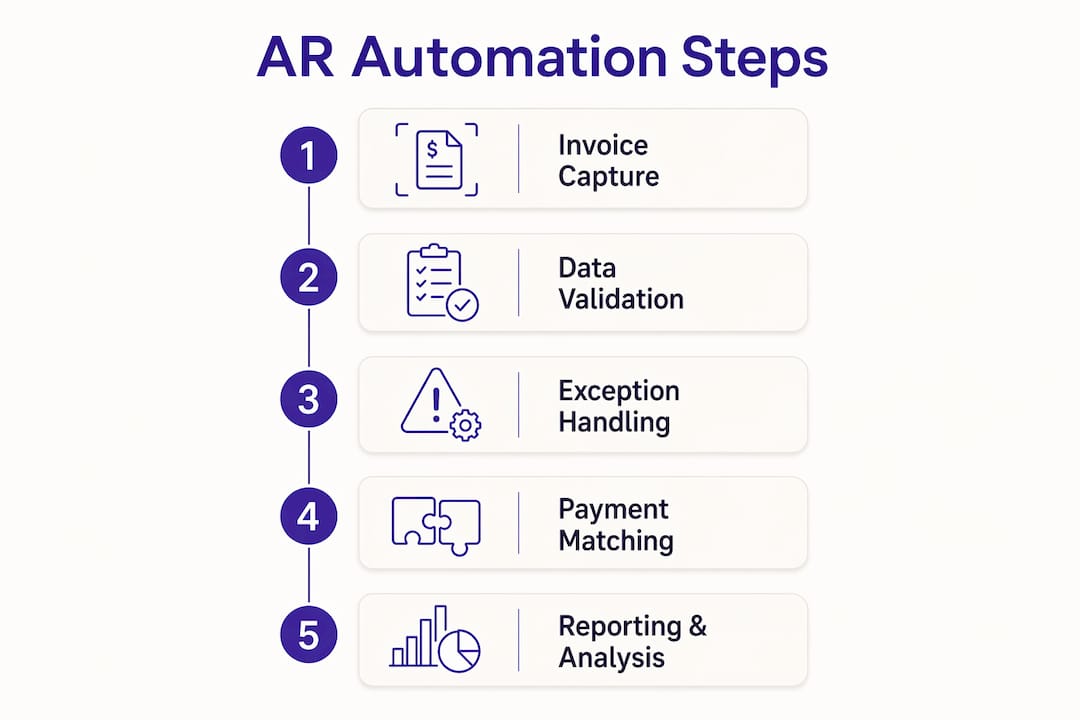
The typical technical flow runs in six stages: invoice capture, validation, posting to the AR subledger, payment matching, collections orchestration, and AR accounting close. Each stage has a distinct technology layer, and the integration points between them are where most implementations either succeed or stall.
Stage-by-stage breakdown:
- Invoice capture. OCR or AI extraction pulls structured data from PDFs, emails, and EDI files. The system validates field completeness (customer ID, PO number, amount, due date) before passing the record downstream.
- Validation and posting. Business rules check for duplicates, pricing mismatches, and approval thresholds. Clean invoices post automatically to the AR subledger; exceptions route to a review queue.
- Payment matching (cash application). Incoming payments from card processors, ACH batches, and bank files are matched to open invoices using exact-match rules first, then AI-assisted fuzzy matching for remittance edge cases. Automated matching with AI suggestions speeds settlement of open items across all payment rails.
- Collections orchestration. The dunning engine reads invoice state and aging data to trigger the right outreach at the right time, rather than sending generic reminders on a fixed schedule.
- Exception routing. A workflow engine holds unresolved items, assigns them to the appropriate team member, and tracks resolution time against SLA targets. This is the human-in-the-loop layer that keeps STP rates high without letting edge cases fall through.
- AR accounting close. Resolved items post to the GL via API or file-based connector. A connected AR subledger delivers continuous trial balances and auditable journals, cutting the manual tie-out work that typically dominates month-end close.
Integration architecture in plain terms: the AR automation layer sits between your billing system (or ERP) and the GL. It receives invoice data from upstream, processes payments from payment gateways and bank files, and pushes reconciled journal entries downstream. APIs handle real-time connections to ERP systems like SAP, Oracle, or NetSuite; file-based connectors (SFTP, CSV) cover legacy systems. CRM integration, typically Salesforce or HubSpot, feeds customer credit data and dispute context into the AR workflow.
Quick glossary for cross-functional conversations:
- AR subledger: the transaction-level ledger that tracks open receivables and reconciles to the GL.
- Cash application: the process of matching a payment to the invoice(s) it settles.
- Remittance advice: the document (or data file) a customer sends to explain which invoices a payment covers.
- Lockbox: a bank service that collects mailed checks and provides a digital remittance file for automated matching.
- STP (straight-through processing): a transaction that completes end-to-end with no manual intervention.
Pro Tip: Map your current exception rate before you go live. If a significant share of your incoming payments require manual matching today, your matching rules need tuning before you automate at scale. Start with your top 10 customers by payment volume and build rules for their remittance formats first.
What business benefits and ROI should you actually expect?

The most reliable outcomes from AR automation are a reduction in DSO, a higher automated match rate, lower cost per invoice, and faster month-end close. The exact magnitude depends on your starting baseline, invoice volume, and how well your data is structured before you begin.
KPIs to track from day one:
- DSO (Days Sales Outstanding). The primary cash-flow metric. Measure it weekly during the pilot, not just at month end.
- Automated match rate. The percentage of payments matched without human intervention. Practitioners report that an automated match rate above 85–90% is a realistic near-term pilot goal; exceptions below that threshold should route to a dedicated queue with SLAs.3. Exception count per period. Tracks whether your matching rules are improving over time.
- Cost per invoice. Total AR labor cost divided by invoice volume. This is the clearest efficiency signal for a CFO conversation.
- Time to close. How many days after period end your AR subledger is fully reconciled.
- Days sales in receivables. A balance-sheet complement to DSO that captures the aging distribution of your open items.
A worked ROI example (labeled assumptions — replace with your own figures):
Assume a mid-market company processes 1,500 invoices per month. At an assumed 15 minutes of manual handling per invoice (data entry, matching, follow-up), that is 375 staff-hours per month. At a fully loaded cost of $40 per hour, the monthly labor exposure is $15,000. Automation that handles 85% of those invoices without manual touch reduces the labor cost to roughly $2,250 per month, a saving of $12,750 monthly. Against a hypothetical $25,000 implementation cost and $1,500 monthly subscription, payback lands around three months. These are illustrative assumptions; your actual figures will differ based on invoice complexity, current match rate, and vendor pricing.
Isolating the impact of AR automation from other parallel changes (new ERP, pricing changes, customer mix shifts) requires a clean before/after measurement window. Run your pilot on a single customer cohort or product line so the signal is unambiguous.
For small businesses thinking through cash flow management, the same logic applies at smaller scale: even automating invoice delivery and payment reminders alone can move cash in days faster.
Common challenges when automating AR and how to mitigate them
Automation pays off, but implementations commonly stall on three things: data quality, integration complexity, and internal resistance to changing how the AR team works. None of these are fatal, but all of them need a plan before you go live.
The major risks and how to address them:
- Poor data and matching rules. If customer master data is inconsistent (duplicate IDs, mismatched names, missing PO numbers), your match rate will be low regardless of how good the software is. Run a data-profiling exercise before the pilot and fix the top 20 customer records by payment volume.
- Legacy ERP constraints. Older ERP systems often lack real-time APIs, forcing file-based integrations with batch delays. Map your critical integrations (GL, banking, billing) in the discovery phase and confirm the connector approach before signing a contract.
- Invoice format variety. B2B customers send remittances in dozens of formats: PDF, CSV, portal downloads, faxed images. Build a format inventory for your top customers and confirm the platform handles each one before go-live.
- Remittance variance. Customers who pay short, combine invoices, or add deductions create matching exceptions. Define your exception routing rules and SLAs before launch so these items don’t pile up in an unmanaged queue.
- Customer workflow constraints. Some customers require portal-based invoice submission or have approval workflows that delay payment regardless of your automation. Identify these accounts early and exclude them from the initial pilot scope.
- Security and compliance gaps. AR data includes sensitive customer financial information. Confirm the vendor holds SOC 2 Type II certification at minimum, supports role-based access controls, and provides a complete audit trail for every transaction state change.
Pilot success criteria checklist:
- Automated match rate between 85% and 90% within the first 60 days
- Manual exception handling time reduced by at least 50% versus baseline
- DSO improvement of at least 2–3 days on the pilot customer cohort
- Zero unresolved items older than your defined SLA threshold at the 90-day mark
What to look for when evaluating AR automation vendors
The most important evaluation criteria are integration fidelity with your GL and banking systems, cash-application accuracy, exception-handling depth, auditability, and the quality of the vendor’s implementation support. Everything else is secondary.
Must-have features:
- Native or certified GL integration (SAP, Oracle, NetSuite, QuickBooks, or your specific ERP)
- Live AR trial balance and subledger support with auditable journal entries
- Support for your payment rails (ACH, card, wire, check/lockbox)
- OCR accuracy above 95% on your invoice formats (test this before you buy)
- AI-assisted matching for remittance edge cases
- Configurable dunning orchestration tied to invoice state
- SOC 2 Type II certification and role-based access controls
- Multi-entity and multi-currency support if you operate across legal entities
Nice-to-have features:
- CRM integration (Salesforce, HubSpot) for dispute context and credit data
- Self-service customer payment portal
- Predictive cash-flow forecasting
- API-first architecture for custom integrations
- Usage-mediation support for high-volume billing and complex pricing models
Solution category comparison:
| Dimension | Entry-level cloud invoicing | Mid-market AR automation suite | Enterprise AR subledger platform |
|---|---|---|---|
| GL integration | Basic export/CSV | Certified ERP connectors | Native subledger, real-time API |
| Match rate capability | Manual or basic rules | Rules + AI-assisted | AI + ML, high-volume STP |
| Scalability | Up to — | — | — |
| Price model | Flat monthly subscription | Tiered by volume or module | Enterprise contract, usage-based |
| Best for | Small businesses, startups | Growing mid-market finance teams | Large enterprise, multi-entity |

On pricing models: subscription tiers work well when your invoice volume is predictable. Usage-based pricing (per invoice or per OCR page) is better when volume spikes seasonally. Watch for per-connector fees, which can add up quickly if you need integrations with multiple ERPs, banks, or CRMs. Modular pricing lets you start with invoicing and add cash application later, which aligns well with a phased rollout.
Getting started: what does a realistic implementation look like?
The fastest path to measurable results is a time-boxed pilot on your highest-volume, lowest-complexity customer segment. That gives you clean match-rate and DSO signals without the noise of complex exceptions.
Implementation phases:
- Phase 0: Discovery and data profiling (2–4 weeks). Audit your invoice formats, customer master data, payment rails, and current match rate. Map your critical integrations. Define your pilot scope (one customer cohort or one product line). Set baseline KPIs.
- Phase 1: Pilot (6–10 weeks). Configure matching rules for your top customers by payment volume. Connect GL and banking integrations. Go live on the pilot scope. Measure match rate, exception count, and days to cash weekly.
- Phase 2: Scale (3–6 months). Expand to additional customer segments and invoice types. Add dunning orchestration and credit management modules. Refine AI matching models with pilot data. Onboard the full AR team.
- Phase 3: Post-launch optimization (ongoing). Run monthly governance reviews. Track KPI trends. Retrain matching models as customer payment behavior changes. Expand integrations (CRM, additional banks, multi-entity GL).
For practical implementation steps on automating invoice capture from email, the step-by-step guide on the Zenith-books blog covers the operational detail.
Change management matters more than most teams expect. AR automation does not eliminate AR jobs; it redefines them. Staff who spent 70% of their time on data entry and routine follow-up now own exceptions, disputes, and customer relationship quality. Define the new role descriptions before go-live, not after. Run training in two phases: system training (how to use the platform) and process training (how to handle exceptions and escalations under the new workflow).
Pro Tip: Tie internal KPIs to the new workflow from day one. If your AR team is still measured on “invoices processed,” they have no incentive to let automation handle those invoices. Shift the metric to “exception resolution time” and “DSO improvement” so the team’s success aligns with the automation’s success.
Pricing models for AR automation and how to estimate payback
Most AR automation vendors use one of four pricing structures: a flat subscription tier, usage-based pricing (per invoice or per OCR page), per-connector or per-module add-ons, and a separate implementation services fee. Enterprise platforms often combine all four.
What drives total cost of ownership:
- Monthly or annual license fee (varies widely by vendor tier and feature set)
- Per-invoice or per-OCR-page fees if usage-based pricing applies
- Connector fees for each ERP, bank, or CRM integration
- Implementation and onboarding services (often a one-time fee, sometimes bundled)
- Ongoing support tier (standard vs. dedicated customer success)
Payback formula:
Monthly savings = (hours saved per month × fully loaded hourly cost) + (DSO improvement in days × average daily receivables balance × cost of capital)
Months to payback = (implementation cost + first-year license) ÷ monthly savings
Using the worked example from the ROI section above: $12,750 monthly savings against a $25,000 implementation cost and $1,500 monthly subscription gives a payback of roughly three months. The DSO improvement term in the formula is often larger than the labor savings term for companies with significant receivables balances, so do not leave it out of your calculation.
Contract negotiation tips:
- Ask for a proof-of-concept or pilot period with defined success metrics before committing to a full contract.
- Negotiate success-based milestones: tie payment of implementation fees to hitting the agreed match-rate target.
- Confirm data portability in writing. You need to be able to export your full transaction history and matching rules if you switch vendors.
- Include an exit clause with a defined data-return SLA. Vendors who resist this are worth scrutinizing.
Zenith-books in practice: what the platform does and what pilots prove
Zenith-books takes a direct approach to AR automation: AI-powered invoice extraction from email, automatic filing to Google Drive, live bank-to-Sheets sync, transaction matching, and QR code payment generation. The design targets small and mid-market finance teams that need to eliminate manual entry without a six-month enterprise implementation.
What Zenith-books automates end-to-end:
- AI extraction of invoice data from email attachments, with auto-filing to Google Drive and standardized naming
- Live bank sync to Google Sheets for real-time cash visibility without manual exports
- Automatic transaction matching and reconciliation across bank accounts
- Invoice issuing with QR code payment generation to speed customer payment
- eSlog accounting exports for standardized downstream posting
Client outcomes: Združenje YES reports substantially reduced month-end close times and zero manual entry across transactions after deploying Zenith-books. BAM Chocolate cites significant time savings and a fully automated invoice workflow that eliminated the manual retyping their team previously handled across every billing cycle.
These outcomes align directly with the pilot success criteria outlined earlier: match rate improvement, reduced manual FTE hours, and faster close. The OCR accuracy Zenith-books delivers on invoice extraction is testable before you commit, which is the right way to validate any AR automation platform.
A Zenith-books pilot typically proves three things within the first 60 days: OCR accuracy on your specific invoice formats, the match rate achievable with your customer payment data, and the reduction in manual hours your team experiences. Those three data points give you everything you need to build the business case for a full rollout.
Key Takeaways
AR automation delivers the fastest ROI when you start with a time-boxed pilot on a well-defined customer segment, measure match rate and DSO from day one, and fix data quality issues before you automate at scale.
| Point | Details |
|---|---|
| Start with a scoped pilot | Pick one customer cohort with standardized invoices; measure match rate and days to cash weekly. |
| Target 85–90% match rate | Practitioners report this is a realistic near-term goal; route remaining exceptions to a dedicated queue with SLAs. |
| Fix data before you automate | Poor customer master data and inconsistent remittance formats are the top causes of low match rates. |
| Payback can be fast | The worked example shows roughly three months to payback at 1,500 invoices/month with 85% automation coverage. |
| Zenith-books for small and mid-market teams | Zenith-books delivers AI invoice extraction, bank-to-Sheets sync, and Drive auto-filing with no lengthy enterprise implementation. |
When AR automation is worth it and when it is not
The honest answer is that AR automation delivers strong ROI quickly when three conditions are met: your invoice volume is high enough to generate meaningful labor savings, your data is clean enough to support automated matching, and your ERP or accounting system can connect to the platform without a custom build.
Below roughly 200–300 invoices per month, the labor savings from full AR automation may not justify the subscription and implementation cost. At that scale, targeted automation of specific steps (invoice delivery, payment reminders, bank reconciliation) often delivers better payback than a full AR suite. Tools like Zenith-books are designed precisely for this range, where you want real automation without enterprise-level complexity or cost.
Data hygiene is the threshold most teams underestimate. If your customer master data has duplicate records, inconsistent naming, or missing PO references, your match rate will be poor regardless of the platform. A two-week data-profiling exercise before the pilot is not optional; it is the difference between a successful pilot and a frustrating one.
On governance: AR automation should be owned by finance operations, not IT. IT owns the integration architecture and security review, but the business rules, matching logic, exception SLAs, and KPI governance belong to the finance team. When IT owns the program, matching rules tend to get treated as technical configurations rather than business decisions, and the AR team loses the ability to tune the system as customer behavior changes. Finance ops ownership, with IT as a delivery partner, is the model that sustains results past the initial go-live.
One more thing worth saying plainly: automation does not fix a broken collections process. If your dunning strategy is ineffective today, automating it will send ineffective reminders faster. Fix the strategy first, then automate the execution.
What a Zenith-books pilot gives you in 60 days
Skip the six-month enterprise evaluation. Zenith-books gives finance teams a working AR automation setup in days, not quarters, with AI invoice extraction that files directly to Google Drive, live bank data in Google Sheets, and QR code payments that speed up what customers owe you.

A pilot with Zenith-books proves three concrete things before you commit to a full rollout:
- OCR accuracy on your actual invoice formats, testable at Zenith’s OCR demo before you sign anything
- Match rate on your real payment data, so you know exactly what percentage of transactions close without manual touch
- Hours saved per month for your AR team, measured against the baseline you set in week one
The pilot scope is deliberately narrow: one invoice source, one bank account, one customer cohort. That keeps the signal clean and the decision easy. When the numbers hold up, scaling is a configuration change, not a new project.
Explore Zenith-books solutions to request a pilot or see a live demo of the full workflow. This article is published by Zenith-books; the pilot offer described here is the company’s own product.
Useful reading and sources
These sources back the claims in this article and are worth bookmarking for your own evaluation process.
- Zenith-books solutions overview — The starting point for a pilot request or demo. Covers the full workflow from invoice capture to bank sync and Drive filing.
- Automate invoice processing from email — Step-by-step implementation detail for the email-to-Drive capture workflow; useful for scoping your pilot.
- Invoice reconciliation explained — Plain-English guide to reconciliation concepts and common failure modes; good background for the challenges section.
- Zenith-books blog — Ongoing resources on automation best practices, case studies, and implementation guidance.
- Zuora: Connected AR automation platform — Detailed documentation of AR subledger architecture, dunning orchestration, and AI-assisted matching; authoritative reference for enterprise AR concepts.
- Chargebee: Automated billing software — Explains how recurring and usage-based billing connects to AR automation; useful for SaaS and subscription businesses.
- Financial Professionals: Embracing AR automation — Practitioner-oriented overview of AR automation adoption, benefits, and getting started; good for building internal buy-in.
- InvoiceLabs: Cash flow management examples — Practical cash-flow examples for small businesses; useful context for the ROI calculation and pilot design.