


Email invoice capture automatically pulls invoices out of your inbox, reads the header and line-item data, and delivers a validated invoice record into your accounting system or file store, no retyping required. Get started in three moves: route every vendor invoice to one capture mailbox, run a one-week pilot against real invoices, and check the results for header accuracy and workflow gaps before you scale up.
That third step matters more than people expect. The technology behind this, invoice OCR paired with machine learning, has matured fast, and the pieces you need (a Gmail API connection, a document classifier, a Google Drive folder to land the files in) are standard enough now that most SMB finance teams can be running a live pilot within a week, not a quarter.
Pro Tip: Don’t pilot with your messiest vendor first. Start with three or four suppliers who send clean PDF invoices, confirm the system works end to end, then throw the ugly formats at it.
Key Takeaways
Email invoice capture works because it replaces manual data entry with automated extraction, validation, and routing, cutting AP labor and cycle time in a matter of weeks.
| Point | Details |
|---|---|
| Start with a single mailbox | Route every vendor invoice to one capture inbox before piloting anything else. |
| Test format variance early | Attachment parsing and vendor-format handling break pilots more often than extraction accuracy does. |
| Set concrete pilot targets | Aim for above 95% header capture or a defined cut in manual review workload before rolling out further. |
| Expect a tuning period | Accuracy improves over two to three weeks as the system absorbs corrections, not instantly. |
| Zenith handles capture to filing | Zenith auto-files emailed invoices into Google Drive with standardized naming and feeds bank reconciliation directly. |
Table of Contents
- Why Invoices Sitting in Email Create Real Problems for Finance Teams
- How Does Email Invoice Capture Actually Work?
- What Features Should You Expect From an Invoice Capture Solution?
- How Do You Connect Your Inbox and Start Capturing Invoices?
- Where Does Captured Invoice Data Actually Go?
- How Accurate Is Email Invoice Capture, and What Goes Wrong?
- What Does Email Invoice Capture Cost, and Does It Pay for Itself?
- What Should Be on Your Vendor Evaluation Checklist?
- What Does a Real Implementation Look Like?
- What Finance Leaders Get Wrong About Rolling This Out
- Get Your Invoices Out of Your Inbox and Into Your Books
- Where to Read More Before You Pilot
- Frequently Asked Questions
Why Invoices Sitting in Email Create Real Problems for Finance Teams
Invoices don’t arrive in one tidy stream. They land in the AP inbox, the CFO’s personal email, a project manager’s forwarded thread, and sometimes a shared mailbox nobody checks on Fridays. That fragmentation is the root problem, and it compounds every month you don’t fix it.
Here’s what that looks like on the ground for a typical small or midsize finance team:
- An invoice attached to a reply-all thread gets buried under 40 unrelated messages within a day.
- Two people in AP independently key the same invoice into the ledger, and nobody catches the duplicate until reconciliation.
- A vendor changes their invoice template and the totals field lands in a different spot, so someone has to open the PDF manually.
- A payment gets flagged late because the invoice sat unread in a shared inbox for eleven days.
Automated invoice processing exists specifically to close these gaps by standardizing capture, extraction, and routing into one repeatable flow rather than a patchwork of manual habits, as IBM’s overview of automated invoice processing lays out. The operational cost isn’t just the hours lost retyping data. It’s the AP cycle time creeping upward, the totals errors that surface three weeks later during a bank reconciliation, and the vendor relationships strained by late payments that were never actually late, just misplaced.
How Does Email Invoice Capture Actually Work?
An email invoice capture system runs through five distinct stages, and understanding each one tells you exactly what to test during a pilot.
- Ingestion. The system connects to a mailbox, either a shared capture inbox you set up specifically for this or a forwarding rule that routes copies of invoice emails from existing inboxes.
- Classification. The system decides whether an incoming email actually contains an invoice, distinguishing it from a receipt, a purchase order, or plain correspondence with an attachment.
- Extraction. Using invoice OCR technology combined with machine learning and natural language processing, the system pulls header fields (vendor name, invoice number, date, total) and, where relevant, line-item detail. Modern extraction engines handle unstructured PDFs, scanned images, and even messy handwritten fields, and they get more accurate over time as they ingest correction feedback, according to ABBYY’s guide to automated invoice processing.
- Validation. The system checks totals against line items, matches the invoice to an open purchase order where one exists, and flags anything that doesn’t reconcile.
- Routing. The validated invoice record moves into your accounting software, ERP, or a structured file store like Google Drive or Google Sheets for further processing.
The formats a capture system needs to handle vary more than most teams expect. PDF invoices are the baseline, but you’ll also see scanned images from vendors still printing and re-scanning paper, and increasingly, structured e-invoice formats that arrive with machine-readable data already embedded. Attachment parsing, the ability to reliably find, open, and read whatever file type is buried in an email, is where a lot of otherwise capable systems quietly fail.
Pro Tip: Test attachment parsing and vendor-format variance first in any pilot. A system that reads clean PDFs perfectly but chokes on a scanned image from your biggest supplier isn’t ready for production, no matter how good its demo looked.
What Features Should You Expect From an Invoice Capture Solution?
Not every capability advertised in a vendor pitch deserves equal weight. Some are the difference between a system that works and one that generates more manual review than it saves; others are genuinely nice but survivable without.
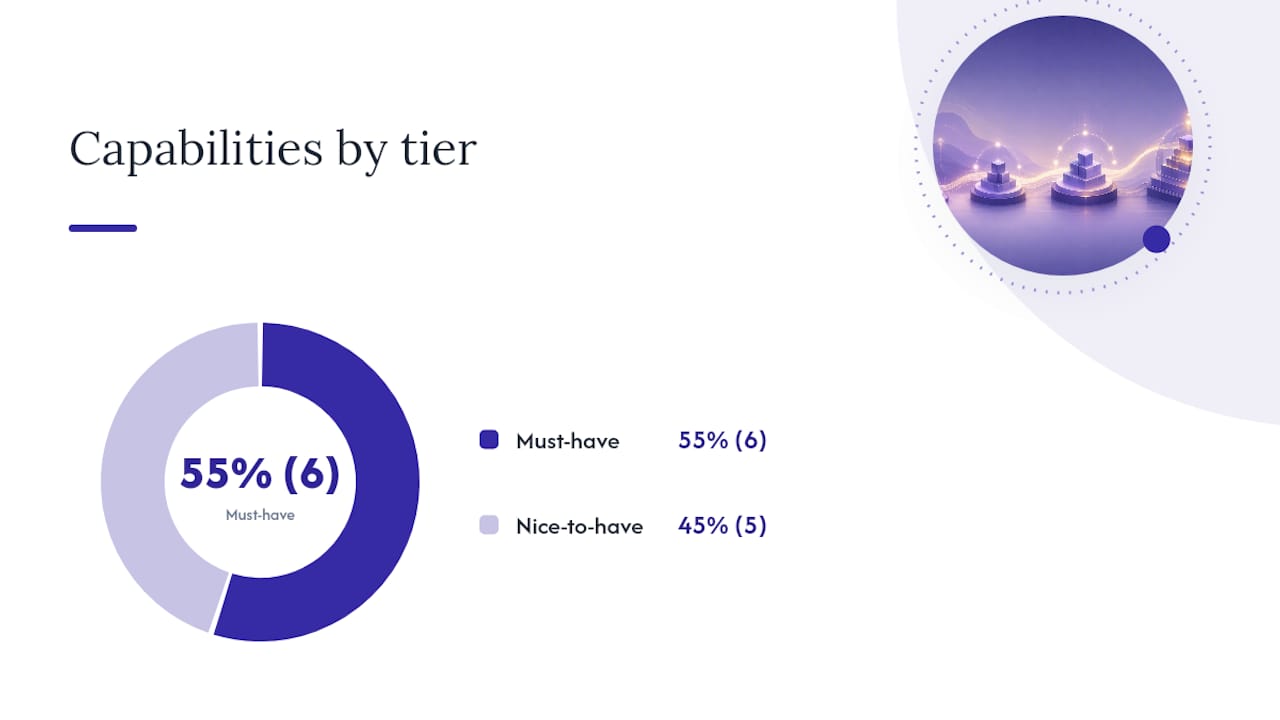
Reliable header extraction, consistent vendor identification, and totals and tax extraction sit in the must-have category because without them you’re back to manual verification on every single invoice. Line-item OCR matters if your business runs on detailed multi-line invoices; if most of your vendors send simple lump-sum bills, it’s less critical. Attachment parsing across PDF, image, and structured formats is non-negotiable, as is some form of PO matching hook, even a basic one, and integration connectors or an API that gets data out of the capture tool and into wherever your books actually live.
Active learning that improves accuracy as it processes corrections, native Google Drive and Sheets connectors, duplicate detection, configurable business rules, and QA dashboards fall into the nice-to-have column. They compound value over time, but a solution lacking them on day one isn’t disqualified.
| Capability Tier | What It Includes |
|---|---|
| Must-have | Header extraction, vendor identification, totals/tax extraction, attachment parsing, PO matching hooks, integration connectors or API access |
| Nice-to-have | Active learning that improves accuracy over time, native Drive/Sheets sync, duplicate detection, configurable business rules, QA dashboards |
Rule-based routing, the “if this, then that” logic that standardizes documents before they hit your ledger, is what makes invoice automation solutions consistent across hundreds of vendors with slightly different formats, as NetSuite’s resource on invoice automation describes. Ask any vendor to show you their rules engine in action, not just describe it.
How Do You Connect Your Inbox and Start Capturing Invoices?
Before touching any settings, decide your capture mailbox strategy. You have two real options: a dedicated shared mailbox that vendors get redirected to, or a forwarding rule layered on top of existing inboxes so nothing changes on the vendor side. Most SMB teams start with forwarding because it requires zero vendor communication, then migrate to a dedicated mailbox once the pilot proves out.
Pre-deployment, gather a sample set of a sufficient number of real invoices spanning your messiest and cleanest vendors, map your active POs and vendor list so the system has something to match against, and confirm your integration target, whether that’s an ERP, an accounting ledger, or a Google Drive and Sheets combination for lighter-weight workflows.
Connection steps differ by platform:
- Gmail. Connecting via the Gmail API requires OAuth authorization, and any application requesting access must comply with Google’s API Services User Data Policy, which limits requested scopes to the minimum necessary for the stated function. Expect to grant read access to the specific capture mailbox, not your entire Google Workspace.
- Outlook or Exchange. Set up a mail flow rule or transport rule that forwards a copy of incoming invoice emails to your capture address, or grant delegated mailbox access if your IT policy prefers that over forwarding.
- Generic forwarding mailbox. Configure an auto-forward rule on each relevant inbox, pointing to the dedicated capture address, and confirm the forwarding survives your organization’s spam and security filtering.
Once connected, run initial QA on your sample batch before letting live invoices flow through unattended. Watch for these common failure points:
- Connection errors. Usually an expired OAuth token or a forwarding rule silently disabled by an email security policy; re-authenticate and check your mail flow logs.
- Missing attachments. Often caused by invoices embedded as inline images rather than true attachments; confirm the system’s attachment parser handles both.
- Parsing failures on specific vendors. Flag the format, feed it back as a correction, and recheck after the system’s next training pass.
- Duplicate invoices. Typically from a vendor emailing the same invoice to two different addresses that both forward into the capture mailbox; enable duplicate detection or dedupe rules early.
Where Does Captured Invoice Data Actually Go?
Capture is only half the job. Once an invoice is extracted and validated, it needs a home, and how that routing works determines whether the automation actually saves anyone time or just moves the bottleneck downstream.

The most common integration pattern pushes validated invoice data straight into your ERP or accounting software via a connector or API, following the same kind of mailbox-ingestion pattern documented in Microsoft Dynamics 365’s invoice capture overview. A second pattern, better suited to leaner finance teams, auto-files the invoice PDF into a structured Google Drive folder with standardized naming, so anyone can find “Vendor_InvoiceNumber_Date.pdf” without opening a single email. Zenith’s invoice-to-Drive feature works exactly this way, filing incoming invoices automatically the moment they’re captured. A third pattern posts extracted totals and line data into a Google Sheet for teams that want visibility without a full accounting integration.
A realistic workflow generally runs: capture, then a QA queue for anything below a confidence threshold, then approval routing, then PO matching, then payment scheduling. Automation typically owns everything up through PO matching cleanly. Human review tends to stay in the loop for exception handling and final payment approval, at least until a system has proven itself over several months of clean runs.
How Accurate Is Email Invoice Capture, and What Goes Wrong?
Capture accuracy depends heavily on invoice format consistency. Clean, machine-generated PDFs from regular vendors extract with high reliability. Accuracy drops noticeably with handwritten invoices, unusual layouts from smaller or newer vendors, and multi-page documents with dense line-item tables that break across pages.

Modern systems combining OCR with machine learning and NLP are specifically built to handle unstructured PDFs and improve their accuracy over time as they process corrections, per ABBYY’s step-by-step guide to automated invoice processing. That improvement curve is real, but it’s not instant. Expect your first two to three weeks of live capture to generate more exceptions than month three will.
Good systems handle exceptions through a layered pattern rather than an all-or-nothing pass. Anything below a configured confidence threshold gets automatically flagged for human review. Totals mismatches trigger a hold before the invoice reaches payment approval. Duplicate detection compares vendor, invoice number, and amount to catch the same bill arriving through two channels, a frequent side effect of forwarding rules layered on top of existing inboxes.
On the security side, confirm exactly how the vendor’s system accesses your mailbox. A service account with narrowly scoped permissions is generally preferable to broad delegated OAuth access to a full inbox. Ask about encryption for data in transit and at rest, and get specifics on retention and deletion policies, particularly for invoices containing bank details or tax identifiers. Any legitimate provider connecting to Gmail must operate within Google’s API Services User Data Policy, which caps the scopes an application can request.
- Confirm the mailbox access model: dedicated service account versus delegated OAuth.
- Ask whether data is encrypted both in transit and at rest.
- Get a written retention and deletion policy, especially for invoices carrying banking details.
- Check whether QA review portals require separate consent handling under frameworks like the Transparency and Consent Framework if they’re browser-based.
Pro Tip: Fake invoice emails almost always share tells: a sender domain that’s one letter off from the real vendor, a “updated payment details” note attached to an otherwise normal-looking bill, or a total that’s slightly different from the vendor’s usual pattern. Train your capture system’s exception rules to flag any invoice with a bank detail change, and train your team to never approve one without a phone call to the vendor first.
What Does Email Invoice Capture Cost, and Does It Pay for Itself?
Pricing structures vary, but most fall into a handful of recognizable shapes: per-invoice or per-page OCR consumption, per-mailbox or per-seat fees, flat-tier subscriptions with usage caps, and add-on charges for premium connectors or enterprise-grade SLAs.
Here’s a simple way to think about ROI before you sign anything. Say your team currently spends 15 hours a month manually keying and chasing invoices, at a blended hourly cost of $35. That’s $525 a month in labor alone, before you count late-payment penalties or the occasional duplicate payment that automation would have caught.
Before signing a quote, confirm these specifics with any vendor:
- What’s the monthly or annual capture limit, and what happens on overage?
- What accuracy SLA, if any, is guaranteed in writing?
- What support is available during the pilot phase specifically, not just after go-live?
- Are integration connectors (ERP, accounting software, Drive, Sheets) included or billed separately?
What Should Be on Your Vendor Evaluation Checklist?
Every serious evaluation should force a vendor to answer the same core set of questions, because vague answers here predict messy implementations later.
- How does the system connect to a mailbox: OAuth, delegated access, or forwarding only?
- Which file types does it reliably parse: PDF, scanned image, structured e-invoice formats?
- Does it support line-item extraction, or header-only capture?
- Does it offer PO matching, and how configurable are the match rules?
- What are the integration endpoints: API, native ERP connector, Drive/Sheets sync?
- What’s the documented accuracy SLA, and how are exceptions routed?
- What’s the data retention and deletion policy?
For pilot success criteria, set a concrete target before you start rather than judging results on gut feel afterward. A reasonable bar is header capture accuracy above 95% on your sample set, or, if that’s not the priority, a clear reduction in manual review workload against a baseline you measure in week one. Pair that with a clean, working connector into your accounting system; a pilot that nails accuracy but can’t get data into your ledger hasn’t actually solved anything.
If the pilot clears both bars, the decision is simple: refine the exception rules based on what actually broke, then roll out to the rest of your vendor list in stages rather than all at once.
What Does a Real Implementation Look Like?
Finance teams that have moved to email-first capture through Zenith’s step-by-step approach to automating invoice processing from email report a consistent pattern: faster month-end close and a sharp drop in manual entries once the pilot rules stabilize. Clients including Združenje YES and BAM Chocolate have specifically reported reduced month-end close times and zero manual entry across transactions after adopting Zenith’s automated capture and reconciliation workflow.
A typical rollout follows four stages. First, set up the capture mailbox, either a dedicated address or a forwarding rule layered on existing inboxes. Second, pilot against a real batch of 100 to 200 invoices pulled from actual vendor history, not a curated clean sample. Third, run a focused QA loop for the first two weeks, correcting misreads and letting the system’s learning model absorb the feedback. Fourth, integrate the validated output into Google Drive, Google Sheets, or a connected accounting ledger for ongoing use.
- Prepare a representative batch of 100 to 200 recent invoices before requesting a trial.
- Identify your two or three messiest vendor formats in advance so the pilot tests real edge cases.
- Confirm your target integration (Drive, Sheets, or accounting connector) before the pilot starts, not after.
- Expect active support during the first two weeks while exception rules get tuned.
Starting a trial requires no long commitment upfront. Review the Zenith solutions overview to see how invoice capture fits into the broader automation suite before requesting pilot access.
What Finance Leaders Get Wrong About Rolling This Out
The biggest mistake I see isn’t picking the wrong vendor. It’s treating email invoice capture as a set-and-forget project instead of a two-week tuning exercise followed by ongoing light maintenance. Teams that pilot conservatively, measure both accuracy and cycle time from day one, and resist the urge to declare victory after the first clean week are the ones who still trust the system six months later.
Prioritizing capture and validation before worrying about deeper ERP customization is the right sequence, and it lines up with how IBM frames automated invoice processing as a focused subset of broader AP automation rather than a replacement for it. Get the capture layer solid first. Everything downstream, approval routing, PO matching, payment scheduling, works better once the data feeding it is clean.
The other underestimated factor is change management. Bring accounts payable, procurement, and IT into the pilot conversation early, not after the contract’s signed. AP needs to trust the exception queue before they’ll stop double-checking everything by hand, procurement needs to know PO matching rules won’t silently reject legitimate invoices, and IT needs visibility into mailbox permissions before they’ll approve OAuth access. Skip any of these three and you’ll spend more time managing internal resistance than you would have spent just tuning the software.
Accuracy climbs steadily if you feed corrections back into the system consistently. It plateaus, or even regresses, if you let exceptions pile up unreviewed for weeks at a time.
Get Your Invoices Out of Your Inbox and Into Your Books
Zenith-books gives finance teams a direct path from a cluttered inbox to a clean, reconciled ledger, without the weeks of manual setup that a custom-built capture pipeline usually demands. Emailed invoices get pulled, read, and auto-filed into Google Drive with standardized naming the moment they arrive, and the same extraction feeds directly into your bank reconciliation and reporting, so nothing sits waiting for someone to key it in by hand.

If you’ve been nodding along at the pilot criteria in this guide, here’s the practical next step: visit the Zenith solutions page to see how invoice capture connects to bank sync and reporting, or go straight to the invoice-to-Drive feature page if auto-filing is your immediate priority. Either page lets you start a trial and test capture against your own vendor invoices this week, not next quarter.
Where to Read More Before You Pilot
- Zenith’s step-by-step guide to automating invoice processing from email walks through setup and pilot planning in more implementation detail than fits here.
- Google’s API Services User Data Policy spells out exactly what scopes and consent an application needs before it can read your Gmail data.
- Zenith’s Accounts Payable Automation guide covers the broader AP workflow that invoice capture feeds into, useful once your pilot moves toward full rollout.
Frequently Asked Questions
What is invoice capture, exactly? Invoice capture is the process of automatically pulling invoice data, vendor name, amount, line items, due date, out of a document or email attachment without manual keying, then delivering that structured data to an accounting system or file store.
How do I email an invoice so it gets captured correctly? Send it as a genuine attachment (PDF or image) rather than embedding it inline in the email body, and keep the subject line and sender consistent with your normal vendor pattern so classification rules recognize it reliably.
How can I tell if an invoice email is fake? Check the sender domain closely for subtle misspellings, treat any “updated bank details” note with suspicion, and verify unexpected amounts or new payment links with a phone call to the vendor before approving payment.
Does email invoice capture work with Outlook as well as Gmail? Yes. Outlook and Exchange environments typically connect through mail flow rules or delegated mailbox access, while Gmail connections run through OAuth under Google’s API data policy; both patterns are common in production deployments.
How long does a typical pilot take before I see real results? Most teams see workable results within one to two weeks on a sample batch, with accuracy continuing to improve over the following two to three weeks as the system incorporates correction feedback.