


Invoice email parsing pulls structured data (invoice number, vendor, totals, line items) out of email bodies and attachments, then hands that data to your accounting system without anyone retyping a thing. If you want the fastest, reliable setup, choose a managed, template-free AI parser; reach for custom code only when you need full control over every step. Either way, you should expect these outcomes within days of setup:
- Invoice number, vendor name, dates, and totals extracted automatically
- Line items broken out for GL coding and PO matching
- Clean records pushed straight to your ERP or accounting API
Pro Tip: Before evaluating any tool, pull 20 real invoice emails from the last month, including at least one scanned PDF and one forwarded chain. That sample will expose weaknesses no vendor demo ever shows you.
Key Takeaways
Reliable invoice email parsing depends on MIME-aware attachment handling, idempotent delivery, and template-free extraction that adapts to new vendor formats without manual rule-writing.
| Point | Details |
|---|---|
| Match the approach to vendor volume | Under ten stable formats, rules or custom code can work; beyond that, AI extraction scales better. |
| Build in deduplication from day one | Use Message-ID plus attachment checksum so re-sent emails never create duplicate invoices. |
| Score attachments before extracting | Use Content-Disposition, filename patterns, and text density to pick the right file automatically. |
| Route low-confidence results to review | Confidence thresholds around 85% catch OCR and layout errors before they hit the ledger. |
| Zenith-books offers managed, template-free extraction | Zenith-books ingests invoices directly from inbox, extracts fields with AI, and delivers clean records with no manual entry. |
Table of Contents
- What Is Invoice Email Parsing and What Fields Should It Extract?
- Why Automating Invoice Extraction From Email Matters
- No-Code Parsers, Custom Code, or Dedicated AI Platforms: Which Fits?
- What Does a Reliable Invoice Email Parsing Pipeline Look Like?
- How Do You Handle PDFs, Scanned Images, HTML, XML, and CSV Attachments?
- How Do You Extract, Normalize, and Validate Invoice Fields?
- What Should You Ask Before Building or Buying a Parser?
- When Does a Managed AI Extraction Platform Make Sense?
- How Do You Roll Out an Invoice Parsing Pipeline Without Breaking Anything?
- What Security and Compliance Standards Should the Pipeline Meet?
- Why Managed Automation Beats the Template Trap
- How Zenith Handles Invoice Email Parsing for You
- Sources
What Is Invoice Email Parsing and What Fields Should It Extract?
Invoice email parsing covers three layers: the email headers, the message body, and any attachments. A working pipeline reads all three and normalizes them into one canonical record, whether the invoice arrived as a PDF, sat directly in the HTML body, or came in as an XML feed from a large vendor.
Every finance team should expect this baseline schema, regardless of vendor:
invoice_number,invoice_date,due_datecurrency,total,tax_totalvendor_name,vendor_id,po_numberline_items: description, quantity, unit price, amount
| Field | Example Value |
|---|---|
| invoice_number | INV-2026-00417 |
| vendor_name | Northgate Supplies Ltd |
| total | 1,240.50 |
| currency | GBP |
| line_items | [{“description”: “Widgets”, “qty”: 100, “amount”: 500.00}] |
Why Automating Invoice Extraction From Email Matters
Manual entry is where errors and delays both live. A person keying in a PDF invoice makes typos, misreads handwriting on scanned documents, and often processes invoices in batches once a week instead of daily, which stalls approvals.
Automated extraction fixes the sequencing problem as much as the accuracy one:
- Invoices get processed the day they arrive, not the day someone gets to them
- Consistent field mapping means fewer GL coding disputes at month end
- Vendors get paid on time more consistently, which protects early-payment discounts and vendor trust
Statistic Callout: Client outcomes reported by Zenith include near-zero manual transaction entries and faster month-end close after switching to automated invoice extraction. Use that framing when you’re building the ROI case internally: the savings show up less in “hours saved” and more in “days shaved off close.”
No-Code Parsers, Custom Code, or Dedicated AI Platforms: Which Fits?
Three broad approaches cover almost every team’s situation. No-code email parsers watch an inbox and apply rules you configure. Custom code gives engineers full control over MIME handling, storage, and delivery. Dedicated AP automation platforms use AI extraction that doesn’t rely on per-vendor templates at all.
| Approach | Setup Time | Maintenance | Accuracy on New Vendors |
|---|---|---|---|
| No-code rule-based parser | Days | High (rules break often) | Poor without manual tuning |
| Custom code (MIME libraries) | Weeks | Medium to high | Depends entirely on your extraction logic |
| Managed AI extraction platform | Hours to days | Low | Strong on first attempt, template-free |
Rule-based tools work fine if you have five vendors who never change their invoice layout. The moment a sixth vendor shows up with a different format, someone has to write a new rule, and that someone is usually you.
Pro Tip: Ask yourself one question: how many distinct vendor invoice formats do you receive in a typical month? Under ten, custom code or rules can work. Over twenty, template-free AI extraction almost always wins on total cost of ownership.
What Does a Reliable Invoice Email Parsing Pipeline Look Like?
A production pipeline has six stages, and skipping any one of them is where teams get burned. Mail arrives at an inbound SMTP relay or API gateway, gets routed by sender or subject rules, passes through a MIME parser, hits extraction workers, runs through validation, and finally lands in a canonical schema before delivery.

Building this with standard libraries is doable. The Python email package’s Parser and FeedParser classes correctly build multipart message trees, and a working extractor takes roughly 40 lines of code to walk that tree and decode attachments. That’s not a huge lift, but it’s also not nothing once you add error handling for malformed messages.
Three features separate a fragile pipeline from a durable one:
- Idempotency keys built from Message-ID plus an attachment checksum, so a re-sent email never creates a duplicate invoice
- Webhook signing (HMAC) so downstream systems can verify delivery authenticity
- Retry logic with a dead-letter queue for extraction failures, instead of silently dropping messages
The single most common production failure in email-based pipelines isn’t bad extraction. It’s duplicate invoices created because nobody hashed the Message-ID and attachment content before writing to the ledger.
Pro Tip: Log every raw MIME payload for at least 30 days before you delete it. When a vendor disputes a payment, you’ll want the original message, not just your parsed output.
How Do You Handle PDFs, Scanned Images, HTML, XML, and CSV Attachments?
Different attachment types need different extraction logic, and treating them all the same is the fastest way to get garbage data.
- application/pdf: check for native text first; fall back to OCR only if the PDF is a scanned image
- image/*: always OCR, and expect lower confidence than native PDF text
- text/html: when the message is
multipart/alternative, prefer the HTML part over plain text for structured invoice bodies - application/xml: map directly against UBL or cXML schema nodes instead of guessing at structure
- text/csv: normalize headers first; vendor CSV exports rarely use consistent column names
Picking the right attachment among several in one email matters just as much as parsing it correctly. MailParse’s guidance recommends scoring by Content-Disposition, filename patterns like “invoice” or “inv-”, and text density, then breaking ties with file size or detected invoice-number patterns.
Pro Tip: Assign every extraction a confidence score. Anything below your threshold, say 85%, should route to a human review queue instead of posting straight to the ledger. That one rule prevents most of the embarrassing errors teams report after go-live.
How Do You Extract, Normalize, and Validate Invoice Fields?
Getting raw text out of an attachment is only half the job. Getting it into a clean, trustworthy record takes three more steps.
- Extract using the method suited to the source: regex patterns for invoice numbers and totals in plain text, direct node mapping for UBL/XML, header mapping for CSV, and layout-agnostic AI models for line items on unfamiliar PDF layouts.
- Normalize currency codes, date formats, and numeric separators (some vendors use commas as decimal points), plus vendor names against your vendor master list.
- Validate before anything touches your books.
Your validation checklist should include:
- Line item sums reconciled against the stated total
- PO number matched against open purchase orders where applicable
- Currency consistency checked against the vendor’s expected billing currency
- Tolerance rules (a few cents of rounding is fine; a large mismatch triggers manual review)
What Should You Ask Before Building or Buying a Parser?
Whether you’re evaluating a vendor or scoping an internal build, the same questions apply. Ask directly:
- Does it handle nested MIME structures and multiple attachments per email, not just a single PDF?
- What’s the stated OCR accuracy on scanned documents, and is that number backed by a real benchmark?
- Does it support idempotency keys so re-sent emails don’t create duplicates?
- Is there SOC 2 or ISO 27001 coverage, and what integrations exist for QuickBooks, Xero, or NetSuite?
- What’s the data retention and deletion policy, and is there a documented SLA?
Red flags worth walking away from: heavy reliance on brittle per-vendor templates, no deduplication logic, no audit trail for who approved what, and no webhook signing on delivery.
Pro Tip: Size your pilot at 90 days and at least 50 real invoices spanning your five most different vendor formats. Anything shorter or narrower won’t reveal the edge cases that actually break pipelines in production.
When Does a Managed AI Extraction Platform Make Sense?
Teams with limited engineering bandwidth, a long tail of vendor formats, or pressure to show ROI fast are usually better served by a managed platform than a custom build. Template-free AI extraction reads unfamiliar invoice layouts on the first attempt far more often than rule-based systems, which cuts the ongoing maintenance that quietly eats an internal team’s time.
What finance teams actually want from that platform:
- Direct inbox ingestion with no manual forwarding step
- Template-free AI extraction across formats and vendors
- Validation rules and a review queue for low-confidence results
- Connectors into existing accounting or ERP systems, plus a full audit log
Clients report near-zero manual transaction entry and materially shorter month-end close after adopting automated invoice extraction, rather than the incremental gains typical of rule-tuning projects.
How Do You Roll Out an Invoice Parsing Pipeline Without Breaking Anything?
Rushing production cutover is how teams end up with duplicate invoices and angry vendors. Follow a staged rollout instead:
- Ingest a sandbox copy of real invoice emails without posting anywhere
- Build extraction rules or configure AI field mappings
- Assemble a test suite from actual vendor samples, not synthetic ones
- Run a dual-run pilot: human entry and automated extraction side by side
- Measure precision and recall against the human baseline
- Tune thresholds, enable idempotency checks and monitoring
- Cut over fully once accuracy holds steady across two consecutive weeks
Your test suite needs to include multi-attachment emails, forwarded chains (where headers get messy), scanned PDFs with weak OCR confidence, UBL XML feeds, CSV line-item exports, and locale-specific number formats like European decimal commas.
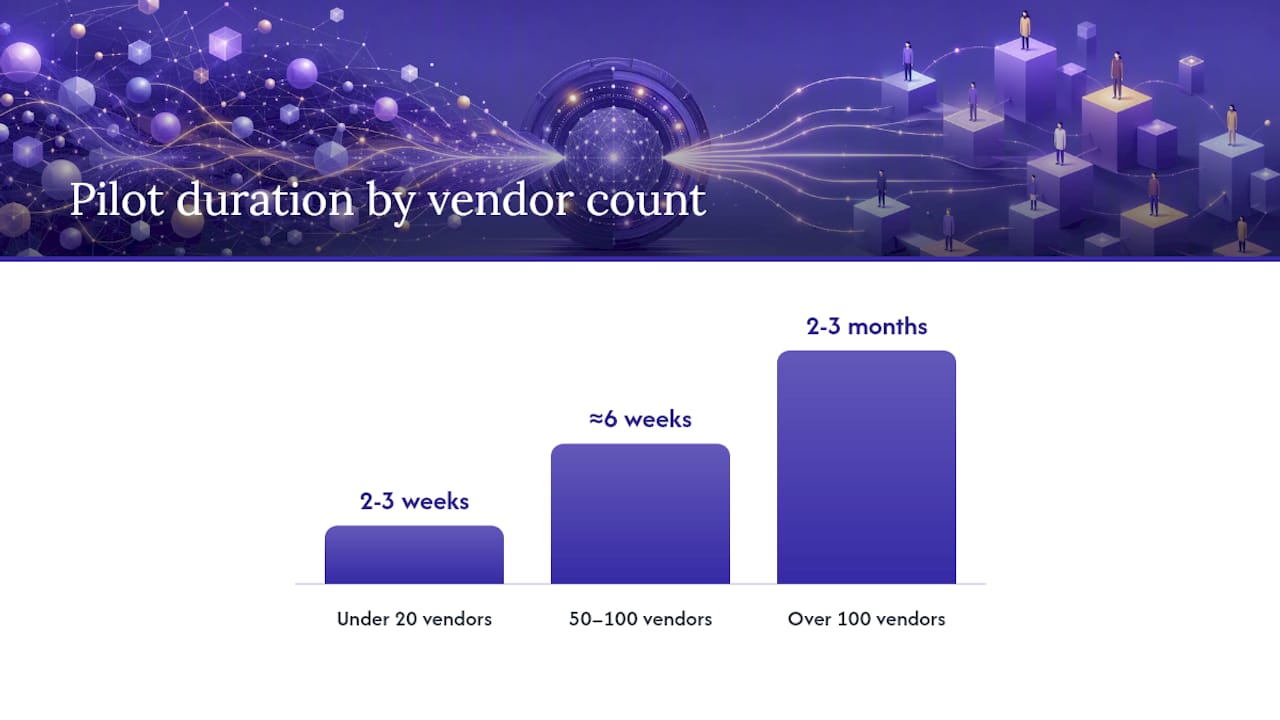
Pro Tip: A pilot for under 20 vendors typically takes two to three weeks. Fifty to 100 vendors runs closer to six weeks. Past 100, budget two to three months, mostly for edge-case tuning, not initial setup.
What Security and Compliance Standards Should the Pipeline Meet?
Invoice data touches banking details and vendor relationships, so the pipeline needs real security controls, not just a privacy policy page. At minimum, look for TLS encryption in transit, encryption at rest, HMAC-signed webhooks, and role-based access control limiting who can view or export financial data.
Certifications matter because they force documented processes: SOC 2 covers operational controls around data handling, and ISO 27001 covers information security management broadly. Neither guarantees perfection, but both mean an independent auditor reviewed the claims.
- Confirm a stated data retention window and a documented deletion process
- Require an audit trail showing who approved, edited, or rejected each invoice
- Ask whether credentials and API keys are stored using dedicated secrets management, not environment files
Statistic Callout: Buyer feedback on platforms like Mailparser consistently flags setup complexity and attachment handling as the areas that make or break adoption, which is exactly why security and usability need equal weight in any evaluation.
Why Managed Automation Beats the Template Trap
Template-based parsing feels cheap at first and expensive later. Every new vendor format means someone writing another rule, and that maintenance cost compounds quietly until a finance team is spending more time fixing broken templates than they ever spent on manual entry. Template-free AI extraction sidesteps that entirely by reading new layouts without a rule update.
The teams that get this right treat the pipeline itself as infrastructure worth guardrails: idempotency, review queues, audit logs. Skip those and even the best extraction engine will eventually produce a duplicate payment or a silent failure nobody notices until reconciliation.
How Zenith Handles Invoice Email Parsing for You
Zenith-books is built specifically for finance teams who want their inbox to stop being a data-entry queue. Invoices land in your connected inbox, get read by template-free AI extraction, and arrive in your books with vendor names, totals, and line items already matched, no manual retyping and no per-vendor rule-writing.

Beyond extraction, Zenith-books auto-files every invoice to Google Drive with consistent naming, syncs live bank data to Google Sheets for real-time cash visibility, and connects to the accounting workflows your team already runs on. Security and compliance sit underneath all of it, so finance leaders don’t have to choose between speed and control.
If you’re evaluating whether to build a parser in house or hand the whole pipeline off, the fastest way to find out is to see it running on your own invoices. Visit Zenith’s invoice-to-Drive solution to start a trial and watch your next batch of vendor emails turn into structured records without touching a keyboard.
Sources
For teams building in house, these sources cover the implementation details this article summarizes:
- Parse and Download Email Attachments | Nylas CLI
- email.parser: Parsing email messages — Python 3.14.7 documentation
- Inbound Email Processing for Invoice Processing | MailParse | MailParse
This article is general information, not a substitute for advice from a qualified financial advisor. Consult a qualified financial professional about your own circumstances before acting on anything here.