


Machine-learning expense categorization automatically maps transactions to the right general ledger codes, allocates spend by department or project, and surfaces only the low-confidence items that genuinely need a human decision. The practical payoff for finance teams is significant: fewer hours spent on manual coding, more consistent period-over-period data, and earlier visibility into budget drift before month-end close.
Here is what that looks like in practice:
- Reclaimed finance hours: Manual expense tracking disappears from the critical path, freeing analysts for variance work and forecasting.
- Consistent categorization: The model applies the same logic to every transaction, eliminating the human inconsistency that causes reclassifications at close.
- Earlier anomaly detection: Unusual spend patterns surface during the period, not after the books are closed.
- Audit-ready records: Confidence scores and correction logs create a traceable decision trail.
This approach works best when you have recurring expenses, card-driven spend, or roughly higher transaction volumes. A parallel pilot is still worth running below that volume — the data you collect trains a better model later.
Table of Contents
- How does ML expense categorization actually work?
- What accuracy should you realistically expect?
- How to implement ML categorization: a practical checklist
- How do you keep ML categorization accurate after launch?
- How does ML categorization support anomaly detection and policy enforcement?
- Privacy, security, and U.S. recordkeeping requirements you need to address
- How automation repositions finance teams: evidence and outcomes
- Key Takeaways
- The pitfall most finance teams don’t see coming
- Zenith-books cuts the time from receipt to GL code
- Useful sources and further reading
How does ML expense categorization actually work?
The system combines receipt OCR, transaction metadata, and historical labels to predict a category and a confidence score. Those three inputs are what separate a reliable production system from a rule-based lookup table that breaks the moment a new vendor appears.
What the system reads from each transaction
OCR handles the document layer: merchant name, amount, tax line, and individual line items on multi-line receipts. Line-level extraction matters because a single receipt from a hardware store might contain both office supplies and a maintenance item that belong in different GL codes. Once the text is extracted, NLP tokenizes the merchant description, normalizes common abbreviations (think “AMZN MKTP” → Amazon Marketplace), and pulls out entity signals like invoice IDs and SKU-like strings. Short, noisy descriptions — the kind corporate card feeds produce — are handled by matching against a merchant normalization dictionary before any model sees them.

Structured signals round out the feature set: amount, merchant category code (MCC), time of transaction, cardholder role, how often that merchant appears in company history, recurring-transaction flags, and the ledger history for that cost center. Modern ML systems weight these contextual signals together rather than relying on any single field, which is why they outperform brittle static rules when a new vendor or edge-case amount appears.
Model architectures worth knowing
- Supervised classifiers (XGBoost, logistic regression, neural networks): trained on labeled historical transactions; fast to serve; need periodic retraining as the chart of accounts evolves.
- Embedding + similarity search: encodes each transaction as a vector and finds the closest labeled examples; works well when labeled data is sparse.
- RAG (Retrieval-Augmented Generation): retrieves similar past transactions and includes the company’s chart of accounts in the prompt context, so the model reasons with company-specific categories rather than generic ones. This avoids per-client retraining overhead entirely.
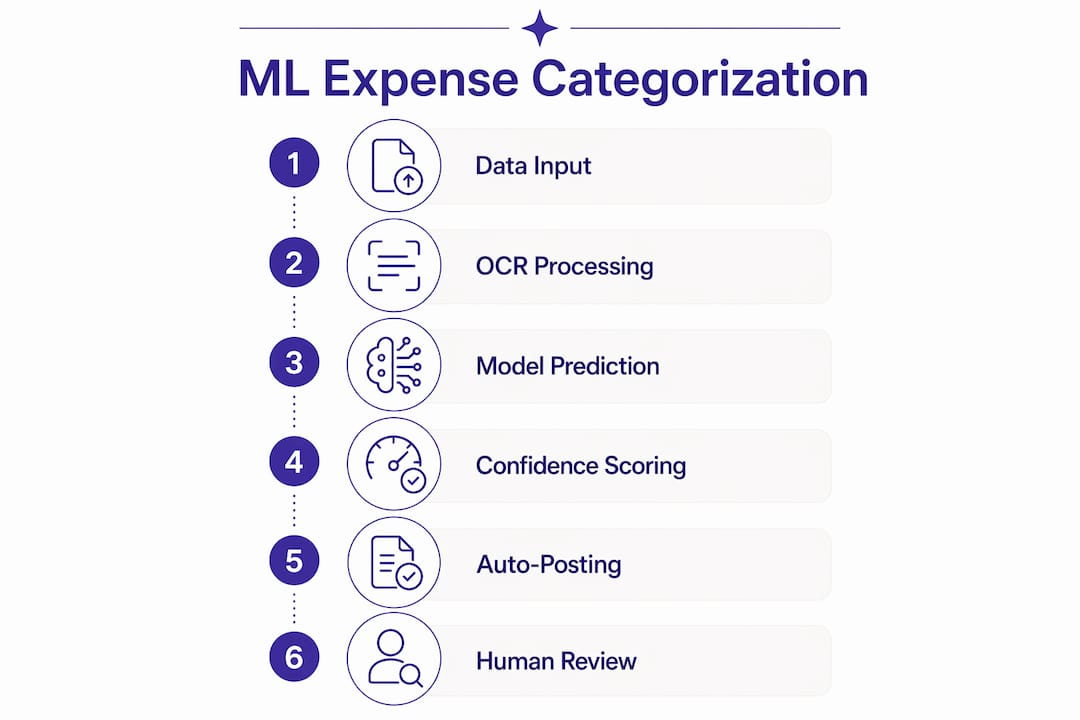
Every architecture outputs the same two things: a predicted category and a confidence score. Confidence-based decision logic routes high-confidence predictions to auto-post and sends low-confidence ones to a human reviewer — that split is what keeps the system trustworthy at scale.
Pro Tip: Embed your company’s full chart of accounts into the retrieval context before you run a single prediction. A model reasoning against your actual GL codes will outperform one reasoning against generic categories from day one.
| Signal type | Examples | Why it matters |
|---|---|---|
| OCR text | Merchant name, line items, tax | Identifies vendor and spend type |
| NLP features | Normalized merchant, entity tags | Handles noisy card-feed descriptions |
| Structured metadata | MCC, amount, cardholder role | Adds context OCR alone can’t provide |
| Ledger history | Past category for this merchant | Anchors predictions to company norms |
| Confidence score | 0–1 probability | Routes auto-post vs. human review |
What accuracy should you realistically expect?
Expect strong accuracy on common categories. A provider case study reports approximately 97% accuracy on a high-volume transaction set after sufficient training and iterative corrections, with 6–12 months of labeled history recommended for best results. Plan for a meaningful low-confidence tail that needs human review, especially in the early months.
Common failure modes
- Cold start: Insufficient labeled history means the model has no anchor for new vendors or new employees.
- Ambiguous merchant names: “SQUARE *COFFEE” could be a meeting expense or a personal purchase depending on context.
- Multi-purpose transactions: A single charge at a big-box retailer that covers both office supplies and break-room snacks.
- Split receipts and foreign currency fees: These often land in a catch-all category unless the system is explicitly trained on them.
- Inconsistent employee inputs: Descriptions typed manually into expense forms introduce noise that OCR-only pipelines never see.
How to measure accuracy in production
Track precision and recall per category, not just overall accuracy. A model that is 95% accurate overall but misclassifies 40% of travel expenses is a problem for any team with a significant T&E budget. F1 score (the harmonic mean of precision and recall) gives a single number that balances both. At the business level, track exception rate (percentage of transactions routed to human review) and percent auto-posted.
| Category | Typical accuracy band | Expected exception rate |
|---|---|---|
| Subscriptions / SaaS | — | 3–8% |
| Travel (air, hotel) | — | 6–12% |
| Meals and entertainment | — | 10– |
| Utilities | — | 4–10% |
| Office supplies | — | 8– |
Confidence thresholds are tunable. A threshold of 0.85 auto-posts more transactions but accepts slightly more errors; 0.95 sends more to review but nearly eliminates incorrect auto-postings. Start conservative and loosen as correction data accumulates.
How to implement ML categorization: a practical checklist
A safe path runs Export → Pilot-in-parallel → Confidence tuning → Gradual cutover. That sequence minimizes disruption and trains the model on real corrections before you flip the auto-post switch.
Step-by-step implementation
- Export labeled history. Pull 6–12 months of transactions with their final GL codes. Clean obvious mislabels — garbage in, garbage out applies here more than anywhere else.
- Audit your chart of accounts. Consolidate redundant categories before training. A model trained on 200 near-duplicate GL codes will underperform one trained on 80 clean ones.
- Set up ingestion pipelines. Connect bank feeds, corporate card feeds, and receipt ingestion (email forwarding, PDF upload, or mobile photo). Common friction points: bank feed OAuth token expiry, PDF receipts with scanned images rather than selectable text, and card providers that batch-deliver transactions with a 24-hour lag.
- Map to your accounting system. Whether you use QuickBooks, Xero, or NetSuite, the model’s output categories must map cleanly to your GL codes. Build this mapping table before the pilot, not after.
- Run a parallel pilot for one full cycle. Let the model categorize every transaction alongside your current process. Compare outputs, measure accuracy and exception rate, and collect correction data without touching live books.
- Tune confidence thresholds. Use pilot data to find the threshold that gives you an acceptable exception rate. Most teams start at 0.85–0.90.
- Enable auto-post for high-confidence items. Start with your most predictable categories (subscriptions, utilities) and expand from there.
- Monitor and retrain monthly. Finance corrections feed back into incremental model updates. Schedule a monthly calibration meeting between finance and whoever owns the ML system.
Pro Tip: Run the pilot during a month that includes at least one unusual spend event — a conference, a software renewal, or a vendor switch. Addressing edge cases during the pilot phase is far more cost-effective than after auto-post goes live.
Integration notes
Expense management platforms commonly integrate OCR receipt capture alongside policy checks and accounting connectors for QuickBooks, Xero, and NetSuite, delivering end-to-end automation without requiring a change in corporate card provider. The invoice reconciliation step downstream benefits directly from clean categorization upstream — miscoded transactions are the single biggest source of reconciliation exceptions.
Timeline and cost shape
| Phase | Weeks | Key output |
|---|---|---|
| Training and data prep | 1–3 | Clean labeled dataset, GL mapping table |
| Parallel pilot | 4–6 | Accuracy baseline, confidence threshold |
| Gradual rollout | 7–8 | Auto-post live for high-confidence categories |
For cost shape: SaaS expense categorization tools run on predictable monthly tiers based on transaction volume or invoice pages processed. Building in-house carries higher upfront engineering cost plus ongoing maintenance as the chart of accounts and card providers change. Most finance teams at the small-to-mid-market level find SaaS faster to value and easier to justify.
How do you keep ML categorization accurate after launch?
Track both model metrics and business metrics. Model metrics tell you whether the system is degrading; business metrics tell you whether that degradation is actually costing time or money.

| Metric | How to calculate | Cadence |
|---|---|---|
| Precision (per category) | True positives / (true positives + false positives) | Monthly |
| Recall (per category) | True positives / (true positives + false negatives) | Monthly |
| F1 score | 2 × (precision × recall) / (precision + recall) | Monthly |
| Exception rate | Transactions routed to review / total transactions | Weekly |
| Auto-post rate | Transactions auto-posted / total transactions | Weekly |
| Month-end reclassifications | Count of GL changes after initial posting | Per close |
| Finance hours on categorization | Time tracked to manual coding tasks | Monthly |
Monitoring steps
- Run a stratified sample audit monthly: pull 50–100 transactions across your highest-volume categories and verify the model’s predictions against final posted codes.
- Check confidence distribution weekly. A shift toward lower confidence scores often signals a new vendor, a card provider change, or a chart-of-accounts update that the model hasn’t seen yet.
- Review month-end reclassifications as a lagging indicator. A spike usually traces back to a specific category or merchant that needs a rule adjustment or retraining pass.
- Feed every human correction back into the model. Corrections are labeled data — they are the cheapest training signal you will ever get.
Pro Tip: Set a calendar alert for the first Monday of each month: pull the exception rate, auto-post rate, and reclassification count before the close meeting. Three numbers, five minutes, and you know whether the model needs attention before it becomes a close-week problem.
The operational guardrail that holds everything together is a human-in-the-loop workflow for low-confidence and high-value transactions. High-value transactions should always route to review regardless of confidence score, because the cost of a misclassification at that level outweighs the time saved.
How does ML categorization support anomaly detection and policy enforcement?
ML categorization enables both rule-based and pattern-based anomaly detection that surfaces real risk while minimizing noise. The category prediction is the anchor: once a transaction has a predicted category and a confidence score, a policy engine can apply spend limits, approval thresholds, and vendor-type rules in real time.
Meaningful alerts worth building:
- Sudden merchant-category shift: An employee who has never expensed entertainment suddenly submits three in a week.
- Duplicate subscriptions: The same SaaS tool billed to two different cost centers, or the same vendor appearing twice in one billing cycle.
- Out-of-policy spend: A meal expense above the per-diem threshold, or a hotel rate above the travel policy cap.
- Unusual cross-entity allocations: A charge coded to a project that the cardholder has no budget authority over.
Real-time OCR and policy enforcement can surface duplicate subscriptions and unused tools during the period rather than after close — that timing difference is what turns anomaly detection from a reporting feature into an actual cost-control tool.
The workflow that avoids alert fatigue: flag → explain why it was flagged (specific rule or pattern) → route to the right reviewer with a suggested correction → log the final disposition so the model learns from the outcome. T&E platforms with policy enforcement and budget controls typically wire this loop into approval workflows so reviewers see context alongside the alert.
Design principle: An anomaly detection system that flags 30% of transactions trains finance teams to ignore it. Tune sensitivity so the flag rate stays low enough that every alert gets genuine attention — precision matters more than recall when the cost is reviewer fatigue.
Pro Tip: Start anomaly detection with your two or three highest-risk categories (T&E and software subscriptions are common candidates) before expanding to the full chart of accounts. A narrow, high-precision alert set builds trust faster than a broad, noisy one.
Privacy, security, and U.S. recordkeeping requirements you need to address
Treat expense data like sensitive financial records. Apply encryption, least-privilege access, and retention policies aligned with IRS guidance and your corporate governance requirements before you go live with any automated system.
Practical security controls
- Encryption in transit and at rest: TLS 1.2 or higher for data in motion; AES-256 for stored receipts and transaction records.
- Role-based access control (RBAC): Finance reviewers see their cost centers; controllers see everything; submitters see only their own records.
- Audit logs for category changes: Every reclassification should log who changed it, when, and from what to what. This is your defense in an IRS audit.
- Secure receipt storage: Scanned receipts contain PII (cardholder names, last four digits, sometimes full addresses). Store them in access-controlled, encrypted storage — not a shared Google Drive folder.
U.S. recordkeeping notes
The IRS generally requires businesses to retain receipts and supporting documentation for expenses for at least three years from the date the return was filed, and up to seven years if the return involves a substantial understatement of income. State sales and use tax documentation requirements vary by state and can extend the retention window further. Export formats matter: a CSV export of categorized transactions with timestamps and GL codes is audit-ready; a PDF summary is not.
| Control | Requirement | Why it matters |
|---|---|---|
| Encryption at rest | AES-256 or equivalent | Protects PII in stored receipts |
| Audit log | Immutable, timestamped | IRS and SOX defensibility |
| Retention period | 3–7 years (IRS guidance) | Statutory compliance |
| RBAC | Role-scoped access | Limits exposure of financial PII |
| SOC 2 Type II (vendor) | Contractual commitment | Validates vendor security posture |
Vendor due diligence
Ask any SaaS vendor for their SOC 2 Type II report, a signed data processing agreement, and explicit contractual commitments on data locality (where your transaction data is stored) and breach notification timelines. These are not nice-to-haves for a finance system — they are baseline requirements.
How automation repositions finance teams: evidence and outcomes
Organizations that automate categorization reclaim finance hours and shift effort from transaction processing to analysis and forecasting. That shift is the real ROI narrative for leaders, not the cost of the software itself.
Accounting automation improves close times by removing manual categorization from the critical path. Teams that stop reviewing every transaction can reallocate that time to variance analysis and forecasting — the work that actually informs decisions. Machine learning in accounting reduces manual labor and improves the accuracy of financial records, two outcomes that compound over time as the model learns from corrections.
Zenith-books clients report concrete results from this shift:
- Združenje YES reduced month-end close time and eliminated manual entry across transactions.
- BAM Chocolate achieved zero manual entry and streamlined operations through automated invoice capture and categorization.
The strategic case: AI-driven categorization is a foundational layer for broader financial intelligence. When combined with policy checks and vendor tracking, it surfaces savings opportunities in real time instead of after close.
Implementation lessons from these deployments:
- Start with clean, labeled historical data. Dirty training data is the single most common reason a pilot underperforms.
- Keep a conservative human-in-the-loop for the first 60 days. The corrections you collect during that window are worth more than any pre-trained model.
- Measure before-and-after close times and exception rates. Without a baseline, you cannot demonstrate ROI to leadership.
Pro Tip: Before you start a pilot, time-track one full month-end close manually. That number becomes your before-state benchmark and your strongest internal justification for the investment.
Key Takeaways
ML expense categorization delivers the most value when it is implemented with clean historical data, conservative confidence thresholds, and a structured monitoring cadence from day one.
| Point | Details |
|---|---|
| Accuracy is high but not uniform | Production benchmarks reach up to 97% after sufficient training and iterative corrections; common categories like subscriptions typically outperform travel and meals. |
| Confidence thresholds are the control lever; it is recommended to start conservatively and adjust only after pilot corrections accumulate. | |
| Implementation follows a fixed sequence | Export history → parallel pilot → threshold tuning → gradual auto-post rollout across 7–8 weeks. |
| Monitor three business metrics weekly | Exception rate, auto-post rate, and month-end reclassifications tell you whether the model needs attention. |
| Zenith-books automates the full cycle | Receipt capture, GL mapping, bank sync, and audit-ready exports reduce close time and manual reclassifications for U.S. finance teams. |
The pitfall most finance teams don’t see coming
The biggest mistake in ML categorization rollouts is not a technical one. It is flipping the auto-post switch too early, before the model has seen enough corrections to handle your specific vendor mix and chart of accounts.
Finance teams often underestimate how much their historical data reflects past mistakes. If your GL codes were inconsistently applied for the last two years, the model learns those inconsistencies. It will reproduce them at scale, confidently. That is why the data audit in weeks one through three of the implementation checklist is not optional prep work — it is the highest-leverage activity in the entire project.
A few other pitfalls worth naming:
Poor historical labels are the most common root cause of a disappointing pilot. Spend a week cleaning your training data before you touch the model configuration.
Ignoring B2B vendor nuances trips up teams that assume consumer-grade merchant normalization will handle their supplier base. A vendor named “Global Solutions LLC” tells a model almost nothing without additional context signals.
Skipping explainability for auditors creates problems six months after launch. Every auto-posted transaction should carry a reason code — not just a category — so an auditor can understand why the system made that decision without asking the finance team to reconstruct it.
Under-investing in change management is the silent killer. Submitters who don’t understand why the system flags their expenses will find workarounds. A 30-minute training session and a one-page FAQ for expense submitters prevents most of the friction.
Pro Tip: Schedule a monthly calibration meeting between finance and whoever manages the ML system. Bring the exception rate, the top five misclassified merchants, and one proposed rule adjustment. Thirty minutes a month keeps the model aligned with how your business actually spends.
Zenith-books cuts the time from receipt to GL code
Most finance teams that evaluate automated expense categorization already know what they want: fewer hours on manual coding, a cleaner close, and spend visibility that doesn’t require a spreadsheet sprint at month-end. Zenith-books delivers exactly that, without the engineering overhead of building a custom ML pipeline.

Zenith-books automates receipt capture via email and PDF ingestion, maps transactions to your GL codes, syncs live bank data to Google Sheets for real-time cash visibility, and files invoices automatically to Google Drive with audit-ready naming. The human-in-the-loop review queue is built in, so low-confidence items surface for your team without disrupting the auto-post flow for everything else. Clients like BAM Chocolate and Združenje YES report zero manual entry and faster close times after deployment.
Explore Zenith-books’ finance workflow solutions to see how the full automation stack fits your current accounting setup, or start a trial directly from the solutions page.
Useful sources and further reading
- How Machine Learning Categorizes 10,000 Expenses Monthly with 97% Accuracy — Case study and implementation timeline covering training phases, confidence thresholds, and production accuracy benchmarks.
- How We Built AI-Powered Expense Categorization with RAG — Technical walkthrough of a RAG architecture for expense categorization, including chart-of-accounts embedding and retrieval logic.
- Intelligent Expense Categorization Example (GitHub) — Open-source implementation showing confidence-based routing: auto-categorize vs. flag for manual review.
- How Is Machine Learning Used in Accounting? — Patriot Software — Accessible explainer on ML applications in accounting workflows, including time savings and error reduction.
- Expense Management Software That Reads Receipts and Finds Waste — Product-level description of real-time OCR, policy enforcement, and accounting integrations (QuickBooks, Xero, NetSuite).
- Travel and Expense Management — Zoho Expense — Overview of T&E policy enforcement, approval workflows, and budget controls as a reference for platform capability expectations.
- Smart Personal Expense Categorizer (GitHub) — Open-source ML classifier using ensemble methods (Random Forest, XGBoost, Gradient Boosting) with confidence score output; useful for understanding model architecture options.