


Month end close automation compresses a process that typically takes accounting teams several business days into a continuous, auditable workflow where month-end becomes a final review rather than a frantic assembly. The core outcome: fewer manual journal entries, reconciliations that run in the background, and a close package that reaches the CFO faster and with a cleaner audit trail.
Finance teams that automate their highest-volume close tasks — bank reconciliations, recurring journal entries, AP invoice matching — consistently report meaningful reductions in overtime hours and fewer last-minute adjustments. The standard for audit readiness in automated close environments includes a full audit trail, role-based access controls, and data encryption in transit and at rest.
The recommended starting point: pick a few high-volume, low-exception processes (bank feed reconciliation, prepaid amortization, recurring accruals) and run a pilot lasting several weeks. Teams that start there build stakeholder confidence quickly and have measurable time savings to show before committing to a full rollout. Zenith-books is built for exactly this entry point, with AI-powered invoice extraction, bank-to-ledger sync, and automated categorization that finance teams can configure without IT involvement.
Pro Tip: Before selecting your pilot processes, pull three months of close logs and rank tasks by volume and error frequency. The highest-volume, highest-error tasks are your best automation candidates — not necessarily the most painful ones.
Key immediate wins from a well-scoped pilot:
- Bank-to-ledger reconciliation running daily instead of at month-end
- Recurring journal entries posted automatically on schedule
- Invoice data extracted and categorized without manual keying
- Exception queues surfacing only the items that need human judgment
Table of Contents
- What does month end close automation actually do for your team?
- How does automated financial closing work under the hood?
- What features should you require from financial close software?
- What does a realistic implementation roadmap look like?
- How do you measure ROI on close process automation?
- What pitfalls should you avoid when automating the close?
- Why Zenith-books fits what finance teams actually need
- Key Takeaways
- What the rollouts actually teach you
- Zenith-books makes the pilot easy to start
- Useful sources and further reading
What does month end close automation actually do for your team?
The honest answer: it shifts your team’s time from data assembly to data review. Here are 11 specific automation patterns finance teams implement, ranked roughly by impact.
-
Bank feed reconciliation. A reconciliation engine pulls live bank transactions and matches them against GL entries using configurable rules. Unmatched items land in an exception queue. Zenith-books’s live bank-to-Google-Sheets sync handles this in real time, so the reconciliation is largely done before the period closes.
-
AP invoice extraction. AI reads invoices from email or uploaded PDFs, extracts vendor, amount, date, and line items, and posts them to the correct GL account. Owned by AP; quality check is exception review, not data entry. Time savings are significant because manual keying is eliminated entirely.
-
Recurring journal entry posting. Depreciation, prepaid amortization, and subscription accruals post automatically on a defined schedule. The controller reviews the exception log, not the individual entries.
-
AR cash application. Incoming payments are matched to open invoices using remittance data or bank reference numbers. Unmatched receipts go to an exception queue for the AR team.
-
Intercompany eliminations. Rules-based matching identifies intercompany payables and receivables across entities and generates the elimination entries automatically. This is one of the highest-effort manual tasks in multi-entity closes.
-
Currency conversion and revaluation. Automated FX rate pulls and balance revaluation entries run on schedule, with variance alerts when rates move beyond a defined threshold.
-
Variance commentary drafts. AI-assisted tools can generate a first-draft explanation for budget-vs-actual variances above a threshold, which the FP&A analyst then reviews and edits. The analyst writes the insight; the tool writes the setup.
-
Approval routing. Journal entries and reconciliations above a materiality threshold route automatically to the designated reviewer. No email chains, no missed sign-offs.
-
Late-posting alerts. The system flags transactions posted after the soft close date, so the controller can decide whether to include or exclude them before the hard close.
-
Checklist task assignment. Close tasks are assigned to owners with due dates and status tracking. The close manager sees a real-time completion dashboard instead of chasing status updates by Slack.
-
Audit document filing. Invoices and supporting documents are auto-filed with consistent naming conventions. Zenith-books’s automated invoice filing to Google Drive means audit evidence is organized before the auditor asks for it.
Pro Tip: Start your pilot with bank feed reconciliation or recurring prepaid amortizations. These are high-volume, low-judgment tasks where automation handles most items and exceptions are genuinely meaningful tests of your matching rules.
How does automated financial closing work under the hood?
Understanding the architecture helps you evaluate whether a tool will actually fit your existing systems — or create a new integration problem.

The data flow from source to ledger
Every automated close starts with data ingestion. Source systems (ERP, bank feeds, AP subledger, AR subledger, HRIS, CRM) push or pull data into a central integration layer. That layer normalizes the data — aligning chart-of-accounts codes, currency, entity identifiers, and date formats — before passing it to the reconciliation engine.
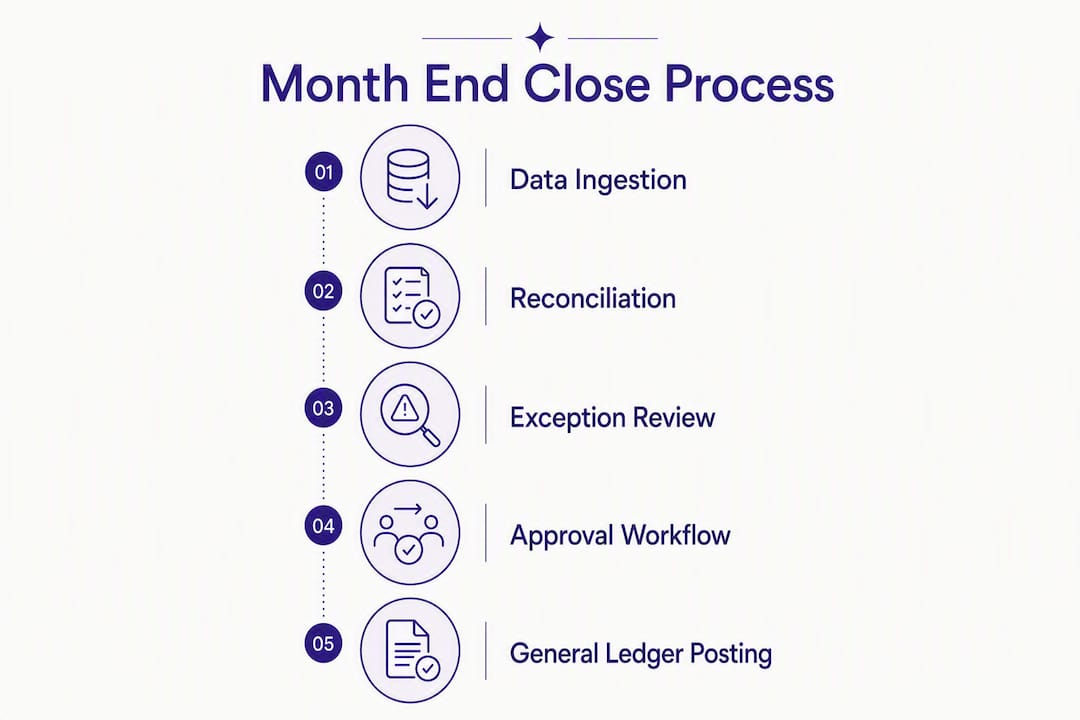
The reconciliation engine applies matching rules: exact match on amount and reference, fuzzy match on vendor name, threshold-based tolerance for rounding differences. Matched items clear automatically. Unmatched items enter an exception queue with context: the source record, the expected match, and the rule that failed.
From the exception queue, workflow routing takes over. Items above a materiality threshold go to a reviewer. Approved items generate journal entries that export to the GL in the format the ERP expects (CSV, API, or direct connector). The reporting layer aggregates status across all tasks and entities into a close dashboard.
What to connect first
| Integration | Priority | Mapping effort | Common pitfall |
|---|---|---|---|
| Bank feeds | High | Low | Multiple bank formats require format normalization |
| GL extract (ERP) | High | Medium | Chart-of-accounts mismatches across entities |
| AP subledger | High | Medium | Vendor master inconsistencies inflate exceptions |
| AR subledger | Medium | Medium | Remittance data quality drives match rates |
| HRIS (payroll accruals) | Medium | Low | Pay period timing vs. accounting period timing |
| CRM (revenue recognition) | Lower | High | Contract data quality is often the bottleneck |
Practical automation guides consistently recommend sequencing bank feeds and GL extracts first, then AP/AR subledgers, and leaving CRM integrations for a later phase when data quality is validated.
Security and compliance requirements
Automated close tools handle material financial data, so the security bar is high. At minimum, validate these during procurement:
- Audit trail: every transaction match, journal posting, and approval action is logged with timestamp, user, and change detail
- Role-based access control (RBAC): preparers, reviewers, approvers, and read-only auditors have distinct permission sets
- Encryption: data encrypted in transit (TLS 1.2+) and at rest
- Data retention: configurable retention periods that meet your audit and regulatory requirements
- SOC 2 Type II: the standard most enterprise finance teams require from SaaS vendors handling financial data
Finance teams that skip the security validation during procurement often discover gaps during their first external audit — after the tool is already embedded in the close process. Validate audit trail completeness and RBAC before go-live, not after.
What features should you require from financial close software?
Use this checklist during vendor evaluation. The table separates what you genuinely need from what is useful but not blocking.
Must-have vs. nice-to-have features
| Feature | Must-have or nice-to-have | Why |
|---|---|---|
| Reconciliation engine with configurable rules | Must-have | Core automation; without it, you are still matching manually |
| Full audit trail with user timestamps | Must-have | Required for external audit and SOX compliance |
| Approval and sign-off workflow | Must-have | Separation of duties; no sign-off = no close |
| Journal import/export (ERP-compatible) | Must-have | Automation is useless if entries can’t reach the GL |
| Bank feed integration | Must-have | Highest-ROI automation; manual bank rec defeats the purpose |
| Configurable close checklist with task ownership | Must-have | Close management without a checklist is just email |
| Multi-entity consolidation | Must-have for multi-entity | Eliminates the biggest manual effort in group closes |
| Currency conversion and revaluation | Must-have for international | Manual FX revaluation is error-prone and time-consuming |
| AI-assisted variance commentary | Nice-to-have | Saves analyst time but not a blocker |
| CRM integration | Nice-to-have | Useful for revenue recognition; complex to implement |
| Real-time close progress dashboard | Nice-to-have | Improves visibility; not a functional requirement |
| Invoice OCR and auto-categorization | Must-have for AP automation | Eliminates manual keying; high ROI for AP-heavy teams |
Mid-market vs. enterprise weighting
Mid-market teams (under 500 employees, single or two-entity structure) should weight bank feed integration, AP invoice extraction, and configurable checklists highest. Multi-entity consolidation and intercompany elimination matter less until you have three or more entities.
Enterprise teams need multi-entity consolidation, intercompany elimination, and RBAC with granular permission sets as non-negotiable requirements. AI-assisted commentary and CRM integration move up the priority list because analyst time is the binding constraint, not data entry.
What does a realistic implementation roadmap look like?
A phased rollout protects the close while you build confidence in the automation. Here is a practical timeline.
- Expanded rollout (weeks 14–25) — Add AP/AR subledger integrations, intercompany eliminations, and additional entities. Each new process follows the same parallel-run pattern before going live.
Pro Tip: A 4–8 week pilot focused on 2–3 high-volume close activities typically delivers measurable time savings and gives you the proof point you need to get executive sign-off for the full rollout.
Roles and responsibilities by phase
| Phase | Accounting | FP&A | IT | Internal Audit | Executive Sponsor |
|---|---|---|---|---|---|
| Scoping | Process mapping, task list | Reporting requirements | System access, API readiness | Control requirements | Approve scope and budget |
| Pilot config | Rule building, testing | Variance commentary setup | Integration build | Control design review | Remove blockers |
| UAT and training | Lead testing, train team | Test commentary outputs | Integration QA | Audit trail validation | Sign off on go-live |
| Rollout | Own each new process | Expand commentary | Add integrations | Ongoing control monitoring | Track KPIs |
Change management is where most rollouts stall. The accounting team needs to trust the exception queue before they stop checking every matched item manually. Build that trust by running parallel closes, not by asking people to take the automation on faith.

How do you measure ROI on close process automation?
Track these KPIs from your first pilot close onward. Baseline them before go-live so you have a real before/after comparison.
- Close cycle time (days). The number of calendar days from period end to final board package delivery. This is the headline metric.
- Manual journal entries per period. Count entries that required human keying. Automation should reduce this sharply within two close cycles.
- Exception rate. Unmatched items as a percentage of total transactions processed. A well-tuned reconciliation engine should clear most items automatically.
- Time spent on reconciliations (hours). Track preparer hours per reconciliation type. Bank rec and AP matching should drop the most.
- Audit adjustments per period. Fewer adjustments signal better data quality and more reliable matching rules.
- Time to deliver board package. Separate from close cycle time; measures the reporting layer specifically.
A simple ROI framing
Consider a team of four accountants spending an average of 15 hours each on manual close tasks per month. At a fully loaded cost of $45/hour, that is $2,700 per month in labor on tasks that automation can handle. A subscription-based close automation tool at a few hundred dollars per month pays back in the first cycle on labor alone, before counting error correction, overtime, and audit preparation time.
The real ROI often shows up in the second and third months, when matching rules are tuned and exception rates drop. Track your exception rate monthly: if it is not improving, your data quality or mapping rules need attention, not your automation tool.
- Set your baseline in the month before go-live (close cycle time, manual entries, reconciliation hours).
- Measure the same metrics for three consecutive close cycles post-go-live.
- Calculate labor hours saved and multiply by fully loaded hourly cost.
- Compare against total tool cost (subscription plus implementation time).
- Report the payback period to your executive sponsor.
What pitfalls should you avoid when automating the close?
The most common failure mode is automating a broken process. If your chart-of-accounts mapping is inconsistent, your vendor master has duplicates, or your bank statement formats vary by account, automation will surface those problems at scale rather than fix them.
Do this:
- Clean your data before configuring matching rules, not after
- Run at least one parallel close before switching off the manual process
- Maintain clear ownership for each reconciliation even after it is automated — someone still signs off
- Version-control your chart-of-accounts mapping table so new entities or ERP changes don’t break existing rules
- Keep a manual override log so every exception resolution is documented
Avoid this:
- Treating the automation as a black box — your team needs to understand the matching logic
- Skipping user training because “the interface is intuitive”
- Rushing sign-off on the first automated close before the audit trail is validated
- Automating intercompany eliminations before your entity mapping is clean
The teams that get the most from close automation are the ones that treat the exception queue as a diagnostic tool, not a failure signal. A 10% exception rate in month one is normal. If it is still 10% in month four, something in your data or rules needs fixing.
Continuous close practices reduce last-minute pressure by moving reconciliation and accrual drafting into daily or weekly operations. When month-end arrives, the team is reviewing and approving, not assembling from scratch.
Why Zenith-books fits what finance teams actually need
Zenith-books maps directly to the core requirements in the checklist above, with a setup path that does not require a multi-month IT project.
Feature mapping
| Requirement | Zenith-books capability |
|---|---|
| Bank feed integration | Live bank-to-Google-Sheets sync with real-time cash visibility |
| Invoice OCR and auto-categorization | AI-powered extraction from email and uploaded PDFs |
| Automated document filing | Auto-upload and naming to Google Drive for audit evidence |
| Journal export | Standardized eSlog accounting exports compatible with accounting workflows |
| Reconciliation and matching | Transaction matching and reconciliation engine |
| Audit trail | Full activity logging with timestamps |
| Integrations | Email, bank feeds, Google Drive, Google Sheets |
| Pricing model | Subscription tiers with usage-based add-ons (OCR pages, bank accounts) |
Clients including Združenje YES and BAM Chocolate report reduced month-end close times and zero manual entry across their transaction workflows after implementing Zenith-books. The outcomes align with what the pilot framework above predicts: the first two close cycles show the sharpest improvement, driven by eliminating manual invoice keying and bank reconciliation work.
Pro Tip: Use Zenith-books’s automate bookkeeping setup guide to configure your first bank feed and invoice extraction workflow before your next close cycle. Most teams are live within a day.
The pricing model is designed for the pilot-first approach: subscription tiers scale with usage (OCR pages processed, number of bank accounts connected), so you pay for what you actually use during the pilot and expand as you roll out additional processes. There is no requirement to commit to enterprise pricing before you have proven the ROI.
For teams focused on AP automation specifically, Zenith-books’s invoice extraction and auto-categorization handles the highest-volume, most error-prone part of the AP close workflow.
Key Takeaways
Month end close automation delivers its fastest ROI when you start with a focused pilot on 2–3 high-volume processes, measure close cycle time from day one, and treat exception queues as a data quality signal rather than a system failure.
| Point | Details |
|---|---|
| Start with a focused pilot | Pick 2–3 high-volume, low-exception processes and run a 4–8 week pilot before full rollout. |
| Automate the highest-impact tasks first | Bank feed reconciliation, AP invoice extraction, and recurring journal entries deliver the fastest time savings. |
| Track the right KPIs | Measure close cycle time, manual journal entries, exception rate, and reconciliation hours from your first pilot close. |
| Keep controls intact | Maintain sign-off ownership, audit trails, and RBAC even after automation; controls do not disappear, they shift. |
| Zenith-books fits the pilot model | Subscription tiers, AI invoice extraction, and live bank sync let teams start small and scale without IT-heavy setup. |
What the rollouts actually teach you
The gap between a clean automation demo and a reliable automated close is almost always data quality. Teams that invest two weeks in mapping cleanup before configuring their first rule consistently reach a stable exception rate faster than teams that rush to go-live. Realistic expectations matter here: your first automated close will surface problems your manual process was quietly absorbing. That is a feature, not a bug.
The teams that get the most durable results treat automation as a process discipline, not a software purchase. The tool handles the volume; the team handles the judgment. That division of labor is what makes the close genuinely faster rather than just differently manual.
Zenith-books makes the pilot easy to start
Zero-manual-entry bookkeeping is not a distant goal for most finance teams. It is one pilot away.

Zenith-books’s finance workflow automation covers the highest-ROI close tasks out of the box: AI invoice extraction from email, live bank-to-ledger sync, automated document filing to Google Drive, and standardized journal exports. The pricing starts with a free tier and scales through subscription plans based on actual usage (OCR pages, bank accounts connected), so the pilot costs a fraction of what a full enterprise rollout would. No long-term contract required to start.
The recommended next step: connect your first bank account and email inbox, run one close cycle in parallel with your current process, and measure the hours saved. Teams that follow this path typically have a clear ROI case within 60 days. Start your pilot at zenith-books.com/solutions.
Useful sources and further reading
Zenith-books resources:
- Zenith-books finance workflow automation overview
- Automated invoice filing to Google Drive
- Live bank-to-Google-Sheets sync
- AP automation guide for finance leaders
- Invoice reconciliation explained
- Automate bookkeeping: fast setup guide
Partner and industry reading:
- Month-End Close Automation: A Finance Team Guide — practical pilot recommendations and continuous close concepts
- Accounting Automation: A Practical 2026 Guide — integration sequencing, rules-based matching, and testing best practices