


Send supplier invoices to the buyer’s centralized, invoice-only accounts payable address. These mailboxes follow predictable formats: invoices@, apinvoices@, accountspayable@, or ap@ followed by the buyer’s domain. Three live institutional examples you can verify right now: POINV@upenn.edu (University of Pennsylvania, invoices only), accountspayable@stanford.edu (Stanford, individual PDF files per invoice), and MSUPAY@msu.edu (Michigan State, one original email per invoice). Before you send anything, confirm the address on the purchase order or vendor portal, attach a single PDF with the PO number and invoice number visible, and use a subject line in the format: INV-[Invoice#] | PO-[PO#] | [Your Company] | [Date]. A successful submission triggers an automatic acknowledgment or an AP reply within the buyer’s stated processing window, usually within a few business days.
Key Takeaways
Sending to the correct, centralized AP email address with a single, properly formatted PDF is the single most effective way to avoid invoice holds and speed payment.
| Point | Details |
|---|---|
| Use the centralized AP address | Send to the buyer’s invoice-only mailbox (invoices@, apinvoices@, accountspayable@), never to an individual. |
| One PDF, one email | Attach a single text-embedded PDF per invoice; MSU and Stanford both require this explicitly. |
| Match vendor master exactly | Supplier name and remit-to address must be character-for-character identical to the buyer’s vendor master record. |
| Include PO number in subject and invoice | Use the format INV-[#] |
| Save proof of submission | Keep portal acknowledgments or sent-email timestamps; they resolve payment disputes faster than any follow-up call. |
| Zenith-books automates intake | Zenith-books extracts, matches, and auto-files emailed invoices, reducing manual holds and resubmission cycles. |
Table of Contents
- How do you find the correct supplier invoice email address?
- What submission rules do AP teams expect from suppliers?
- Copy-ready email templates for invoice submission
- What fields does AP check before processing your invoice?
- Why do emailed invoices get rejected, and how do you fix each cause?
- What are your options beyond email for invoice submission?
- How does invoice automation actually process your emailed invoice?
- What suppliers consistently get wrong (and the fix is usually one step)
- Stop losing invoices to manual errors with Zenith-books
- Sources
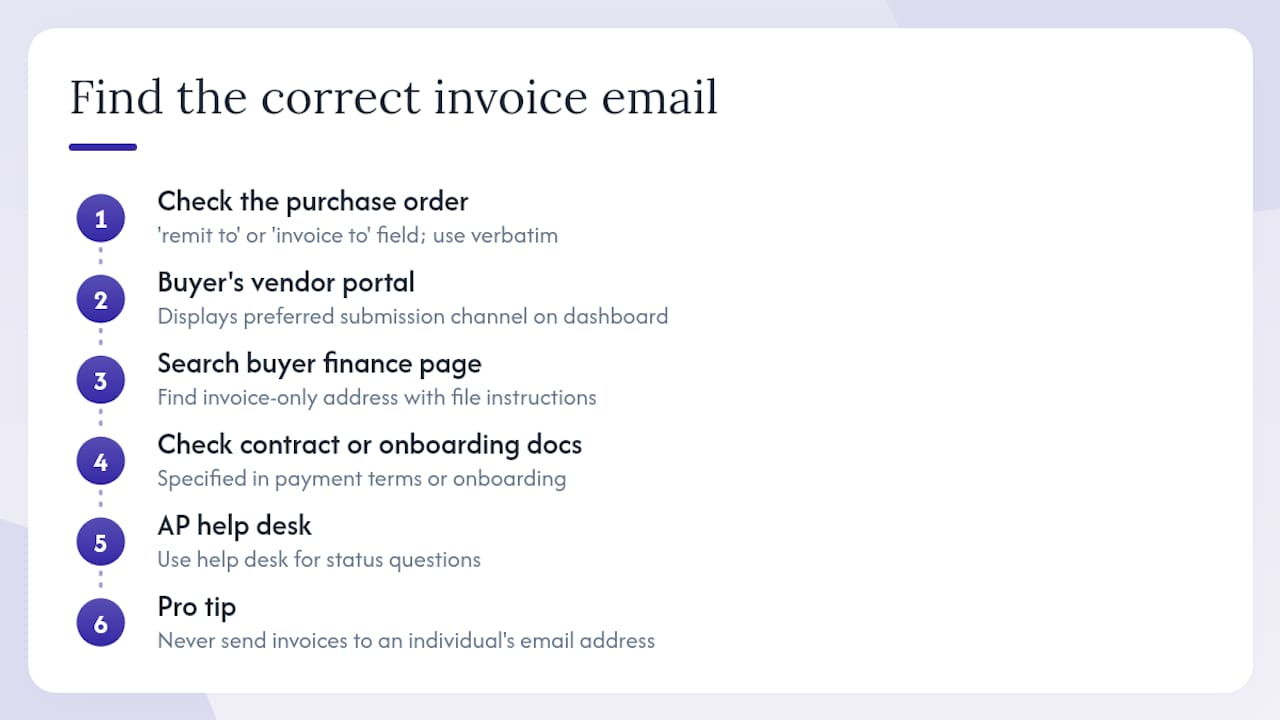
How do you find the correct supplier invoice email address?
The official invoice intake address is almost never the same as a general contact email, and sending to the wrong place is the single fastest way to delay payment.
Step 1: Check the purchase order first. Most POs include a “remit to” or “invoice to” field that lists the exact accounts payable email address. If it’s there, use it verbatim.
Step 2: Log into the buyer’s vendor portal. Portals like SAP Business Network (Ariba) or a buyer’s proprietary supplier hub usually display the preferred submission channel on the dashboard or in the supplier FAQ. This is the most authoritative source because it reflects the buyer’s current routing rules.
Step 3: Search the buyer’s finance or procurement web page. A search query like site:buyer.com "invoice submission" or "accounts payable" [buyer name] invoice email often surfaces a dedicated AP page within the first few results. Stanford’s Fingate page and UPenn’s Division of Finance page are good examples of what to look for: a clearly labeled invoice-only address with explicit file-format instructions.
Step 4: Check the contract or supplier onboarding documents. Longer-term agreements frequently specify the invoice submission channel in the payment terms section. Supplier onboarding packets from procurement teams almost always include it.
Step 5: Call or email the AP help desk — not the buyer contact. AP teams separate invoice intake from administrative inquiries. Use the help desk address for status questions and the invoice-only mailbox strictly for invoices.
Pro Tip: Never send invoices to an individual employee’s email address. Centralized invoice-only mailboxes feed directly into automated OCR and PO-matching systems. An individual’s inbox does not, and the invoice will likely sit unprocessed.
What submission rules do AP teams expect from suppliers?
Most institutional AP teams enforce a short, strict checklist. Failing any single item can push your invoice into a manual exception queue or trigger an outright rejection.
File format and attachment rules:
- Attach invoices as PDF only. XLSX, DOCX, and ZIP files are rejected by most automated parsers.
- One invoice per PDF file and, at most institutions, one invoice per email. MSU explicitly requires a separate email for each invoice to MSUPAY@msu.edu.
- No password-protected PDFs. Automated systems cannot open them, and AP staff typically will not request the password.
- Keep file size within the buyer’s stated limit. Policies at large organizations commonly set limits in the range of 9–35 MB per the Fresenius Medical Care supplier invoicing requirements.
- Use embedded text in the PDF, not a scanned image of a handwritten or typed page. OCR accuracy drops sharply on image-only PDFs.
File naming convention:
Use a consistent pattern: SupplierName_INV_YYYYMMDD_InvoiceNumber.pdf. Example: AcmeCorp_INV_20260301_12345.pdf. This helps AP staff locate the file instantly if the automated system flags it for review.
What the PDF must contain:
- Invoice number and invoice date
- Supplier legal name and remit-to address, matching your vendor master record exactly
- PO number (when the buyer requires one)
- Line-item detail, amounts, applicable taxes, and currency
- Buyer’s company name and billing address
Pro Tip: Keep the email body short. Automated parsers often ignore body text entirely and read only the attachment. Supplementary details like a requester’s name belong on the invoice itself, not in the email body.
Copy-ready email templates for invoice submission
Subject lines and body text that match common AP parsing rules speed both automated ingestion and manual review when a human has to step in.
Subject-line pattern (use for all submissions):
INV-[Invoice Number] | PO-[PO Number] | [Supplier Name] | [Invoice Date]
Example: INV-12345 | PO-98765 | Acme Corp | 2026-03-01
1. Standard PO-based invoice submission
To: accountspayable@[buyer].com Subject: INV-12345 | PO-98765 | Acme Corp | 2026-03-01
Please find attached Invoice #12345 dated March 1, 2026, referencing PO #98765. The invoice is submitted as a single PDF per your submission guidelines.
Acme Corp | accounts@acmecorp.com | +1 (555) 000-0000
2. Non-PO invoice (with requester contact)
To: accountspayable@[buyer].com Subject: INV-12346 | NON-PO | Acme Corp | 2026-03-01
Please find attached Invoice #12346 dated March 1, 2026. This invoice does not reference a PO. The authorizing requester is Jane Smith (jane.smith@buyer.com), whose contact details also appear on the invoice face.
Acme Corp | accounts@acmecorp.com | +1 (555) 000-0000
3. Corrected or resubmitted invoice
To: accountspayable@[buyer].com Subject: RESUBMISSION | INV-12345 | PO-98765 | Acme Corp | 2026-03-01
This is a corrected resubmission of Invoice #12345. The original was rejected due to [brief reason, e.g., incorrect remit-to address]. The corrected PDF is attached. Please disregard the prior submission.
Acme Corp | accounts@acmecorp.com | +1 (555) 000-0000
4. Follow-up if no acknowledgment is received
- Wait the full processing window stated by the buyer (commonly 3–7 business days) before following up.
- Send to the AP help desk address, not the invoice intake mailbox.
- Subject:
STATUS REQUEST | INV-12345 | Submitted [Date] - Attach your original sent-email confirmation or portal acknowledgment as proof of submission.
What fields does AP check before processing your invoice?
Automated matching engines compare every field on the invoice against two records: the purchase order and the vendor master. A mismatch on either triggers a hold.
Albemarle’s invoicing guide is explicit: back-dated and future-dated invoices are forbidden, and the remit-to address on the invoice must match the regional submission address for the applicable entity.
OCR formatting tips:
- Place the PO number and invoice number in the top-right or top-left corner of the first page. Most OCR engines scan those zones first.
- Avoid decorative headers, watermarks, or complex table borders that obscure field values.
- Use a standard font at 10pt or larger. Condensed or script fonts reduce extraction accuracy.
For non-PO invoices: include the full name, title, and email address of the internal requester who authorized the purchase directly on the invoice face. This satisfies most “No PO, No Pay” exception policies without requiring a separate email thread.
Why do emailed invoices get rejected, and how do you fix each cause?
Most rejections fall into a short list of repeatable causes. Each one has a direct fix.
Common rejection causes and fixes:
- Missing or mismatched PO number. Confirm the PO number with your buyer contact before submitting. Resubmit with the correct PO using the RESUBMISSION subject-line format above.
- Supplier name or remit-to doesn’t match vendor master. Check your vendor master record with the buyer’s AP team. Update the invoice to reflect the exact legal name and address on file, then resubmit.
- Multiple invoices in one PDF or one email. Split into separate PDFs and send each in its own email. Stanford’s policy, for example, requires individual PDF files and rejects bundled submissions.
- Password-protected or corrupted PDF. Re-export the invoice from your billing system without encryption. Test by opening the PDF on a different device before sending.
- Wrong file type (XLSX, DOCX, image-only scan). Convert to a text-embedded PDF. Most accounting platforms export directly to PDF; avoid printing to a scanner.
- Incorrect currency or tax details. Match the currency to the PO exactly. For US buyers, confirm whether the transaction is tax-exempt and include the appropriate documentation.
Escalation steps when an invoice is stuck:
- Wait the full stated processing window (3–7 business days is typical).
- Email the AP help desk (not the invoice intake mailbox) with subject:
STATUS REQUEST | INV-[#] | Submitted [Date]. - Attach your original submission confirmation or portal acknowledgment as proof.
- If no response within two additional business days, copy the buyer’s procurement contact.
Keep every sent-email timestamp and any portal acknowledgment on file. The Coca-Cola Company’s supplier guide describes automated acknowledgment emails that include an AP Reference Number — that reference number is your proof of receipt and the fastest way to resolve a dispute.
What are your options beyond email for invoice submission?
Email is not always the preferred channel. Large buyers increasingly require or strongly prefer structured electronic submission, and routing an invoice through the wrong channel can delay payment just as much as a formatting error.
| Channel | When to use it | Key benefit |
|---|---|---|
| Vendor portal (e.g., SAP Business Network/Ariba) | Buyer has enabled portal onboarding for your supplier account | Real-time status tracking; automated acknowledgment |
| EDI / cXML | High-volume, recurring invoices; buyer has issued EDI specs | Fully automated end-to-end; no manual touchpoints |
| Peppol / e-invoicing tax portal | Buyer operates in a jurisdiction with mandated e-invoicing | Legal compliance; government-validated receipt |
| Email (PDF) | Small suppliers, transitional rollouts, or buyer exception policy | Low setup cost; works before portal onboarding |
| Postal mail or fax | Legacy contracts or buyers without electronic intake | Last resort; slowest processing |
Large organizations are actively migrating away from unstructured email toward portals and EDI. Fresenius Medical Care’s supplier portal lists SAP Business Network (Ariba) as the preferred channel and treats email as a fallback. When buyers roll out centralized mailbox infrastructure in phases, confirm with your buyer contact whether they have migrated before changing your submission method — misrouting during a transition delays processing.
To request portal onboarding or EDI setup, contact the buyer’s procurement or AP team and provide: your legal entity name, tax ID (EIN for US suppliers), remit-to address, primary AP contact email, and preferred payment method. Most buyers complete onboarding within 5–10 business days.
How does invoice automation actually process your emailed invoice?
When an invoice lands in a centralized AP mailbox, it doesn’t go to a human first. The pipeline typically runs like this:
- Centralized mailbox receives the email and strips the attachment.
- Automated parser / OCR engine reads the PDF, extracts field values (invoice number, date, amount, PO number, supplier name), and structures them as data.
- PO-matching engine compares extracted values against the open PO and vendor master. Matches within tolerance move to payment approval automatically.
- Exception queue catches anything that doesn’t match — wrong PO, mismatched name, unreadable file — and routes it to a human reviewer.
This is why every submission rule in this guide exists. A password-protected PDF stops the parser at step two. A supplier name that reads “Acme Corp” instead of “Acme Corporation” fails the vendor master match at step three. Neither failure is obvious to a supplier who just hit send.
Benefits of a well-formatted submission:
- Faster processing with fewer manual holds
- Trackable acknowledgments (like the AP Reference Number Coca-Cola issues)
- Cleaner audit trails for both buyer and supplier
- Reduced back-and-forth between AP and supplier contacts
Pro Tip: If your buyer uses SAP Business Network (Ariba) or a similar platform, the portal’s submission form pre-validates fields before the invoice even reaches the matching engine. That pre-validation alone eliminates most of the rejection causes listed in this guide.
For a deeper look at how invoice processing from email works inside an automation system, the step-by-step breakdown covers parser configuration and exception-handling logic in plain terms.
What suppliers consistently get wrong (and the fix is usually one step)
The most common mistake isn’t a complex formatting error. It’s a vendor master mismatch that’s been sitting unnoticed for months. A supplier registers as “Acme Corp LLC” during onboarding, then sends every invoice as “Acme Corporation.” The OCR engine reads both correctly. The matching engine rejects the second one every time. The supplier calls AP, AP asks them to resubmit, and the cycle repeats until someone updates the vendor master.
The fix takes about five minutes: ask the buyer’s AP team to confirm the exact legal name and remit-to address on your vendor master record, then lock that string into your invoice template. Don’t abbreviate it, don’t add a DBA, and don’t let your billing system auto-populate a shortened version.
The second most common mistake is sending to the wrong address entirely — usually a procurement contact or account manager who forwarded an invoice once and became the de facto “invoice contact.” That person’s inbox is not connected to any processing system. The Cargill supplier guidance makes this explicit: individual colleague mailboxes are not monitored for invoice processing.
Standardize your file names, confirm your vendor master details once per year, and verify the PO number before every submission. Those three habits eliminate the majority of exception-queue entries for most buyers.
Stop losing invoices to manual errors with Zenith-books
Finance teams that process dozens or hundreds of supplier invoices per month spend a disproportionate amount of time on the exact problems this guide describes: chasing missing PO numbers, re-exporting PDFs, correcting vendor master mismatches, and manually filing acknowledgments.
Zenith-books handles the intake side automatically. Its AI extracts invoice data from emailed PDFs, matches fields against your records, and auto-files invoices to Google Drive with consistent naming — no manual renaming, no lost attachments. For AP teams, that means fewer exception-queue entries and a complete, timestamped audit trail from the moment an invoice arrives. For suppliers, it means faster acknowledgment and fewer resubmission requests.

The full solutions overview covers the complete workflow: email intake, OCR extraction, PO matching, and cash-flow syncing to Google Sheets. If your team is still manually processing emailed invoices, that’s the place to start.
Sources
These institutional and corporate AP pages were used as live examples throughout this guide. Each one demonstrates a specific submission standard you can reference directly.
- Invoicing & Payment | Fresenius Medical Care
- ALBEMARLE GENERAL INVOICING REQUIREMENTS
- The Coca-Cola Company Supplier Invoicing Instructions
- Submit an Invoice to Accounts Payable - Fingate
- Supplier Invoice Submission - Procurement
- Processing Invoices and Payments - Division of Finance