


Supplier statement reconciliation ties a vendor’s statement of account to your AP ledger, explains every difference between the two, and confirms the ending balance is correct. Your immediate next step: pull the supplier statement for the target period and the matching AP ledger extract (vendor aging or vendor detail) for the same dates, then put them side by side before your next payment run. ACCA treats this as a foundational control for maintaining accurate payables records, while FASB’s broader internal-control framework for financial reporting depends on exactly this kind of subsidiary-ledger verification. Zenith-books automates the ingestion and matching steps for teams that need to scale the process beyond a handful of vendors.
What a supplier statement actually contains
A supplier statement is the vendor’s customer-account statement sent to you. From your side of the relationship, it is a source document you use to verify what your AP system shows. ACCA confirms it covers a specific period and shows the opening balance, every transaction that moved the balance, and the closing amount the supplier believes you owe.
Typical fields you will see on any statement:
- Opening balance (what you owed at the start of the period)
- Invoice references, dates, and amounts (each line item billed)
- Credit memos and adjustments (returns, price corrections, allowances)
- Payments applied, usually with a remittance or check reference
- Closing balance and the “as of” date the statement was generated
- Statement period (the date range covered)
Format varies by supplier. Large vendors often provide a portal CSV or Excel export you can load directly into a spreadsheet. Mid-size suppliers typically email a PDF. Smaller vendors may send a one-page summary with no line-item detail at all. Format matters for intake because a PDF requires OCR extraction before you can match it line by line, while a CSV can go straight into your reconciliation workbook. The same underlying transaction can also look different across systems: a supplier’s accounting software may record an invoice on the shipment date, while your system records it on receipt, creating a legitimate date mismatch that looks like an error until you check the PO.
Why supplier statement reconciliation matters more than most teams realize
The direct payoff is straightforward: reconciling prevents overpayments, surfaces unapplied credits sitting idle in your AP ledger, and keeps your vendor aging accurate. Those three outcomes alone justify the time. But the downstream effects are what most AP teams underestimate.
An inaccurate AP ledger distorts your cash flow forecast. If you are carrying unapplied credits against a vendor but your aging shows a net payable, you may schedule a payment that is partially or fully unnecessary. Multiply that across twenty vendors and the working capital impact is real. Reconciliations also protect vendor relationships: catching a disputed invoice before the supplier escalates it to collections is far cheaper than resolving a credit hold after the fact.
From a financial-reporting standpoint, unreconciled vendor accounts weaken the audit evidence supporting your trade payables balance. Period-end accruals depend on knowing which invoices are outstanding and which credits are valid. Auditors will ask for reconciled statements as supporting documentation, and a stack of unreconciled PDFs is not a satisfying answer.
Supplier statement reconciliation is also a critical internal control for catching what three-way matching misses: missing invoices that never entered your system, duplicate payments that cleared the bank, and pricing errors that passed PO matching because the PO itself was wrong.
Common reasons your AP ledger won’t match a supplier statement
Discrepancies between your records and a supplier’s statement are normal. ACCA notes they usually stem from timing differences or operational errors rather than fraud, but every exception still needs a root cause before you can close it.
The most frequent discrepancy types, in rough order of how often they appear:
- Payments in transit: You recorded the payment; the supplier has not received or posted it yet. Classic timing difference that resolves itself in the next period.
- Unapplied credit memos: A credit note exists in one system but has not been processed in the other, or has been processed but not applied against an open invoice.
- Missing invoices: The supplier has billed you; you have no record in your AP system. Often caused by invoices routed to the wrong inbox or lost in email.
- Duplicate entries or duplicate payments: The same invoice appears twice in your ledger, or a payment was issued twice. These do not self-correct.
- Misapplied payments: A payment was posted to the wrong vendor account or applied against the wrong invoice, leaving one invoice open and another overpaid.
- Currency and exchange-rate variances: For foreign-currency vendors, the rate used at invoice entry may differ from the rate at payment, creating a residual balance that is not an error but needs documenting.
- Transposition and data-entry errors: A digit flipped during manual entry ($1,450 entered as $1,540) creates a difference that matches no other line item and requires going back to the original document.
Quick triage checklist: When you hit an unmatched item, ask three questions in order. First, does the difference appear on both sides with a date gap of fewer than ten business days? If yes, it is likely a timing difference — document it and move on. Second, does one side show a credit and the other show nothing? Check whether a credit memo was issued but not posted. Third, does the amount match another line exactly? Flag it as a potential duplicate and pull the payment or invoice history before doing anything else.
How often should you reconcile, and which vendors come first?
Reconcile high-spend, high-volume, and high-risk vendors monthly, and always before a large payment run. Reconciling after payment increases the risk of overpayment and makes recovery significantly harder. Low-volume vendors with stable, predictable invoices can be handled quarterly or on exception.
| Vendor tier | Criteria | Recommended frequency | Typical effort per reconciliation |
|---|---|---|---|
| Tier 1 — Critical | High-spend, high-volume, and strategic or sole-source | Monthly, before payment run | 1–3 hours |
| Tier 2 — Significant | Mid-range spend, occasional discrepancies, multi-currency | Monthly or bi-monthly | 30–90 minutes |
| Tier 3 — Routine | Low spend, low volume, consistent pricing, domestic currency | Quarterly or on exception | 15–30 minutes |
| Tier 4 — Spot-check | Infrequent purchases, no credit terms | Annually or on exception | 15 minutes |
Prioritization criteria beyond spend: historical discrepancy rate (a vendor with recurring mismatches earns a higher tier regardless of spend), strategic importance (a sole-source supplier you cannot replace easily), and currency risk (any vendor invoiced in a foreign currency moves up at least one tier because exchange-rate variances require extra documentation).
A step-by-step reconciliation process you can follow today
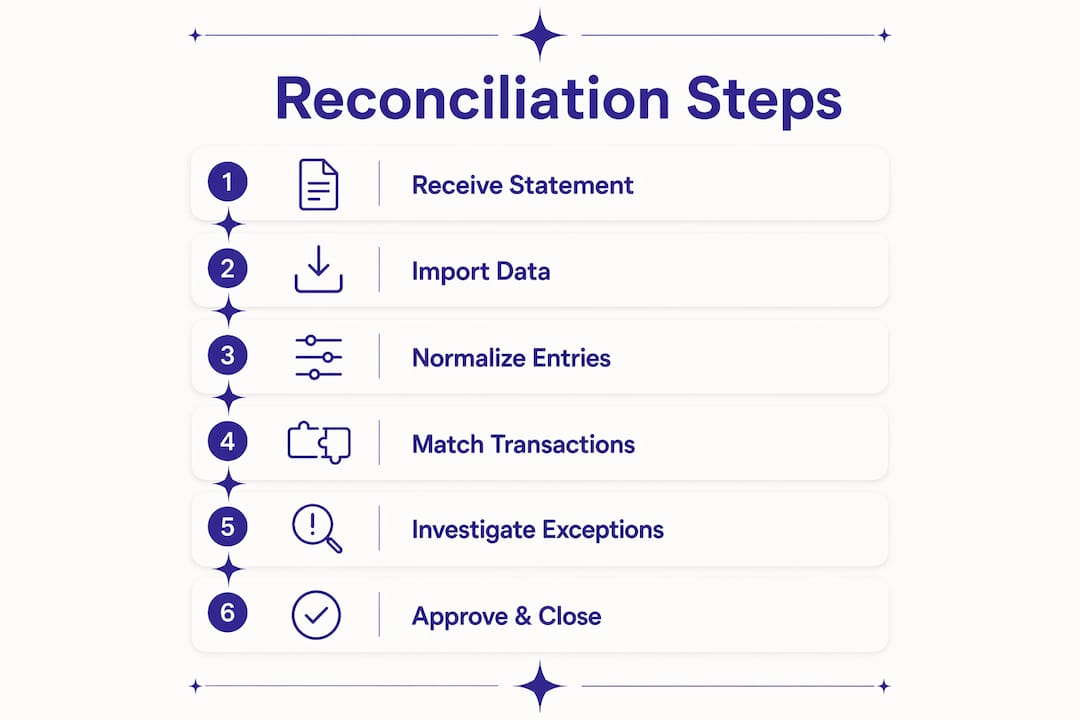
The goal of every reconciliation is to start with the opening balance, account for every transaction, and arrive at a closing balance that matches on both sides. The formula is simple: Opening Balance + Invoices Issued − Payments Made − Credits Applied = Closing Balance. Practitioners recommend matching line by line and documenting timing differences rather than writing them off.
- Agree the opening balance. Confirm the opening balance on the supplier statement matches the prior-period closing balance in your AP ledger. A mismatch here means a prior-period item was never resolved.
- Extract and structure statement data. Convert the supplier statement into a structured format (CSV or spreadsheet rows). For PDF statements, use OCR extraction before attempting any matching. Extracting structured data first reduces downstream matching errors significantly.
- Pull the AP ledger extract. Run a vendor detail or vendor aging report for the same period from your ERP or accounting system. Include invoice number, date, amount, payment reference, and any credit memos.
- Match invoices line by line. Tick off every invoice that appears on both the statement and the ledger with the same reference number, date, and amount. These matched items are done.
- Verify payments. Match each payment on the statement to your AP ledger and, where needed, to your bank remittance. A payment that cleared your bank but does not appear on the statement is a payment in transit — document the bank date and move on.
- Confirm credits. Match every credit memo on the statement to a corresponding entry in your ledger. Unmatched credits on the statement that are not in your ledger need to be posted.
- List all exceptions. Every unmatched item from either side goes into an exceptions log with: vendor name, statement date, line reference, discrepancy type, dollar amount, and a preliminary root-cause note.
- Investigate exceptions. For each exception, pull the original source document (invoice PDF, PO, goods receipt, remittance advice). Determine whether the item is a timing difference, a recording error on your side, or a supplier-side posting issue.
- Post corrections. For items that are your error, post the correcting journal entry (see the financial-statement section below for sample entries). For supplier-side errors, contact the vendor with documentation.
- Escalate unresolved items. Any exception not resolved within five business days should move to the AP manager. Items unresolved after ten business days go to the finance controller and, if supplier-side, to the vendor’s AR contact with a formal dispute notice.
- Tie to the closing balance. After corrections, your adjusted AP ledger balance should equal the supplier statement closing balance (adjusted for documented timing differences). If it does not, restart the exception investigation.
- Document and file. Archive the reconciled statement, the reconciliation worksheet, the exceptions log, any correcting journal entries, and all supplier communications in your ERP or a centralized document drive.
How to reconcile supplier statements in Excel
Use a two-sheet workbook: Sheet 1 holds the reconciliation data; Sheet 2 is your exceptions pivot. The core layout on Sheet 1 uses one row per statement line, with a parallel AP extract section alongside it.

| Column | Description |
|---|---|
| A: Supplier Invoice # | Invoice reference from the supplier statement |
| B: Statement Date | Invoice date per the statement |
| C: Statement Amount | Dollar amount per the statement |
| D: AP Invoice ID | Matching invoice ID from your AP ledger extract |
| E: AP Date | Invoice date in your system |
| F: AP Amount | Dollar amount in your system |
| G: Match Status | Formula-driven flag: Matched / Amount Diff / Date Diff / Not in AP / Not in Statement |
| H: Variance | =C2-F2 (positive = statement higher; negative = AP higher) |
| I: Adjustment Code | TIM (timing), CR (credit), DUP (duplicate), ERR (error), FX (currency) |
| J: Notes | Free-text root cause and action taken |
Key formulas:
- XLOOKUP for matching:
=XLOOKUP(A2, AP_Extract[Invoice_ID], AP_Extract[Amount], "Not in AP", 0)pulls the AP amount for each statement line. If no match exists, it returns “Not in AP” — your first exception flag. - SUMIFS for totals:
=SUMIFS(C:C, G:G, "Matched")gives you the matched total;=SUMIFS(H:H, G:G, "Amount Diff")isolates variance dollars. - Match flag with IF/AND:
=IF(AND(F2<>"Not in AP", ABS(C2-F2)<tolerance_threshold), "Matched", IF(F2="Not in AP", "Not in AP", "Amount Diff"))wheretolerance_thresholdis a named cell holding your dollar tolerance (e.g., $5.00).
For PDF statements, run them through an OCR tool or use automated invoice processing from email to convert them into structured rows before loading into the workbook. Trying to manually retype a 40-line PDF statement is where transposition errors are born.
Pro Tip: Normalize supplier names and invoice references before matching. A vendor who sends “INV-2024-001” in one period and “2024-001” in the next will break every XLOOKUP. Create a helper column that strips prefixes and leading zeros using SUBSTITUTE and TEXT functions, then match on the cleaned reference. This single step eliminates a large share of false “Not in AP” flags.
For fuzzy matching on references that are genuinely inconsistent, the Microsoft Fuzzy Lookup Add-in for Excel handles approximate string matching without requiring a macro. Use it as a second-pass check after your exact XLOOKUP run.
How automation changes the reconciliation workflow
Manual matching is the bottleneck. An AP team member working through a 200-line supplier statement in Excel can spend two to three hours on a single vendor. Automation handles the matching in seconds, which means the team’s time shifts from finding differences to resolving them.

Automated statement reconciliation can dramatically increase throughput, with some implementations reporting efficiency gains of 12x compared to fully manual workflows. The practical effect: a team that could reconcile ten vendors per month manually can cover far more of the vendor portfolio with the same headcount.
Feature checklist for evaluating any reconciliation tool:
- PDF and CSV ingestion with OCR extraction (handles both portal exports and emailed statements)
- Intelligent line-item extraction that captures invoice number, date, amount, and credit references
- Automatic vendor-to-ledger mapping with vendor-master normalization
- Fuzzy-match rules for invoice references that are not identical across systems
- Configurable tolerance thresholds (dollar and percentage) so minor rounding differences do not generate false exceptions
- ERP and bank-feed integrations (so payment data flows in automatically rather than being manually exported)
- Secure access controls and a full audit log of every match decision and manual override
- Exception workflow with SLA tracking and escalation routing
Implementation considerations: Before going live, normalize your vendor master — standardize vendor names and account numbers across your ERP. Vendor-master drift (the same supplier stored under three slightly different names) is the single most common cause of false exceptions in automated matching, and fixing it before implementation is far cheaper than investigating phantom mismatches after.
| Approach | Matching speed | Exception detection | Audit trail | Scalability |
|---|---|---|---|---|
| Manual (Excel) | Slow — hours per vendor | Dependent on analyst skill | Manual documentation required | Limited by headcount |
| Semi-automated (Excel + OCR) | Moderate — minutes per vendor | Improved; still analyst-reviewed | Partially automated | Moderate |
| Fully automated platform | Fast — seconds per vendor | Systematic; rules-based | Automated log and approval chain | High |
Change management is often underestimated. AP teams that have run manual reconciliations for years need clear documentation of the new workflow, defined exception-handling rules, and a parallel-run period where automated results are checked against manual ones before the team trusts the output fully.
Tolerance thresholds, escalation playbook, and documentation standards
Document your tolerance thresholds before you run a single reconciliation. Without them, every $0.01 rounding difference generates an exception ticket, and your team spends time on noise instead of real discrepancies.
Recommended starting thresholds (adjust based on your vendor spend profile):
- Dollar tolerance: Differences of $5.00 or less per line — document as rounding, no action required.
- Percentage tolerance: Differences of 0.5% or less of the invoice amount — document as acceptable variance.
- Escalation trigger: Any single-line difference above $500, or any vendor where total unresolved variances exceed $1,000, escalates to the AP manager within five business days.
Exceptions log — required fields:
| Field | Purpose |
|---|---|
| Vendor name | Identifies the supplier |
| Statement date | Period the statement covers |
| Line reference | Invoice or credit memo number |
| Discrepancy type | TIM / CR / DUP / ERR / FX |
| Amount | Dollar value of the difference |
| Root cause | Brief description of why the difference exists |
| Assigned owner | AP team member responsible for resolution |
| Target resolution date | SLA deadline |
A documented, repeatable exceptions log does more than satisfy auditors. Over time, it reveals patterns: a vendor who consistently posts payments two weeks late, or an internal team that routinely misroutes invoices to the wrong cost center. Those patterns are where process improvements come from.
Three-step escalation timeline:
- Day 1–5: AP owner investigates and attempts resolution (contact supplier, pull source documents, post corrections).
- Day 6–10: Unresolved items escalate to the AP manager, who reviews root cause and approves any journal entries above the team’s posting authority.
- Day 11+: Finance controller is notified; supplier-side items trigger a formal dispute notice to the vendor’s AR contact with a target response SLA of five business days.
Pro Tip: Store every reconciliation package (statement PDF, reconciliation worksheet, exceptions log, correcting journal entries, and supplier communications) as a single archived folder per vendor per period. Name the folder consistently: VENDORNAME_YYYYMM_Reconciliation. Auditors can pull the complete evidence package in under a minute, and your team can reopen any prior period without hunting across three systems.
How reconciliation findings affect the balance sheet and audit trail
Unresolved supplier-statement differences directly misstate your trade payables balance on the balance sheet. A missing invoice that the supplier has billed but you have not recorded understates payables and overstates net income for the period. An unapplied credit that sits unposted overstates payables. Neither corrects itself without an explicit journal entry.
Sample journal entries for common reconciliation findings:
-
Missing invoice (not in your AP ledger):
- Dr. Expense (or Inventory) — $X
- Cr. Accounts Payable — $X
- Memo: Record invoice [Inv#] per supplier statement; not previously entered.
-
Duplicate payment (paid twice):
- Dr. Accounts Payable — $X
- Cr. Cash / Bank — $X (if requesting a refund) or Cr. Prepaid/Vendor Deposit — $X (if applying to future invoices)
- Memo: Reverse duplicate payment [Check/ACH#]; supplier notified [date].
-
Unapplied credit memo:
- Dr. Accounts Payable — $X
- Cr. Expense (or Inventory) — $X
- Memo: Apply credit memo [CN#] per supplier statement; previously unposted.
Post corrections in the period they are discovered unless the amount is immaterial and the period is already closed, in which case document the timing difference and carry it forward. For period-end accruals, any invoice on the supplier statement dated before the period-end cutoff that is not in your AP ledger should be accrued, even if the physical invoice has not arrived.
Audit-evidence checklist for each reconciliation:
- Reconciled supplier statement (PDF or portal export, date-stamped)
- Reconciliation worksheet showing matched items, exceptions, and the closing-balance tie
- Approval sign-off from the AP manager or controller
- Correcting journal entries with supporting documentation attached
- Supplier communications for any disputed items (emails, dispute notices, responses)
- Bank remittance or payment confirmation for any payment-in-transit items
Key Takeaways
Effective supplier statement reconciliation requires a documented workflow, defined tolerance thresholds, and consistent exception logging — without all three, the process produces results that neither your team nor your auditors can rely on.
| Point | Details |
|---|---|
| Prioritize by spend and risk | Reconcile Tier 1 vendors monthly before payment runs; Tier 3 and 4 vendors quarterly or on exception. |
| Use the closing-balance formula | Opening Balance + Invoices − Payments − Credits = Closing Balance; any gap after this check is an unresolved exception. |
| Set tolerance thresholds first | Document dollar and percentage tolerances before running reconciliations to avoid wasting time on rounding noise. |
| Archive a complete evidence package | Store the statement, worksheet, journal entries, and communications together per vendor per period for audit readiness. |
| Zenith-books automates ingestion and matching | Zenith-books handles OCR extraction, vendor-to-ledger mapping, and exception routing so AP teams focus on resolution, not matching. |
The part most AP teams skip — and why it costs them later
The conventional wisdom on supplier statement reconciliation focuses almost entirely on the matching step. Get the statement, match it to the ledger, document the differences. That is correct, but it misses the part that actually determines whether the process is sustainable: what happens to the exceptions after they are identified.
Most AP teams I have seen operate with an informal escalation path. The analyst flags an exception, sends an email to the supplier, and then the item sits in a spreadsheet until someone follows up. Weeks pass. The supplier closes the period. The exception gets written off or quietly ignored. The next reconciliation starts with the same unresolved balance, now dressed up as an “opening balance difference.”
The fix is not complicated. Require a root-cause code on every exception before it leaves the analyst’s desk. Not a free-text note — a code from a defined list (TIM, CR, DUP, ERR, FX). That single discipline forces the analyst to actually diagnose the item rather than describe it. Over three months, the codes tell you exactly where your process is breaking down: too many ERR codes means a data-entry problem; too many TIM codes on the same vendor means their posting cycle is misaligned with your payment run. You cannot fix what you have not categorized.
Normalize your remittance references while you are at it. Require a vendor invoice number on every ACH payment. That one change eliminates a significant share of “payment not applied” exceptions before they ever appear on a statement.
Cut your reconciliation time with Zenith-books
Manual statement reconciliation scales poorly. The more vendors you add, the more hours your team spends on matching rather than on the exceptions that actually need judgment. Zenith-books is built for exactly this problem: it ingests supplier statements automatically (PDF, CSV, or email), extracts line items with AI-powered OCR, and maps them to your AP ledger without manual rekeying.

The features AP teams ask for most are all there: fuzzy-match rules for inconsistent invoice references, configurable tolerance thresholds, ERP and live bank feed integrations, a full audit log, and an exception workflow with SLA tracking. Clients like Združenje YES and BAM Chocolate report reduced month-end close times and zero manual entry across their transaction volumes. For teams ready to move beyond spreadsheets, the Zenith-books solutions page shows the full workflow. If you want to test extraction accuracy before committing, run a live statement through the invoice OCR test — results come back in seconds.
Useful sources and further reading
- Supplier Statement Reconciliations — ACCA Global: The authoritative standard-setter reference on why supplier account records matter and how reconciliations identify errors. Useful for audit and exam citation.
- How to Reconcile a Supplier Statement in 12 Simple Steps — FiscalTec: Practitioner-focused step-by-step guide covering the reconciliation sequence and common exception types.
- Vendor Statement Reconciliation: A Practical Guide — Invoice Data Extraction: Covers the extraction-first workflow, vendor-master normalization, and exception-log best practices for AP teams evaluating automation.
- Zenith-books Blog — Insights on Expense Automation: Practical resources on invoice extraction, reconciliation workflows, and AP automation for finance teams.
Recommended
- What Is Invoice Reconciliation? A Plain-English Guide for Non-Accountants — Zenith Blog
- Zenith Blog — Insights & Resources on Expense Automation
- Expense Management for Startups: What You Need Before Series A — Zenith Blog
- How to Stop Chasing Receipts: The Real Cost of Manual Expense Tracking — Zenith Blog