

Finish Month End in Days: PSD2 Ready Cash Application Automation for EU SMEs

Cash application automation is the practice of matching bank transactions to invoices and ledger entries automatically, using open-banking feeds and OCR-extracted invoice data instead of a person cross-checking statements by eye. The payoff is straightforward: fewer manual matches, fewer exceptions and a month-end close that finishes in days rather than weeks. If you want the short version of what to do next, jump to the implementation checklist below and start by connecting a read-only bank feed.
TL;DR:
- Most bank data issues stem from the quality and format of remittance information, with structured ISO 20022 data significantly improving match rates.
- The effectiveness of automation heavily depends on invoice data fields like invoice number, IBAN, VAT, line items, and payment date, which must be accurate.
- Running a multi-pass matching engine from exact to fuzzy to aggregate logic increases the percentage of transactions matched automatically, often reaching 70 to 80 percent.
- Initial setup should include testing with recent historic data, connecting bank feeds, and training staff on exception handling to ensure trust and accuracy.
- Regular review of exceptions and staying updated on regulatory changes like ViDA and ISO 20022 helps maintain optimal match rates and adapt to data format improvements.
Table of Contents
- How does cash application automation actually work?
- What bank data standards actually affect your match rate?
- What invoice data do you actually need to capture?
- How do you build a matching sequence that actually works?
- What should your first 30 to 60 days look like?
- Why an integrated provider helps
- How should exceptions actually get resolved?
- Which European standards actually change your matching logic?
- Does this need to replace your accounting system?
- What should you actually be measuring?
- Is your bank data actually secure during automation?
- How does this change your cash flow forecasting?
- How do you get your team to actually use this?
- How do you keep match rates from decaying over time?
- Author’s perspective and recommended next steps
- Try Zenith on your own bank data this week
- Sources
- FAQ
How does cash application automation actually work?
Three components have to work together, and most implementations fail because one of them is missing or half-configured.
The first is the bank feed itself. A PSD2-based open banking connection gives you read-only, consented access to transaction data straight from the bank, no CSV exports, no logging into five different banking portals. This is your canonical source of truth for what actually cleared.
The second is invoice capture. OCR and AI extraction turn a PDF or scanned invoice into a structured, validated record before payment happens, capturing the invoice number, amount, VAT and bank details as data fields rather than as text on a page.
The third is the matching engine, which sits between the two and tries to pair transactions to invoices using a sequence of rules rather than one blunt comparison. Running several passes matters because:
- A single “exact amount and date” rule misses partial payments, rounding differences and bundled transfers.
- Sequential passes (exact match, then fuzzy match, then aggregate logic) catch progressively harder cases without loosening the rules for the easy ones.
- Each pass that fails to find a match should hand the item to the next pass automatically, not to a human queue.
Get the sequencing wrong and you end up with either too many false matches or a backlog of exceptions nobody has time to clear.
What bank data standards actually affect your match rate?
Most match-rate problems trace back to what your bank actually sends you, not to your matching logic. Two ISO 20022 message types matter here: camt.053 gives you end-of-day statement data, while camt.054 delivers debit/credit notifications you can use for near real-time matching rather than waiting for the daily statement. If your bank only offers MT940 or a basic CSV export, you are working with a much thinner data set than camt.053 provides.
Remittance information is the other lever. Structured remittance fields under ISO 20022 let a payment carry a proper invoice reference all the way to your bank statement, rather than relying on whatever the payer typed into a free-text field. In practice, this still varies enormously by bank and by country: some payment rails truncate remittance text, and correspondent banking chains can strip data entirely on cross-border transfers. Expect to build fallback logic that extracts a reference from a truncated or garbled string, because clean end-to-end data is the exception on some corridors, not yet the rule.
A few practical points worth raising with your bank directly:
- Ask specifically whether your account can be delivered in camt.053/camt.054 format, not just MT940.
- Verification of Payee (VoP), now mandatory for eurozone instant payments, is forcing better vendor master data across the board, which indirectly improves matching accuracy.
- Instant payments settle in seconds rather than days, which changes your timing-pass logic since “pending” and “cleared” states now happen almost simultaneously.
What invoice data do you actually need to capture?
Matching only works if the invoice record on your side is as clean as the bank transaction on the other. Five fields do almost all the work:
- Invoice number — the single strongest matching key when it survives into the remittance field.
- IBAN of the payee — confirms you’re matching against the right counterparty, not just a similar amount.
- VAT amount and total — needed both for matching tolerance and for e-invoicing compliance.
- Line-item detail — lets you cross-check against a purchase order rather than trusting the header total alone.
- Currency and expected payment date — critical once you’re reconciling multi-currency accounts.
Duplicate detection has to run before matching, not after, comparing invoice number, vendor and amount together, so a resubmitted PDF doesn’t get paid twice or matched twice. Cross-checking against the purchase order catches the case where an invoice total is correct but the line items don’t add up.
Tolerance rules are where most teams either get burned or get stuck. A €0.50 rounding difference from currency conversion or a €2 bank fee deducted at source shouldn’t create an exception, but a €50 discrepancy should.
A flat €5 tolerance is generous on a €50 invoice and dangerously loose on a €5,000 one.*
How do you build a matching sequence that actually works?
Run your matching engine as a series of passes, each one catching what the previous one missed, in this order:
- Pass 1, exact match: invoice reference plus amount, matched to the transaction. This should clear the majority of clean, structured payments instantly.
- Pass 2, reference-only match: invoice number matches but the amount is slightly off, flagging a possible short payment, discount or bank fee deduction.
- Pass 3, fuzzy match: description and amount are close but the reference field is missing or garbled, common on international transfers where remittance data gets truncated.
- Pass 4, many-to-one and aggregate logic: one payment covers several invoices, or several partial payments cover one invoice. This is where most manual reconciliation time gets spent without automation.
- Pass 5, timing pass: separates transactions still pending from those cleared, so you’re not chasing a payment that simply hasn’t settled yet.
Anything left after five passes goes into an exceptions queue, and how you classify it there determines what a human actually has to do. A transaction with no plausible invoice match at all needs someone to check whether an invoice is missing from the system. A transaction that’s close on amount but has no reference needs a quick judgement call, not a full investigation. A payment that’s simply pending needs no action beyond waiting for the timing pass to catch it on the next run.
Match-rate expectations vary by how structured your inputs are. A multi-pass matching engine fed with clean invoice and bank data typically delivers automated match rates ranging from moderate to high percentages, and consistent use of structured creditor references or payment QR codes can push straightforward SME setups to the 70 to 80 percent range on its own on its own. The gap between those numbers and near-total automation almost always comes down to invoice data quality, not the matching logic itself.
What should your first 30 to 60 days look like?
Treat this as a project with dates attached, not an open-ended migration.
- Pull a sample of historic bank and invoice data (1 to 3 days). Use the last two or three months so your matching rules get tested against real messiness, not a clean demo file.
- Connect your bank feed. With a PSD2-based sync this takes around 5 minutes per account, though larger or less common banks can take a few hours to authorise.
- Run OCR across your historic invoice backlog to build a validated invoice dataset before you switch on live matching.
- Configure your matching passes in the order set out above (1 to 2 days for a first working version).
- Set your tolerance rules using the percentage-plus-floor approach, then test them against known edge cases from your sample data.
- Train your exceptions queue by running a week of live data in parallel with your existing process before switching over fully.
On cost, a read-only bank sync connection runs at a reasonable per-account monthly fee, which for a business running three or four accounts is a fraction of the time it replaces.
Pro Tip: Track three numbers from week one: automated match rate, average minutes per reconciliation, and duplicate payments caught before they went out. Those three tell you whether the setup is actually working, long before month-end close speed shows any improvement.
Why an integrated provider helps
You can assemble bank feeds, OCR and matching logic separately, but stitching three vendors together adds its own overhead. A provider can connect via a read-only PSD2 link across multiple banks in your region and deliver transaction data with various compatible tools, whichever fits your existing workflow. Full technical detail sits in the Zenith documentation.
Setup takes about 5 minutes per account, pricing is a modest fee per account per month, and there’s a 30-day money-back guarantee if it doesn’t fit your process. Some customers use it for exactly the workflow described above: bank sync feeding matching, with OCR handling invoice capture on the AP side. It doesn’t replace the checklist, it just removes three of the six steps from your plate.
How should exceptions actually get resolved?
An exception isn’t a failure of the system, it’s the system correctly admitting it doesn’t have enough information to decide on its own. The mistake most teams make is routing every unmatched item into one undifferentiated queue, which turns exception handling into an unstructured backlog nobody wants to own.
Split exceptions into categories the moment they’re created, because each one needs a different person and a different fix:
- Missing invoice: a payment cleared but no invoice record exists. This goes to whoever owns AP, and usually means chasing a vendor for a copy.
- Amount mismatch beyond tolerance: needs someone with authority to approve a short payment or query it with the vendor.
- Ambiguous many-to-one: a single transfer that might cover two or three invoices. This is a five-minute manual check, not an investigation.
- Unidentifiable counterparty: a transaction with no plausible match at all. Flag it and move on rather than letting it sit unresolved for weeks.
A practical guide to invoice reconciliation is worth sharing with anyone new to the exceptions queue, since the categories above map directly onto the resolution steps it walks through. The goal isn’t zero exceptions, it’s a queue small enough that clearing it takes minutes rather than hours, and a pragmatic production setup lets the engine run safe rules unattended and only routes genuinely ambiguous items to a human.
Which European standards actually change your matching logic?
Three regulatory threads matter here, and they’re moving in the same direction: towards structured data that machines can read without guessing.
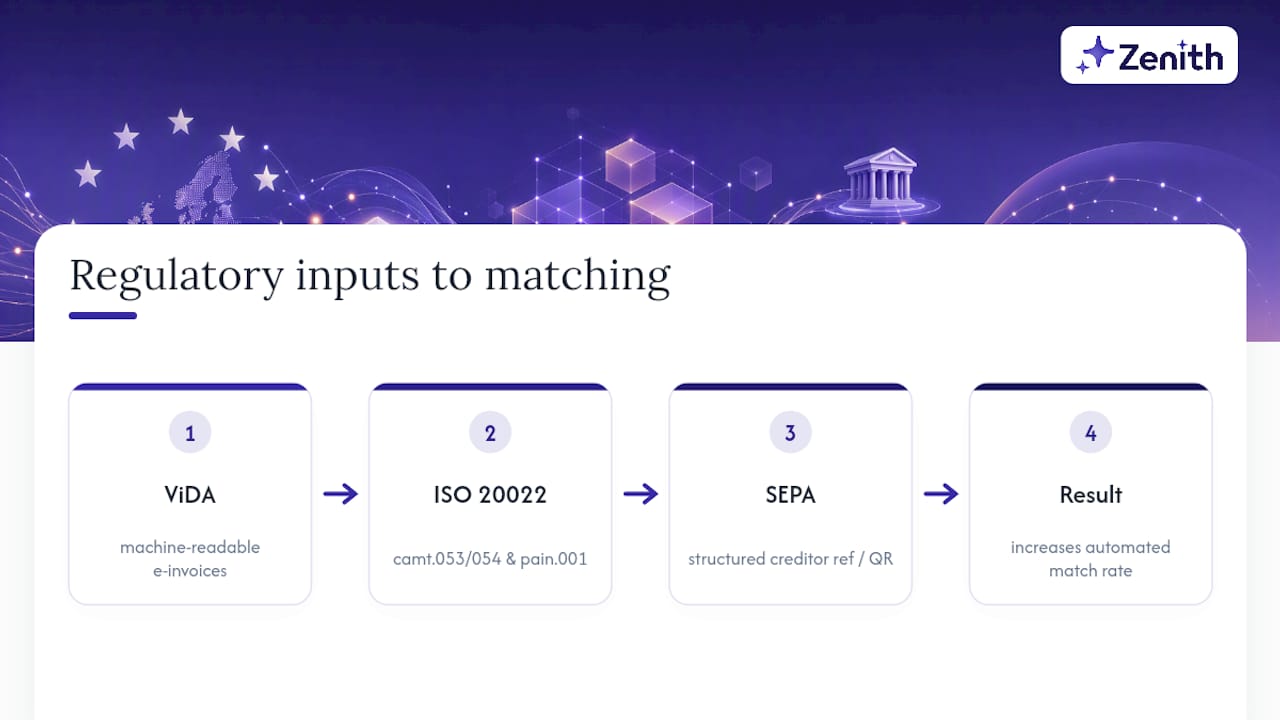
ViDA (VAT in the Digital Age) is pushing structured e-invoicing and near-real-time VAT reporting across EU member states, replacing PDF invoices with machine-readable formats that carry validated data before payment ever happens. For matching purposes, this means the invoice record your OCR previously had to interpret from a scanned document increasingly arrives as clean structured data from the start, which pushes your automated match rate up without any change to your matching rules.
ISO 20022 is the messaging standard behind camt.053/054 statements and pain.001 payment initiation, and it’s what makes richer remittance data possible in the first place. Not every bank has finished migrating, so expect uneven support for a few more years depending on jurisdiction.
SEPA remittance conventions sit underneath both. A SEPA credit transfer can carry either unstructured remittance text (whatever the payer typed) or a structured creditor reference, and only the structured version reliably survives intact to your bank statement. If you invoice European customers, issuing invoices with a structured creditor reference or QR code is one of the highest-leverage changes you can make, because it fixes the input problem rather than asking your matching engine to compensate for it.
None of this requires you to become a compliance specialist. It just means your matching rules should assume structured data is coming, and reward it when it arrives.
Does this need to replace your accounting system?
No, and it shouldn’t try to. Cash application automation sits between your bank and your ledger, feeding matched transactions into whatever accounting or ERP system you already run, rather than becoming a second system of record.
The practical question is delivery format. If your accountant works in spreadsheets, matched transaction data landing in Google Sheets in real time is often more useful than a rigid API integration, because it’s instantly visible and editable without a developer. If you’ve got engineering resource, a REST API lets you pull matched data directly into whatever internal tooling you already use for finance reporting. CSV export covers everything else, including older ERP systems that only accept file imports.
The mistake to avoid is picking a reconciliation tool that assumes you’ll migrate your entire accounting stack to use it. You want the matching layer to output into your existing system, whether that’s a mainstream accounting package or a homegrown spreadsheet process, not to demand you rebuild your finance stack around it. Standardised export formats like eSlog matter here too, particularly if you’re operating across multiple European jurisdictions with different local accounting conventions.
What should you actually be measuring?
Three numbers tell you almost everything about whether your automated matching is working, and none of them require a dashboard vendor to track.
Automated match rate is the percentage of transactions cleared without human intervention. Track it weekly, not monthly, because a sudden drop usually means a vendor changed their invoicing format or your bank altered its remittance field structure.
Exceptions per 1,000 transactions tells you the trend line that match rate alone hides.
Time per reconciliation is the number that actually justifies the project to whoever signed off on it. Measure minutes from bank statement arriving to ledger entry confirmed, before and after, and you’ll usually see the biggest single jump in month-end close speed rather than day-to-day processing.
Beyond those three, keep a running count of duplicate payments caught before they went out the door. It’s a smaller number than match rate, but it’s the one that translates most directly into money saved, and it’s worth surfacing separately in whatever report goes to whoever owns the P&L.
Is your bank data actually secure during automation?
A read-only PSD2 connection cannot move money, it can only read transaction data with your explicit consent, which is the single most important security fact in this entire workflow. Under PSD2, only regulated Account Information Service Providers can request this access, and the connection is revocable at any time from your banking app, not from the third-party tool.
That said, “read-only” doesn’t mean “no risk.” You’re still granting a third party visibility into every transaction on the account, so a few practical questions are worth asking any provider before connecting: where is the data stored, is it encrypted at rest, and does the provider ever sell or share transaction data with anyone else. Most legitimate open-banking providers in Europe operate under strict data-protection obligations tied to GDPR, which limits what they can do with your data regardless of what the commercial contract says.
Two habits reduce your exposure regardless of which provider you choose. First, connect only the accounts you actually need matched, not every account your business holds, since each connection is a separate consent that needs managing and revoking later if you switch providers. Second, review connected accounts periodically rather than assuming a connection made two years ago is still necessary or still configured the way you expect.
How does this change your cash flow forecasting?
Manual reconciliation creates a lag between when money actually moves and when your books reflect it, often a week or more at busy periods. That lag is exactly where forecasting goes wrong, because you’re building projections on ledger data that’s already out of date by the time you look at it.
Automated matching collapses that lag close to zero for cleared transactions, and with instant payments increasingly standard across the eurozone, the gap between “money moved” and “books updated” can shrink to hours rather than days. That matters most for short-term cash flow visibility: knowing today, not next week, whether a large customer payment actually landed changes decisions about supplier payments due the same day.
The second-order benefit is pattern data. Once matching runs continuously rather than in a monthly batch, you start seeing genuine payment timing patterns, which customers consistently pay early, which pay right on the due date, which routinely slip by a week. That’s forecasting input you simply can’t extract from a monthly reconciliation process, because the granularity isn’t there. None of this replaces a proper cash flow forecast model, but it does mean the inputs to that model are current rather than stale.
How do you get your team to actually use this?
The biggest obstacle to automated cash application isn’t the technology, it’s a bookkeeper or finance lead who’s spent years trusting their own eye over a spreadsheet and doesn’t trust a system to catch what they’d catch manually. That resistance is reasonable until proven otherwise, so don’t try to argue it away.
Run the automated system in parallel with the existing manual process for two to three weeks before switching over fully. This does two things: it builds trust because the team sees the automated match rate for themselves rather than taking your word for it, and it surfaces configuration mistakes (wrong tolerance settings, a matching pass that’s too aggressive) while there’s still a manual safety net catching errors.
Training itself is lighter than most teams expect, because the skill that matters isn’t operating the software, it’s learning to read an exceptions queue quickly and correctly. Spend training time on the exception categories rather than the interface: what does a missing-invoice exception look like, what does an aggregate-payment exception look like, and who owns each one. A team that understands the categories can handle a new tool’s interface in an afternoon; a team that only learns the interface will struggle the moment the categories shift.
How do you keep match rates from decaying over time?
Match rates degrade quietly. A vendor changes their invoice template, a bank alters its remittance field format, a new customer starts paying via a payment method your rules weren’t built for, and none of it triggers an alert because each change looks like an isolated exception rather than a pattern.
The fix is a short recurring review, not a major overhaul. Once a month, look at your exceptions queue as a whole rather than item by item, and ask whether the same type of exception keeps recurring. If one vendor consistently produces amount-mismatch exceptions, the fix is usually a specific tolerance rule for that vendor, not a general loosening of your tolerance settings across the board.
Revisit your matching passes whenever you onboard a new payment method, a new major customer, or switch banks, since each of those can quietly change the data format your matching engine is working with. And keep an eye on the regulatory side too: as ViDA-driven structured e-invoicing rolls out further across Europe, more of your incoming invoices will arrive already validated, and your OCR/validation rules should get simpler over time, not more complex. If they’re getting more complex, something upstream has changed and needs investigating rather than patching around.
Author’s perspective and recommended next steps
Most teams over-engineer the matching rules and under-invest in invoice quality, which is backwards. Fix your invoice data first, tune matching passes second. After go-live, watch match rate, exceptions per 1,000 transactions, and hours saved weekly, in that order. Anyone ready to test this against real data should start with the Zenith documentation rather than a sales page.
— Gašper Anderle
Try Zenith on your own bank data this week
Zenith exists for exactly the job described above: read-only bank feeds plus OCR-validated invoices feeding a matching engine, without stitching together three separate tools yourself.

Two ways to test it without committing to anything. Connect a single bank account and watch a live PSD2 feed populate quickly, or run OCR against five sample invoices to see the extracted fields before you trust it with a real backlog. If you’re issuing invoices to European customers, the free payment QR code generator creates the structured references that push your match rate up on the AP side, and the invoice-to-Drive automation handles the capture step from your email inbox automatically. Every plan carries a 30-day money-back guarantee, so there’s no real cost to finding out whether it fits your process before your next month-end close.