


The reliable setup is simple: a watched Google Drive folder or Gmail inbox feeds an AI extractor, which pushes structured invoice data into Google Sheets, where a human spot-checks the results before archiving. This cuts manual entry to almost nothing while keeping someone accountable for accuracy. Expect major time savings on data entry, not a fully hands-off finance function.
TL;DR:
- Automatic invoice extraction relies on a structured folder workflow, with clear naming conventions and access controls to ensure accuracy and auditability.
- AI extraction tools like Google Document AI or low-code connectors differ in control and complexity, with semantic recognition offering better adaptability to supplier invoice layout changes.
- Regular weekly sample reviews are essential to catch systematic errors early, especially in vendor matching, totals reconciliation, and line item completeness.
- Handling exceptions upfront by routing uncertain invoices to human review prevents silent errors and builds trust in the system over time.
- A staged implementation over 30 to 90 days, starting with one vendor category, helps control costs, test success criteria, and expand control measures effectively.
Table of Contents
- How does Google Drive invoice automation actually work?
- Which tools do you actually need to build this?
- How do you build a Drive to Sheets invoice flow?
- What folder and filename structure supports reliable automation?
- How do you keep AI invoice extraction accurate over time?
- What security checks matter before sharing invoice data?
- How much does this cost and how long does it take?
- Why automation redesigns roles instead of cutting them
- Where Zenith-books fits into this workflow
- Sources
How does Google Drive invoice automation actually work?
Three layers do the work. A trigger watches for new invoices, an extraction engine reads them, and an integration layer writes the results somewhere useful.
Triggers. Most setups watch a dedicated Google Drive folder, though many teams route invoices from a Gmail inbox first, saving attachments to Drive automatically before extraction starts.
Extraction. This is where AI reads the PDF or image and pulls out structured fields: invoice number, date, supplier, total, VAT, and line items. Modern extractors use semantic recognition rather than rigid templates, so they cope with a supplier changing their invoice layout without breaking.
Integration and output. A connector maps the extracted fields into a register, one row per invoice, usually in Google Sheets. The commonly recommended pattern for small teams is exactly this: watch folder, extract with AI, parse the result, write to Sheets.
Each row should carry:
- A link back to the original PDF in Drive, for audit purposes
- A processed or exception flag
- The extracted totals and VAT, ready for reconciliation
Done properly, this turns a stack of PDFs into a searchable, reconcilable register without anyone retyping a number.
Which tools do you actually need to build this?
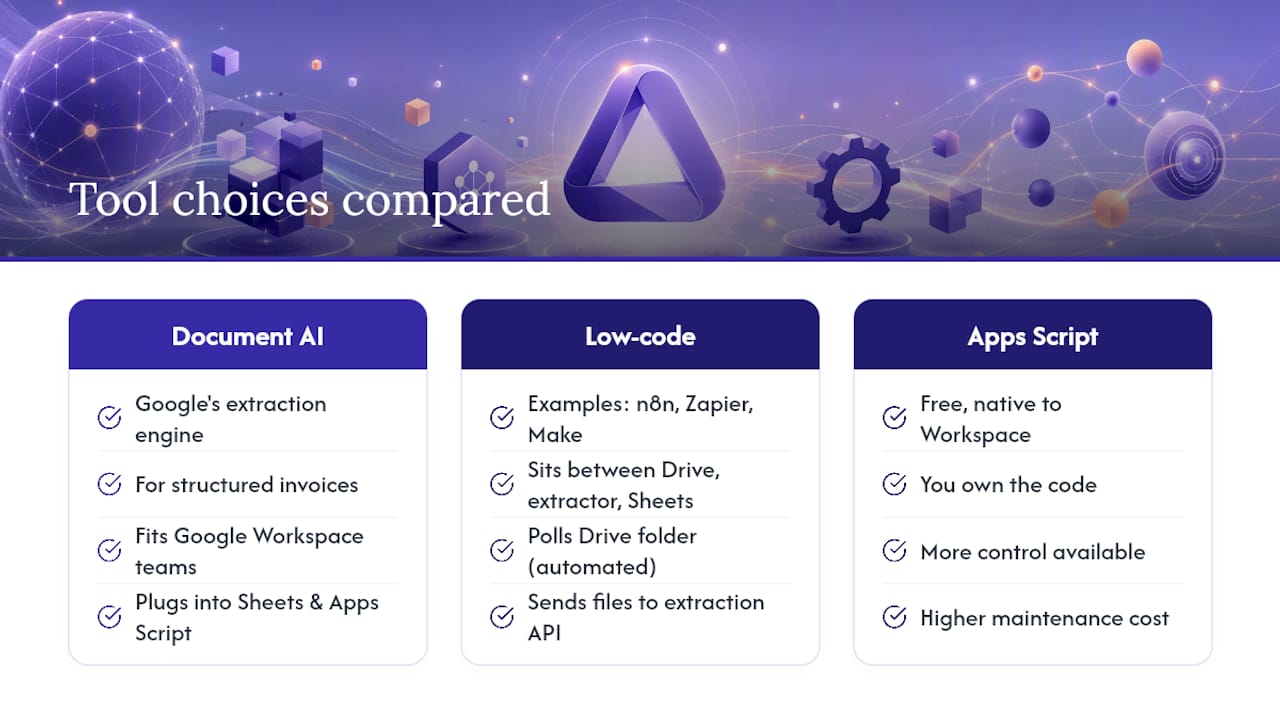
You have three broad choices, and they trade off cost against control.
Google Document AI’s invoice parser is Google’s own extraction engine, built specifically for structured financial documents. It’s a solid fit if your team already lives inside Google Workspace and wants extraction that plugs directly into Sheets and Apps Script without a third-party layer in between.
Low-code connectors like n8n, Zapier, or Make sit between Drive, your extractor, and Sheets. Tutorials regularly show n8n polling a Drive folder, sending each file to an extraction API, and writing the parsed result straight into a spreadsheet, no engineering team required.
Apps Script gives you more control at the cost of more maintenance. It’s free and native to Workspace but means you own the code.
Two extraction philosophies matter here: semantic field extraction, which reads documents by meaning and needs no per-vendor setup, versus template OCR, which is cheaper at scale but breaks the moment a regular supplier redesigns their invoice.
If stitching these pieces together sounds like a project rather than a task, a plug-and-play platform like Zenith-books does the trigger, extraction, and Sheets sync as one connected service instead of three.
How do you build a Drive to Sheets invoice flow?
Here’s a build order that works whether you’re doing this yourself or briefing a contractor.
- Create a dedicated Drive folder structure. One inbox folder for new invoices, restricted editing permissions, and separate subfolders for processed and exception files.
- Configure the trigger. Use a Drive webhook, a scheduled Apps Script check, or an n8n polling job that fires whenever a new file lands in the inbox folder.
- Send each file to your extractor. Whether that’s Google Document AI or a third-party extraction API, the file goes in and a JSON object with fields and line items comes back.
- Map fields into your Sheets register. Each invoice becomes one row, including a link to the source file in Drive and a processed flag you can filter on later.
- Move the file and flag exceptions. Processed invoices shift to the archive folder; anything below your confidence threshold gets flagged and someone is notified to look at it.
Pro Tip: Build the exception path before you build anything else. A flow that only handles clean invoices will silently fail the moment a supplier sends a credit note or a multi-currency freight bill, and you won’t notice until month-end.
Configuration isn’t instant. Industry analysis puts typical setup time at several weeks, often needing 8 to 16 hours of senior accounting time to get field mappings right. That investment is what makes the difference between a flow that mostly works and one you can trust unattended.
What folder and filename structure supports reliable automation?
Extraction accuracy and audit-readiness both start with folder hygiene. A practical Drive setup usually follows this shape:
- Inbox → Processed → Exceptions → Accountant-shared, each as its own subfolder with clear permissions
- A filename template such as
2026-03-14_SupplierName_INV1042_£450.00, so a human can identify an invoice without opening it - A link to each file’s Drive location recorded in the Sheets register, not just a filename, so anyone auditing the register can jump straight to the source
- View-only access for the accountant-shared folder, to stop accidental edits or deletions during month-end
Get the naming convention wrong early and you’ll be renaming hundreds of files later.
How do you keep AI invoice extraction accurate over time?
Automation without checking is how errors compound quietly for months. A weekly sample review, spot-checking 10 to 20 invoices, catches the systematic miscodings that automated extraction tends to miss before they spread across your books.
During review, check:
- Vendor name matches your supplier list exactly, not a near-match
- Totals and VAT reconcile against the original PDF
- Line items are complete, especially on multi-page invoices
Set a confidence threshold so anything the extractor is unsure about routes automatically to a human rather than posting silently. Structured fields typically hit 95 to 99% accuracy, while categorisation lags behind at 85 to 95%, so your exception rules should be tighter on coding than on totals. Track extraction accuracy, exception rate, and time saved against manual entry, then retune mappings over the first 60 to 90 days as real invoices expose edge cases your test batch didn’t.
What security checks matter before sharing invoice data?
Invoice data includes bank details and supplier relationships, so vendor due diligence isn’t optional. Before you send a single document to an extraction API, confirm:
- The data processing agreement covers roles, retention periods, deletion timelines, and subprocessors
- Whether the vendor trains its models on your documents, and whether you can opt out
- Where your data is stored and whether that satisfies UK GDPR requirements for your sector
- That you’ve run a sandbox test proving deletion actually works, requests are idempotent, and every action leaves a traceable log
Security diligence should test these claims directly rather than accepting a vendor’s marketing page at face value. If you want a second reference point, Akika’s security page is a reasonable example of the level of detail worth expecting. For inbox-based capture specifically, patterns for converting email attachments into structured tasks are worth reviewing too, since exception routing there follows similar logic.
How much does this cost and how long does it take?
Start narrow. A staged rollout beginning with one vendor category or a single folder over 30 to 90 days beats trying to automate everything on day one.
- Pilot (30 to 60 days): one invoice type, clear success criteria, weekly review built in from the start
- Expand (60 to 90 days): add supplier categories, matching, and approval routing once the pilot is stable
- Cost usually comes down to per-page extraction credits and middleware task volumes at small scale, versus a flat monthly fee for a managed platform at higher volume
- Move to a managed solution once DIY maintenance time exceeds what a subscription would cost you
Case studies pairing extraction with direct posting into accounting software describe month-end close falling from days to same-day. That gap is usually where the DIY-versus-managed decision gets made.
Why automation redesigns roles instead of cutting them
Automation doesn’t remove the finance person from the loop. It moves them from retyping numbers to handling the invoices the system flags as ambiguous, credit notes, multi-currency freight, anything with genuine judgement involved. The pilots that fail are usually the ones that skip weekly review and assume the extractor is right by default. Clients like Združenje YES and BAM Chocolate saw the difference come from that discipline, not just the automation itself.
— Gašper
Where Zenith-books fits into this workflow
If the build steps above sound like more plumbing than your team has time for, Zenith-books runs the entire Drive-to-Sheets flow as one connected service instead of separate pieces you have to wire together yourself. It auto-files invoices from email straight into Google Drive, extracts fields with AI, and syncs the results live into Google Sheets alongside your bank data.

Beyond extraction, Zenith-books handles transaction matching, reconciliation, and eSlog accounting exports, with the data protection and audit trail controls covered in the security checklist above already built in. Hospitality finance teams juggling high invoice volumes across sites can see the same approach applied in Zenith for Hospitality. If you want proof before committing to a pilot, test Zenith’s invoice OCR against your own documents and see the extraction accuracy for yourself.
This article is general information, not a substitute for advice from a qualified financial advisor. Consult a qualified financial professional about your own circumstances before acting on anything here.
Sources
- Google Sheets Invoice Automation with AI: Step-by-Step
- Automate Invoice Data Extraction from Google Drive to Google Sheets Using Dumpling AI and n8n
- Invoice AI: where it pays back, where it doesn’t