


Duplicate invoice detection flags exact and near duplicate invoices before they clear payment, stopping most double payments without slowing your team down. The fastest wins are three controls: a fuzzy match check at intake, a lookback window covering at least one full billing cycle, and centralised capture so nothing enters through a side door. If you do one thing this week, turn on fuzzy matching against your full payment history, not just open invoices.
TL;DR:
- Relying solely on exact matching risks missing near-duplicate invoices that differ slightly in vendor name, invoice number, or description.
- Fuzzy matching with AI is essential to identify nearly identical invoices, but thresholds must be carefully tuned to balance false positives and missed duplicates.
- Implementing a rolling 12 to 24-month lookback window helps catch billing cycles in insurance, software licenses, and utilities that span longer periods.
- Centralized intake and regular vendor statement reconciliations are key preventive controls to reduce the creation of duplicate invoices.
- Automating invoice capture from email and bank feeds streamlines detection and reduces manual effort, supporting faster month-end closures and fewer double payments.
Table of Contents
- What is duplicate invoice detection and why does it matter?
- How do duplicate invoices actually enter the system?
- Which detection method actually catches duplicate invoices?
- How do you configure sensitivity and lookback windows correctly?
- What process controls actually prevent duplicates from occurring?
- What should you do when you find a duplicate payment?
- How does automation make duplicate detection practical day to day?
- Author perspective: quick wins versus longer projects
- Get duplicate detection running without a rebuild
- Sources
What is duplicate invoice detection and why does it matter?
Duplicate invoice detection is the process of comparing incoming invoices against everything already paid or pending, looking for exact matches and near matches that a human reviewer would likely miss. Exact duplicates share the same vendor, invoice number, amount and date. Near duplicates are the trickier ones: same vendor, same amount, invoice number off by one digit, or a PDF resubmitted three weeks later with a slightly reworded description.
Duplicates creep in at every stage of accounts payable. They come through email alongside a portal upload, get keyed twice by different approvers, or slip past a system that only checks open invoices and ignores anything already archived as paid.
The cost isn’t abstract. Cash leaks out the door, someone spends hours chasing a refund that should never have been needed, and VAT reporting gets messy when a duplicate payment sits unreconciled at period end. Detection matters because catching a duplicate before payment is cheap. Catching it after requires a phone call, a credit note, and a bit of goodwill from a supplier who now wonders about your controls.
How do duplicate invoices actually enter the system?
Duplicates rarely happen because someone is careless. They happen because the process has more entry points than anyone accounted for.
- Parallel intake channels. Invoices arrive by email, supplier portal, and post at the same time, and nobody owns the job of checking whether the same bill landed twice.
- Manual entry errors. A reference number gets retyped with a transposed digit, or a vendor name is abbreviated differently by two different staff members.
- Duplicate vendor records. The same supplier exists twice in the vendor master under slightly different names, so a system match against “ACME Ltd” never catches “ACME Limited”.
- Sync and timing gaps. An ERP updates payment status a day late, so a second system approves an invoice that’s technically already settled.
- Vendor resubmissions. A supplier chases an unpaid invoice near month end, resends it as a “reminder,” and it gets processed as new.
Stripe’s research on payment failures points to something worth sitting with: duplicate payments stem more from fragmented workflows and system design than from individual mistakes. Fix the plumbing, not just the people.
Which detection method actually catches duplicate invoices?
No single method catches everything, which is why relying on exact matching alone is the single most common gap in AP controls.
- Exact matching. Fast and cheap, checking identical vendor, invoice number, amount and date. It catches the lazy duplicate but misses the reworded one entirely.
- Fuzzy matching and composite scoring. This is where modern AI earns its keep. It normalises vendor names, tolerates small amount variances, and scores similarity across invoice number, date proximity and description text. Near duplicates are the common and costly class, and fuzzy logic is what catches them.
- OCR and intelligent document processing (IDP). Consistent data extraction from PDFs and scans feeds everything downstream. If your capture step reads “Invoice #4521” one time and “INV 4521” the next, your matching engine is working with two different strings for the same document.
- Cross-channel reconciliation. Automated systems should check incoming invoices against the full payment history, not just open items, since a duplicate is just as likely to match something already closed.
The trade-off is false positives. Set thresholds too loose and your exception queue drowns in legitimate recurring invoices flagged as suspicious. Set them too tight and genuine duplicates slide through.
Pro Tip: *Run your fuzzy matching against a sample of last year’s invoices before going live.
How do you configure sensitivity and lookback windows correctly?
Configuration is where most detection projects either earn their keep or quietly get switched off after two weeks of alert fatigue.
Sensitivity is a trade-off, not a setting you get right on the first try. Loosen the threshold and you catch more near duplicates but generate more false positives for your team to clear. Tighten it and the queue goes quiet, but so does your protection against the invoice that’s 95% identical to one you paid in March.
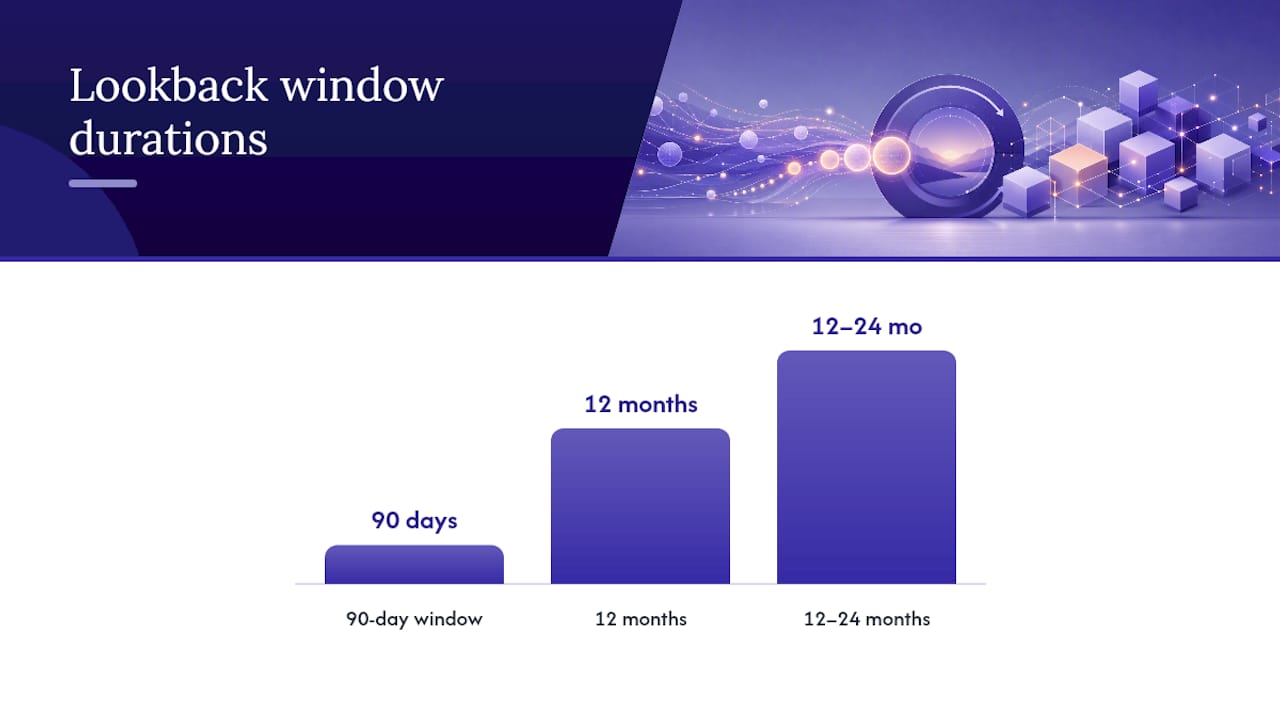
Lookback windows need real thought too. A 90-day window feels sensible until you remember annual or semi-annual billing cycles exist for insurance, software licences, and some utility contracts. Anything shorter than 12 months risks missing them; many AP teams settle on a rolling 12 to 24 months once vendor billing patterns are mapped.
- Include vendor ID, invoice number, amount, and invoice date in your composite score.
- Normalise vendor names at intake so “Acme” and “ACME Ltd” resolve to one record.
- Test settings against a year of historical invoices before go-live.
- Monitor exception queue volume weekly for the first month and adjust.
What process controls actually prevent duplicates from occurring?
Detection catches duplicates. Prevention stops them being created in the first place, and it’s the cheaper half of the equation by a wide margin.
- Centralise intake. One channel, one set of mandatory fields (vendor ID, PO number, invoice number), no side-door email approvals.
- Clean the vendor master. Merge duplicate vendor records and lock down who can create or edit a vendor.
- Enforce three-way matching. Purchase order, goods receipt, and invoice must agree before payment releases.
- Build idempotent payment controls. Idempotency keys at the payment API level stop a retry or double-submit from firing two payments for one invoice.
- Reconcile against vendor statements regularly. Weekly reconciliation for high invoice volume catches what upstream controls miss.
Pro Tip: Ask your top ten suppliers by spend for a statement reconciliation once a quarter. It’s the fastest way to surface a duplicate that both your system and your reviewer missed.
What should you do when you find a duplicate payment?
Speed and documentation matter more than panic here.
- Pull the invoice from any pending payment run immediately and screenshot the match evidence.
- Contact the supplier directly, referencing both invoice numbers, and request a refund or a credit note against the next invoice.
- Give the supplier a realistic timeline, two to four weeks is standard, and keep the tone collaborative rather than accusatory; most duplicates are genuine errors on both sides.
- Record the correcting accounting entry and file the full evidence trail for audit.
- Run a short root cause review: was it a vendor resubmission, a system sync gap, or a manual entry slip? Fix that specific gap, not just the invoice.
A duplicate payment recovery audit can claw back funds from historical disbursements, but prevention costs far less than recovery.
How does automation make duplicate detection practical day to day?
Manual duplicate checking doesn’t scale past a handful of invoices a week. Automation works best when invoice capture normalises vendor and reference data at the point of entry, so fuzzy matching against full payment history is reliable rather than guesswork, and suspected duplicates route straight to a short exception queue instead of a general inbox.
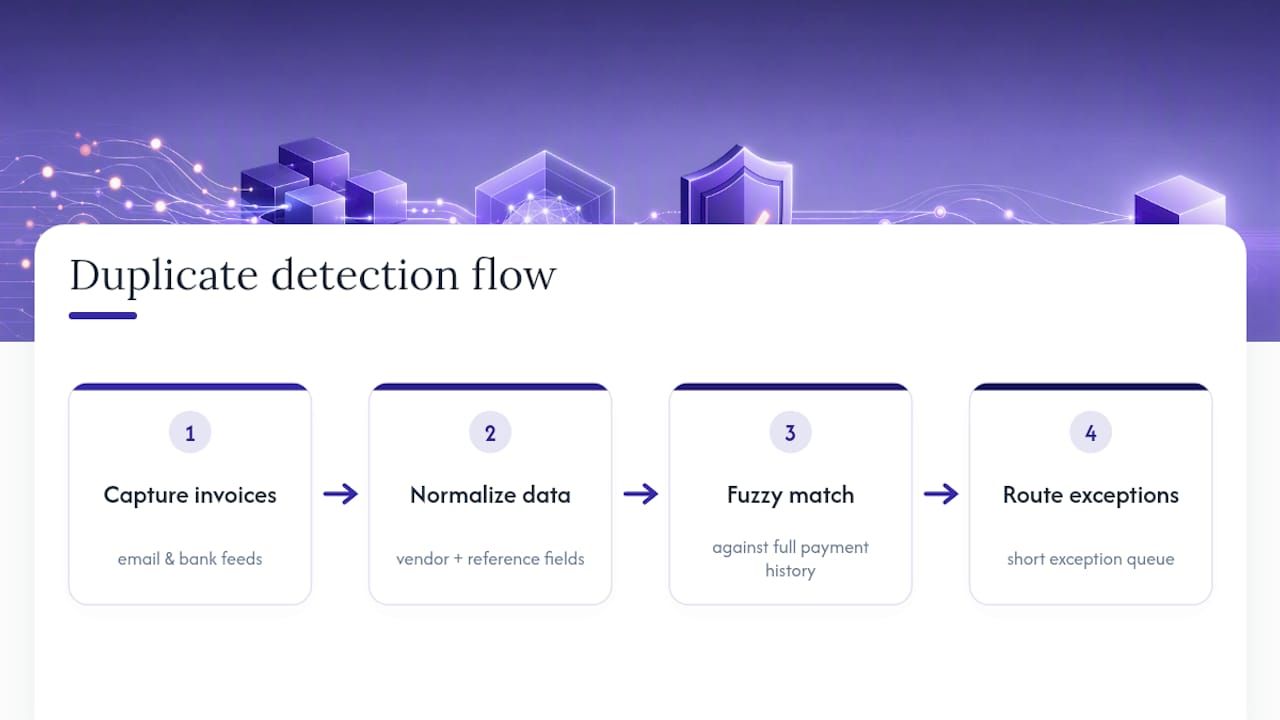
Zenith-books applies this by extracting and categorising invoices automatically from email and bank feeds, so the data feeding your matching engine is consistent from day one. Clients including Združenje YES and BAM Chocolate report near-zero manual entry across transactions and faster month-end close. For rollout, cleanse your vendor master first, pilot on one entity or department, then tune thresholds against real exception volume before scaling.
Author perspective: quick wins versus longer projects
Start with centralised intake and fuzzy matching in the first 30 days, that’s where most duplicates hide. By 90 days, track detection rate and exception review time. By 180 days, three-way matching should be standard. Resourcing this well beats treating it as a side project.
— Gašper
Get duplicate detection running without a rebuild
You’ve read the controls: centralised intake, fuzzy matching, three-way matching, reconciliation. Building all of that from scratch in an ERP customisation project takes months and a budget most finance teams don’t have. Zenith-books gets you there faster because invoice capture, categorisation and matching already work together out of the box, so there’s no integration project before you see a result.

The feature that matters most here is automated intake: Zenith-books pulls invoices straight from email into an organised, auto-filed structure, which closes the exact gap that lets duplicates through parallel channels in the first place. Pair that with live bank data syncing and you get payment status visibility that supports reconciliation rather than fighting it. For process design beyond the software itself, Loturn’s guide to invoice processing automation is a solid companion read. If you’re ready to see how it handles your own invoice volume, start with a look at Zenith-books’s full solution set and book a walkthrough against your actual vendor data.
Sources
For deeper detail, see Corpay on automated duplicate detection, Stripe on preventing duplicate payments, Spendesk on spotting duplicate invoices, and Wise on reducing duplicate payments. For discrepancy remediation, see InvoiceLabs’s audit guide.
- Duplicate Payment Detection: How Automation Catches What Your ERP Misses | Corpay
- How to prevent duplicate payments | Stripe
- Duplicate invoices: How to spot them and prevent double payments | Spendesk