
Best Expensify Alternatives for Finance Managers in 2026

The best Expensify alternatives in 2026 are Zenith-books (automation-first, ideal for small businesses and growing teams), Zoho Expense (budget-conscious SMBs already in the Zoho ecosystem), Ramp and Brex (card-first spend platforms for scale-ups), Navan (travel-heavy organizations), and SAP Concur or Coupa (enterprise AP and T&E consolidation). According to Gartner Peer Insights, the most common reasons buyers replace Expensify are pricing increases, limited multi-entity controls, and gaps in AP automation.
Here is the fastest way to orient your search:
- Tight budget, small team (under 50 employees): Entry-level expense apps or Zenith-books. Expect low per-user monthly pricing under $10, self-serve onboarding, and a setup that typically takes a couple of weeks.
- Scale-up needing cards + spend automation: Card-first platforms like Ramp or Brex. Mid-range pricing, 2–4 week deployment, strong G2 ratings.
- Travel-heavy workforce: Navan or Payhawk. Mid-to-high pricing, 4–6 week rollout, built-in travel booking.
- Enterprise AP consolidation: SAP Concur, Coupa, or Airbase. Custom pricing, 6–12 week implementation, dedicated onboarding.
- AP automation + invoice extraction without the enterprise price tag: Zenith-books. AI-powered invoice extraction, bank-to-Sheets sync, and zero manual entry.
Table of Contents
- How do the top Expensify alternatives compare on price, features, and fit?
- Which alternative fits your company’s actual needs?
- How do you choose the right alternative and run a confident pilot?
- What should you know before migrating away from Expensify?
- Key Takeaways
- The case for going automation-first, not just “better than Expensify”
- Zenith-books cuts the manual work your current tool still leaves behind
- Sources and further reading
How do the top Expensify alternatives compare on price, features, and fit?
The table below maps each alternative category against the dimensions finance teams care about most. Pricing varies by vendor and plan; always confirm current pricing directly with vendors.
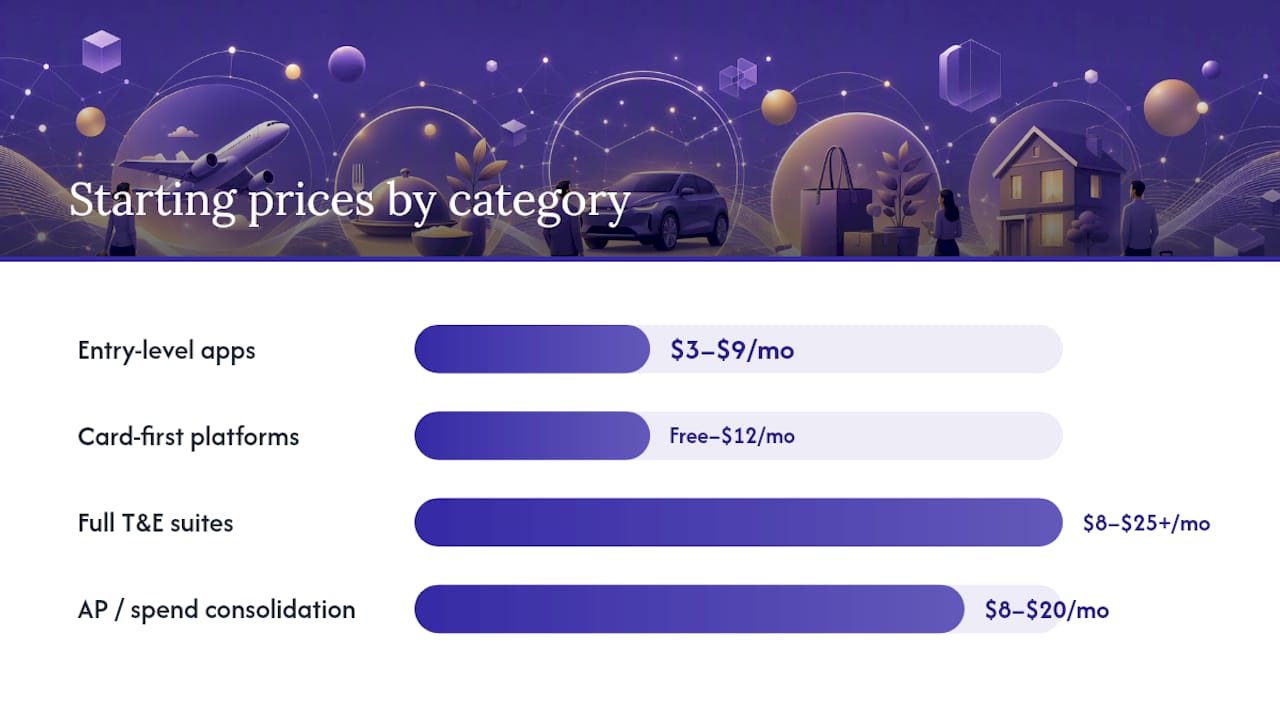
| Category | Starting Price Shape | Best For | Key Integrations | Core Features | Deploy Time | Support | Global/Travel | Automation & AI | Security |
|---|---|---|---|---|---|---|---|---|---|
| Entry-level expense apps (e.g., Zoho Expense, Rydoo, Fyle) | $3–$9/user/month | SMBs, 5–100 users | QuickBooks, Xero, basic ERPs | Receipt OCR, policy rules, basic approvals | 1–2 weeks | Self-serve | Limited | Basic OCR, auto-categorization | SOC2 varies |
| Card-first spend platforms (e.g., Ramp, Brex) | Free–$12/user/month | Scale-ups, 20–500 users | QuickBooks, Xero, NetSuite | Virtual/physical cards, spend controls, approvals | 2–4 weeks | Dedicated CSM | US-focused | Strong auto-matching, AI categorization | SOC2 Type II |
| Full T&E suites (e.g., Navan, SAP Concur) | $8–$25+/user/month or custom | Mid-market to enterprise | NetSuite, SAP, major ERPs | Travel booking, T&E, multi-level approvals | 4–8 weeks | Dedicated onboarding | Strong | AI policy checks, travel AI | SOC 2 |
| AP/spend consolidation (e.g., Coupa, Airbase, Payhawk) | Custom or $8–$20/user | Mid-market to enterprise | SAP, NetSuite, Xero, ERPs | AP automation, PO matching, virtual cards | 6–12 weeks | Enterprise SLA | Strong | Full AP automation, AI matching | SOC2 Type II, encryption |
| Automation-first invoice + expense (Zenith-books) | Subscription tiers; free trial available | SMBs, startups, growing finance teams | Google Sheets, bank integrations, accounting exports | AI invoice extraction, bank sync, auto-categorization, eSlog export | 1–2 weeks | Onboarding support | Bank/email integration | AI OCR, auto-matching, zero manual entry | Reliable, compliant |
Worked TCO examples
Three quick cost snapshots for a 50-user mid-market company over 12 months:
Entry-level app: $6/user/month × 50 users × 12 months = $3,600 in seat fees. Add roughly $1,000–$2,000 for onboarding and any accounting connector add-ons. Total: approximately $4,600–$5,600 per year, before the internal labor cost of manual fixes.
Card-first platform: A free base tier sounds attractive, but card interchange fees, premium feature unlocks, and a dedicated CSM tier can push annual spend to $8,000–$15,000 for a 50-user team, depending on card volume and feature tier.
Enterprise T&E suite: Custom pricing typically starts at $8–$25 per user per month, plus professional services for ERP integration. A 50-user deployment can realistically land at $20,000–$40,000 annually once implementation and support are included.
Pro Tip: Per-user pricing looks cheaper than per-card pricing until you count every card-holder. If most of your employees hold a corporate card, per-card pricing can cost 2–3× more than a flat per-user seat. Run both models against your actual headcount before signing.
The ITQlick comparison data confirms that hidden fees (AP automation add-ons, multi-entity modules, and ERP connector licenses) are the most common source of TCO surprises when switching from Expensify.
Which alternative fits your company’s actual needs?
Rather than a vendor-by-vendor rundown, the profiles below map to the four buyer categories most finance teams fall into, plus Zenith-books as the recommended automation-first option.
1. Entry-level expense apps: Zoho Expense, Rydoo, and Fyle
These tools solve the basics well: receipt capture via mobile OCR, mileage tracking, policy rules, and a direct feed to QuickBooks or Xero. Zoho Expense is the strongest pick if your team already uses Zoho Books or Zoho CRM, since the integration is native and requires no middleware. Rydoo leans toward European multi-currency workflows but works fine for US teams with international travel. Fyle stands out for its Gmail and Outlook plugins, which let employees submit receipts without leaving their inbox.
Pricing callout: Starter plans typically have low per-user monthly pricing suitable for small teams. The catch is that multi-entity support, advanced approval chains, and ERP connectors usually sit behind a higher tier or an add-on fee.
Pros: Low cost, fast setup (1–2 weeks), minimal IT involvement. Cons: Limited AP automation, no native card issuance, weaker multi-entity controls. Ideal for: Teams under 100 employees that need basic expense reporting without a large implementation project.
2. Card-first spend platforms: Ramp and Brex
Both platforms issue corporate cards and build expense management around the card transaction, which eliminates most manual receipt matching. Real-user reviews on G2 consistently highlight Ramp’s auto-categorization accuracy and its NetSuite sync as standout features. Brex targets venture-backed startups and scale-ups with higher credit limits and a stronger international card program.
Pricing callout: Both offer free base tiers, but advanced automation, dedicated support, and ERP connectors require paid plans. Budget moderate per-user monthly pricing in the mid-range for a fully featured deployment.
Pros: Near-zero manual receipt entry for card transactions, strong spend controls, fast approvals. Cons: US-centric card programs, limited AP invoice automation, less useful if your team rarely uses corporate cards. Ideal for: Scale-ups with 20–500 employees that want card-led spend control and can live without deep AP workflows.
3. Full T&E suites: Navan, SAP Concur, and Payhawk
Navan (formerly TripActions) combines travel booking with expense management in a single interface, which is the main reason travel-heavy companies choose it. SAP Concur is the incumbent enterprise choice, with the deepest ERP integrations and the most mature policy-enforcement engine. Payhawk sits between the two: it offers corporate cards, expense management, and AP in one platform, with strong European multi-currency support and growing US adoption.
Pricing callout: SAP Concur and Navan typically have custom pricing. Payhawk offers tiered pricing with moderate per-user monthly fees plus additional card fees.
Pros: End-to-end travel and expense in one tool, enterprise-grade compliance, strong global support. Cons: Long implementation (4–8 weeks minimum), higher TCO, significant IT involvement for ERP mapping. Ideal for: Mid-market and enterprise teams with frequent travel, complex approval hierarchies, or multi-entity structures.
4. AP/spend consolidation platforms: Coupa, Airbase, and SAP Concur (AP module)
Coupa and Airbase go beyond expense reporting into full accounts payable: PO creation, invoice capture, three-way matching, and vendor payment workflows. These platforms make sense when your finance team’s primary pain is AP volume, not just employee expenses. Gartner peer data shows that matching a buyer’s ERP stack is often the most critical adoption barrier for this category, and implementation can take several weeks.
Pricing callout: Custom pricing is the norm. Professional services for ERP integration alone can run $5,000–$20,000 for a mid-market deployment.
Pros: Full AP lifecycle in one platform, strong audit trails, enterprise SLAs. Cons: Highest TCO and longest deployment, overkill for teams without significant AP volume. Ideal for: Finance teams processing high invoice volumes, managing multiple vendors, or running multi-entity structures.
5. Automation-first invoice and expense: Zenith-books
Zenith-books takes a different angle from all four categories above. Instead of starting with a card program or a travel booking engine, it starts with the documents: invoices arriving by email, bank transactions, and accounting exports. Its AI extracts and categorizes invoices automatically, matches transactions to bank data, and syncs everything to Google Sheets in real time. For teams that spend hours each month retyping invoices or chasing receipts, that is where the time savings actually live.
Pricing callout: Subscription tiers with a free trial; pay-as-you-go options based on invoice OCR volume and number of bank accounts. No large upfront implementation fee.
Pros: Fast setup (1–2 weeks), zero manual data entry for invoices, bank-to-Sheets sync, eSlog accounting exports, no per-card fee structure. Cons: Best fit for teams whose primary pain is invoice and bookkeeping automation rather than corporate card management or travel booking. Ideal for: Small businesses, startups, and growing finance teams that want to eliminate manual bookkeeping without a six-figure enterprise contract.
For a deeper look at how to pick the right tool for a small team, the expense management guide for small businesses covers the key decision points in detail.
How do you choose the right alternative and run a confident pilot?
Start with your primary pain point
Before you open a single demo, write down the one workflow that costs your team the most time each month. Is it chasing employees for receipts? Manually keying invoices into your accounting system? Reconciling corporate card statements? Approving travel bookings? The answer almost always points to a category, not a vendor.
Build your integration checklist
Your accounting system is the non-negotiable anchor. If you run QuickBooks Online or Xero, most tools in every category connect natively. If you run NetSuite, SAP, or a custom ERP, the integration question becomes the most important one in your evaluation. Gartner’s buyer data consistently shows that ERP compatibility is the top adoption barrier, and a tool that cannot write cleanly to your GL will create more manual work than it eliminates.
Security and compliance belong on the same checklist. Ask every vendor for their SOC 2 Type II report and their data encryption standards. The FDIC’s overview of institutional oversight is a useful reference point for understanding why financial-services trust signals matter when you are handing a platform access to bank feeds and transaction data.
The 10 questions to ask in every vendor demo
- What accounting systems do you integrate with natively, and what requires middleware?
- How long does a typical implementation take for a company our size?
- What does your SOC 2 Type II report cover, and can we review it before signing?
- How does your OCR handle non-standard invoice formats (handwritten, foreign-language, PDFs)?
- What is the escalation path when an invoice fails to extract correctly?
- How do you handle multi-entity or multi-currency setups?
- What are the per-user, per-card, and per-transaction fees — and which features are add-ons?
- What does onboarding include, and what is the SLA for support tickets post-launch?
- Can we run a pilot with live data before committing to an annual contract?
- What does a typical customer’s month-end close look like after 90 days on your platform?
Pro Tip: Question 9 is the most important one. Any vendor that resists a live-data pilot is telling you something about their confidence in their own product.
Pilot-to-rollout timeline
A realistic selection and deployment calendar for a 50-user mid-market team looks like this:
Weeks 1–2: Internal scoping. Map current workflows, identify integration requirements, and shortlist 2–3 vendors. Owner: Finance manager + IT lead.
Weeks 3–6: Pilot phase. Run live data through 1–2 finalists. Track OCR accuracy, accounting mapping reliability, and time saved per week. Owner: Finance team.
Weeks 7–8: Validation and vendor selection. Review pilot KPIs, confirm pricing, and negotiate contract terms. Owner: Finance manager + CFO.
Weeks 9–12 (or longer for enterprise): Full rollout. Migrate historical data, train users, and configure policy rules. Owner: Finance team + vendor onboarding team.
For complex multi-entity or ERP-heavy deployments, budget 6–12 weeks for full rollout, per Gartner’s implementation benchmarks.
A simple TCO formula
A clean way to estimate annual cost for a 50-user team:
(Seat fee × users × 12) + (card fees × monthly card volume × 12) + implementation/onboarding cost + internal labor saved (negative)
Example: $6/user/month × 50 × 12 = $3,600 in seat fees. Add $1,500 for onboarding. Subtract the labor cost of 10 hours/month of manual data entry at $35/hour = $4,200 saved. Net annual cost: approximately $900. That math changes dramatically if you add enterprise ERP integration services or a per-card fee structure.
The cost of manual expense tracking is often invisible until you price it out. The real cost of chasing receipts breaks down exactly where those hours go.
What should you know before migrating away from Expensify?
Switching expense platforms is not just a software swap. The migration work that catches teams off guard usually falls into three areas.
Historical data portability. Expensify allows you to export expense reports as CSV and PDF. Most alternatives can import CSV transaction histories, but the field mapping rarely aligns perfectly. Budget time to clean and remap your chart of accounts, employee IDs, and cost center codes before import. For teams with more than two years of history, a phased migration (current year live, prior years archived) is often cleaner than a full data transfer.
Policy and approval workflow rebuild. Every platform structures approval chains differently. Your current Expensify policies (spend limits, category rules, multi-level approvals) will need to be rebuilt from scratch in the new system. Document your current rules before you start the migration, not after.
Integration re-mapping. If Expensify currently pushes data to QuickBooks, Xero, or a payroll system, that connection breaks the moment you switch. Coordinate the cutover date with your accounting team so there is no gap in the GL feed during month-end. For AP-focused platforms connecting to NetSuite or SAP, plan for a dedicated integration sprint of 2–4 weeks.
User adoption. The most technically complete migration can still fail if employees revert to submitting paper receipts or emailing spreadsheets. A short training session (30–60 minutes) and a clear “go-live” date with management backing dramatically improve adoption rates. Assign one internal champion per department to field questions during the first 30 days.
One practical safeguard: run both systems in parallel for at least two weeks before fully cutting over. It adds short-term overhead but catches mapping errors before they affect your books.
For teams evaluating AP-focused alternatives as part of a broader consolidation, the guide to Tipalti alternatives covers the AP migration considerations in more detail.
Key Takeaways
The right Expensify alternative depends on your primary pain point: invoice automation, card-led spend control, travel management, or AP consolidation — and Zenith-books is the strongest fit for teams whose core need is eliminating manual bookkeeping.
| Point | Details |
|---|---|
| Match category to pain point | Choose entry-level apps for basic expense reporting, card-first platforms for spend control, T&E suites for travel, and AP tools for invoice volume. |
| TCO goes beyond seat fees | Card fees, ERP integration services, and internal labor for manual fixes are the biggest hidden cost drivers in any platform switch. |
| Pilot before you commit | A 4–6 week live-data pilot tracking OCR accuracy, GL mapping, and hours saved is the only reliable way to validate a vendor’s claims. |
| ERP integration is the top adoption barrier | Per Gartner buyer data, matching your accounting stack is the most critical factor; confirm native connectors before shortlisting. |
| Zenith-books for automation-first teams | Zenith-books eliminates manual invoice entry and bank reconciliation with AI extraction and bank-to-Sheets sync, with a 1–2 week setup. |
The case for going automation-first, not just “better than Expensify”
Most articles about Expensify alternatives frame the decision as a feature swap: which tool has better OCR, a cleaner mobile app, or a cheaper per-user price. That framing misses the more important question.
.
.
The finance teams that get the most out of switching are the ones that use the migration as a forcing function to rethink their entire document workflow, not just their expense reporting. When you automate invoice extraction from email, match it to bank data automatically, and export clean accounting entries without a human in the loop, you are not just replacing Expensify. You are removing a category of work from your team’s calendar entirely.
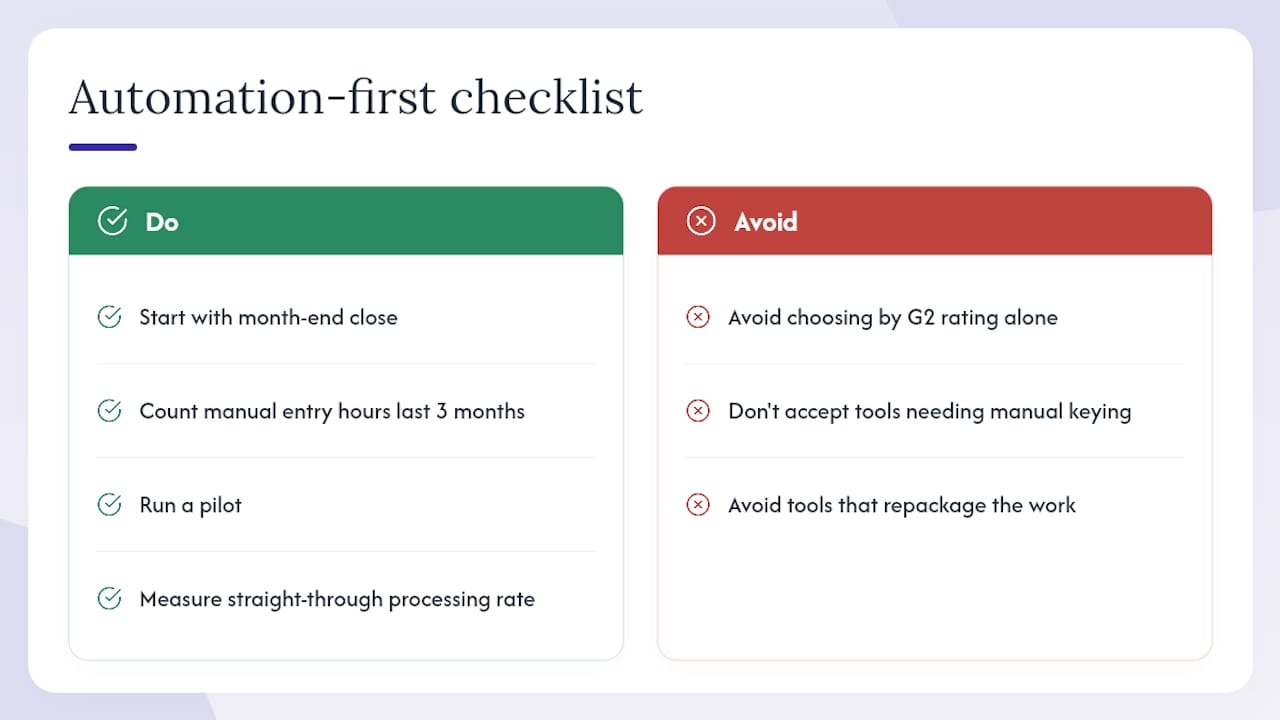
The conventional wisdom says to pick the tool with the best G2 rating in your company size bracket. That is not wrong, but it is incomplete. A tool with a 4.7-star rating that still requires someone to manually key invoice totals into your accounting system has not solved your problem. It has repackaged it.
The practical recommendation: start with your month-end close. Count the hours your team spends on manual data entry in the last three months. If that number is above 10 hours per month, the ROI on automation-first software is almost always positive within the first quarter. If it is below 5 hours, a simpler entry-level tool may be all you need.
Run a pilot. Measure the straight-through processing rate. Let the data make the case.
Disclosure: this article is published by Zenith-books. The perspective above reflects the author’s analysis based on the evidence in this article. Readers should run their own vendor evaluation and pilot before making a final decision.
Zenith-books cuts the manual work your current tool still leaves behind
Most expense platforms automate the front end (receipt capture, approval routing) and leave the back end (invoice extraction, bank matching, accounting export) to your team. That is where Zenith-books is different.

Zenith-books pulls invoices directly from your email, extracts the data with AI, matches transactions to your bank feed, and pushes clean entries to Google Sheets or your accounting system in eSlog format. No retyping. No chasing attachments. Clients like BAM Chocolate and Združenje YES cut their month-end close time and eliminated manual entry across their transaction volumes.
The pilot takes 1–2 weeks to set up. It includes a data import sample, a live invoice extraction demo, and a bank-to-Sheets sync trial so you can see the straight-through processing rate on your own documents before you commit.
See what Zenith-books includes in a pilot and schedule your trial today.
Sources and further reading
The sources below were used to inform this article. Each is worth reviewing directly as you build your vendor shortlist.
-
Gartner Peer Insights: Expensify Alternatives 2026 — Buyer-reported evaluation criteria and the most commonly considered alternatives when replacing Expensify. Useful for validating your shortlist against real buyer behavior.
-
Gartner Peer Reviews: Expense Management Software Alternatives — Covers ERP integration as the top adoption barrier and documents typical implementation timelines. Read this before your first vendor demo.
-
ITQlick: Expensify Competitors & Alternatives — Comparative pricing ranges, TCO examples, and the most common reasons finance teams switch from Expensify. Good for benchmarking your current spend.
-
Ramp Reviews on G2 — Real-user feedback on usability, integration quality, and automation for a leading card-first platform. Useful as a trust signal when evaluating spend platforms.
-
FDIC: What We Do — Institutional context for why security and compliance validation matters when giving a platform access to bank feeds and financial data.
-
Zenith-books: Automate Expenses From Email to Accounting — Publisher’s product overview, client outcomes, and pilot signup. Start here if you want to test automation-first expense management with your own data.