


Ready-to-use Google Sheets templates, led by a 13-week rolling model, are the quickest path to a working cash flow forecast. Make a copy, reconcile your opening cash balance against your latest bank statement, enter scheduled inflows and outflows, and you have a valid forecast within 30 minutes. Update it regularly from there.
TL;DR:
- A 13-week rolling forecast in Google Sheets provides operational visibility by tracking actual bank receipts and payments weekly, preventing drift into guesswork.
- Setting up the forecast requires meticulous reconciliation of the opening cash balance and precise scheduling of scheduled and irregular payments with real dates.
- Manual errors often come from confusing invoice dates with payment dates, formula mishandling, or forgetting irregular expenses, which can be minimized through regular checks and change logs.
- Transitioning beyond spreadsheets becomes necessary if managing multiple bank accounts, encountering frequent errors, or spending too long updating the forecast, where automation can help.
- Automating invoice ingestion, bank data sync, and transaction matching preserves control while significantly reducing manual effort and errors.
Table of Contents
- How to build cash flow forecasting in Google Sheets
- Setting up your cash flow management template step by step
- Why the direct method wins for operational forecasting
- Common spreadsheet errors that break your forecast
- When should you move beyond Google Sheets?
- What I’ve learned building forecasts for small finance teams
- Automate the manual parts without abandoning your spreadsheet
- Sources
How to build cash flow forecasting in Google Sheets
Four template types cover most small business needs, and each one earns its place for a different reason.
- 13-week rolling forecast: your workhorse for operational visibility. It runs on a direct cash flow method, meaning you log actual bank receipts and payments rather than accrual entries, and you refresh it weekly so the horizon always stretches 13 weeks ahead.
- Monthly forecast: built for budgeting cycles and board reporting, where stakeholders want a 6 to 12 month view rather than a week-by-week grind.
- Dashboard tab: a single page pulling in your closing balance trend, upcoming shortfalls, and top payment risks, so a five-second glance tells you whether the week is fine or needs attention.
- Scenario tab: a separate sheet that references the same source data but lets you flex assumptions (a late-paying client, a delayed supplier invoice) without touching the base forecast.
The scenario tab matters more than people expect. Most spreadsheet users bury “what if” thinking directly into the working model, then spend an afternoon untangling formulas after a stress test goes wrong. Keep the base forecast clean and let the scenario tab do the flexing.
Setting up your cash flow management template step by step
Getting from a blank template to a working forecast follows a fixed sequence. Skip a step and the numbers downstream will not hold up.
- Copy the template into your own Google Drive and name the file with the date and version (e.g. “Cashflow_13wk_2026_v1”). Never edit the master.
- Reconcile opening cash first. Pull your actual bank balance for today and enter it before anything else. A forecast built on a wrong starting figure is wrong for its entire life.
- Enter scheduled receipts and payments with real dates, not invoice dates. If a client’s terms are 30 days but they pay in 45 on average, use the historical figure, not the contract figure.
- Add irregular, lumpy payments, quarterly tax, annual insurance, capital purchases, into the same schedule weeks or months ahead so they never surprise you.
- Protect your formula ranges using Google Sheets’ “Protect range” feature and assign one person as the weekly owner. Two people quietly editing the same cells is how forecasts fall apart.
Pro Tip: Build a “lumpy items” tab that lists every irregular outflow with its expected date. Reference those cells into your weekly forecast instead of typing them straight in. It stops the classic mistake of a tax bill vanishing between two update cycles.
Why the direct method wins for operational forecasting
For day-to-day cash management, the direct cash flow method beats the indirect method because it tracks actual bank receipts and payments rather than working backwards from accrual-based profit. You see what genuinely moves through the account, which is exactly what you need when deciding whether payroll clears on Friday.
A 13-week rolling forecast is the sweet spot for most small businesses: long enough to spot a shortfall coming, short enough that the numbers stay realistic rather than speculative. Beyond about three months, forecasts drift into guesswork.
Cadence rules of thumb:
- Weekly for the 13-week rolling model, non-negotiable if you’re managing tight liquidity.
- Monthly for budget and board views, where trend matters more than precision.
- Daily only if you’re managing genuinely thin cash positions or seasonal peaks.
The single most common trap isn’t formula errors. It’s using contractual payment terms instead of actual customer payment behaviour, tracked through AR ageing, to set receipt dates. A client who “pays in 30” but actually pays in 50 will quietly wreck three weeks of forecast accuracy before anyone notices.
Common spreadsheet errors that break your forecast
Spreadsheets remain the default tool for cash forecasting, but the Association of Corporate Treasurers has flagged version control, broken formulas, and manual error as recurring risks that undermine forecasts at any scale beyond the very smallest business.
The usual suspects:
- Confusing invoice date with actual payment date
- A dragged formula that silently references the wrong row after someone inserts a line
- Copy-paste overwriting a formula with a static value
- Irregular payments, tax, insurance, capex, simply forgotten because they don’t recur monthly
Three checks catch most of this before it does damage: reconcile opening cash against your bank statement every week, sum-check your totals row against a manual spot count, and compare last week’s forecast to what actually happened. A £2,000 variance you can’t explain is worth an hour of digging.
Pro Tip: Keep a one-line change log at the bottom of the sheet: date, what changed, who changed it. It takes ten seconds and saves an hour of forensic scrolling when a number looks wrong.
When should you move beyond Google Sheets?
A handful of signals tell you the spreadsheet has stopped scaling with you: you’re juggling more than two or three bank accounts, updates take longer than an hour each week, or the same three error types keep recurring no matter how careful the team is.
Automation doesn’t replace the forecast logic you’ve built. It replaces the manual labour behind it, bank sync, automatic transaction matching, invoice data pulled straight in rather than retyped, so the sheet updates itself instead of waiting on someone’s Tuesday afternoon.
What changes once automation is in place:
- Bank balances sync to your sheet in real time instead of a weekly manual pull.
- Transaction matching happens automatically, cutting reconciliation from hours to minutes.
- Invoice data is extracted and categorised rather than retyped line by line.
Ripple Treasury’s analysis of spreadsheet forecasting costs found the real expense isn’t the software, it’s the hours finance teams lose to manual consolidation that automation removes entirely. This is where Zenith-books fits in: it automates invoice ingestion and syncs bank data directly into your existing Google Sheets, so the forecasting structure you’ve already built keeps working, just without the retyping. Clients including Združenje YES and BAM Chocolate report zero manual entry across transactions and materially shorter month-end closes after making the switch.
What I’ve learned building forecasts for small finance teams
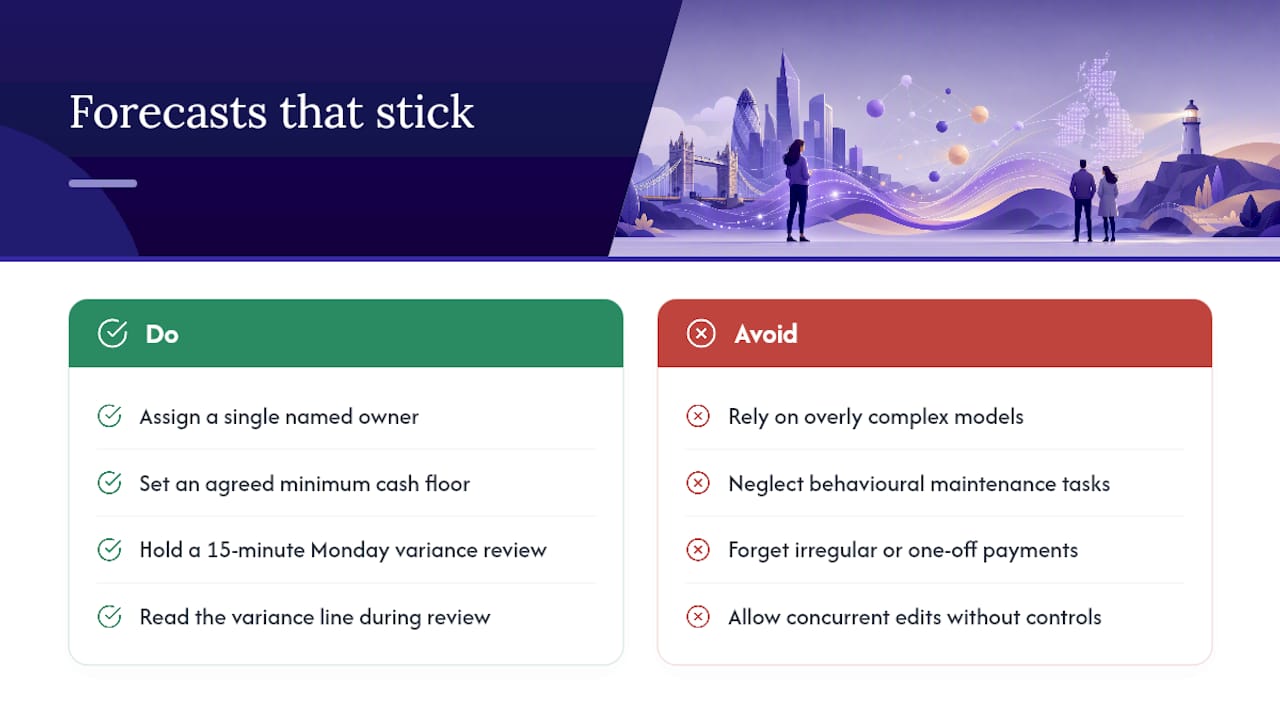
The forecasts that stick aren’t the most sophisticated ones. They’re the ones with a single named owner, a minimum cash floor everyone agrees on, and a fifteen-minute Monday review where someone actually reads the variance line instead of just updating it.
Most implementation friction isn’t technical. It’s behavioural: someone forgets to log an irregular payment, or two people edit the same tab and overwrite each other’s work. and both point to the same lesson: a forecast fails from neglect long before it fails from bad formulas.
— Gašper
Automate the manual parts without abandoning your spreadsheet
You don’t have to choose between the control of a spreadsheet and the speed of automation. Zenith-books keeps your Google Sheets forecast structure intact while removing the retyping, reconciling, and chasing that eat a finance team’s week. It automates invoice extraction, syncs bank balances straight into your sheets, and matches transactions automatically, so the errors that come from manual entry simply don’t happen in the first place.

Clients such as Združenje YES and BAM Chocolate report zero manual entry across transactions and shorter month-end closes since adopting it. If your 13-week forecast is solid but the weekly update has become a chore, start with Zenith’s live bank-to-sheets sync, or browse the full range of finance automation solutions to see what fits your current setup.
Sources
- Direct vs indirect cash flow (Allianz Trade)
- Four reasons not to use spreadsheets for forecasting | The Association of Corporate Treasurers
- 13-week cash flow forecast guide (Denver Business Coach)
- 5 Hidden Costs of Spreadsheet-Based Cash Flow Forecasting | Ripple Treasury