


The best alternative to Spendesk for invoice and bookkeeping automation is an AI-powered stack combining invoice OCR, automatic expense coding, and bank reconciliation. This approach replaces manual data entry with a system that reads vendor bills, codes them to the right accounts, matches transactions, and keeps a clean audit trail — all without a corporate card platform in the picture.
- Finance teams using AI invoice automation typically save 15+ hours per month on accounting tasks, with faster month-end closes as a direct result.
- The core technical flow runs: OCR capture → ML validation → automatic coding → ERP sync, with NLP handling varied invoice layouts from different vendors.
- Role-based approvals and immutable audit logs give finance leaders the control and compliance evidence they need for audits.
Ready to see it in practice? Zenith-books solutions include a sample invoice pilot so you can validate accuracy before committing.
Table of Contents
- What does “Spendesk alternatives” mean in this article?
- How do you choose the right invoice automation solution?
- What stack should you build at each growth stage?
- Migration checklist: switching to a new automation stack
- What security and compliance standards should you require?
- How does Zenith-books solve the invoice automation problem?
- Key Takeaways
- The part most teams get wrong about AI bookkeeping
- Zenith-books pilot: see your invoices processed before you commit
What does “Spendesk alternatives” mean in this article?
This article covers one specific problem: automating invoice processing and bookkeeping. That means AI-powered invoice OCR, automatic data entry and expense coding, transaction matching, and bank reconciliation. If you came here looking for corporate card management, virtual cards, or employee expense reimbursement platforms, that is a different category with a different buyer. This article does not cover it.
The audience here is finance teams, CEOs, and small-business owners who are drowning in manual invoice entry, slow reconciliations, and month-end chaos. The tools and stacks discussed are built for that problem specifically.
Out of scope: corporate card programs, employee expense reporting, payroll processing, and tax filing software.
How do you choose the right invoice automation solution?
The wrong tool costs you twice: once in subscription fees, and again in the manual cleanup when it misses an invoice or posts to the wrong account. Use this checklist before signing anything.
Questions to ask in vendor demos
- What is your average OCR confidence score on unstructured invoices, and what happens when confidence falls below threshold?
- How does your ERP sync handle duplicates? Is it idempotent?
- What is your SLA for support tickets, and do you offer live onboarding?
- How long does a typical implementation take from contract to first live invoice?
Red flags
- Closed export formats with no API access
- Approval paths that cannot be customized
- No retry-safe ERP sync (duplicate payment risk is real)
- Missing audit logs or logs that can be edited
Pricing callout: per-invoice and per-page OCR pricing scales with your volume and is usually more predictable than seat-based models for small teams. Estimate your monthly invoice count, multiply by the per-page rate, and compare that to seat-based alternatives at your headcount. Practical pricing context for small businesses suggests starting with built-in platform AI features before layering on third-party tools.
What stack should you build at each growth stage?
AI invoice automation stacks follow a clear pattern as volume and complexity grow. Here is how to think about each tier.
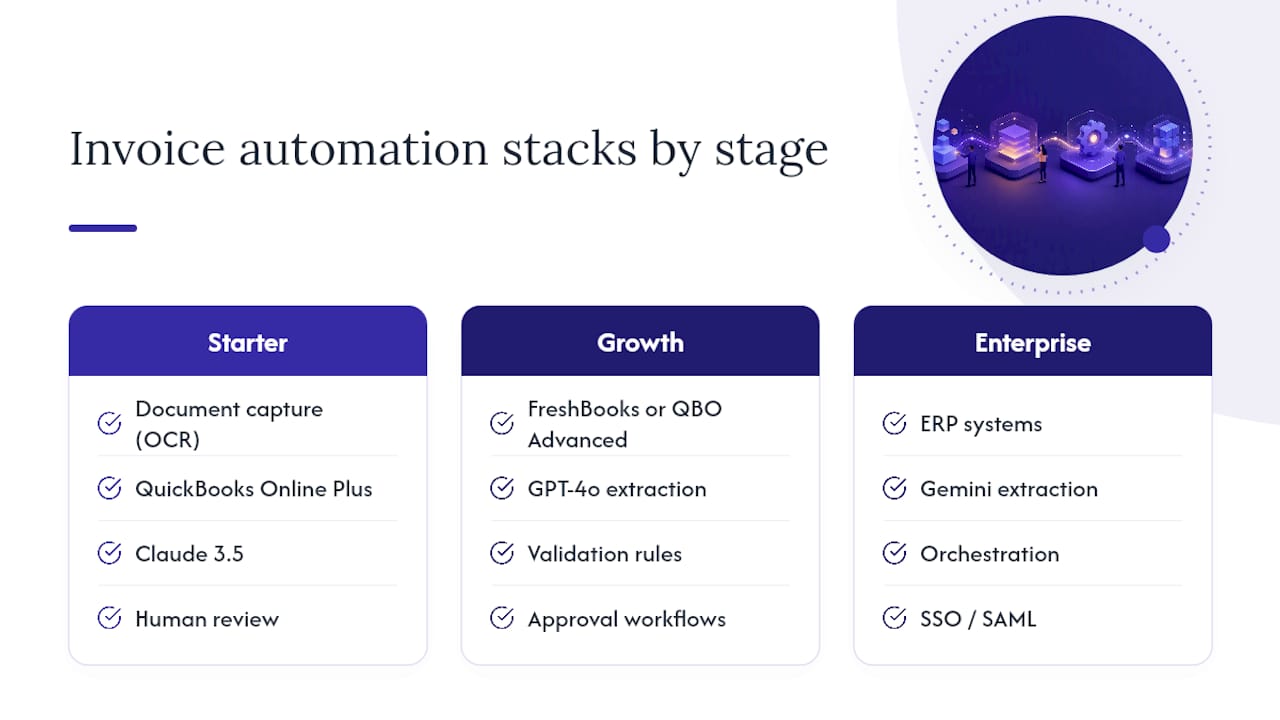
Starter stack (under ~100 invoices/month)
Components: document capture OCR + QuickBooks Online Plus + Claude 3.5 for extraction + light human review on exceptions.
The goal is eliminating manual retyping, not building a fully autonomous AP department. Enable QuickBooks Online’s built-in AI features first — that is often the lowest-friction entry point before adding any third-party layer. Expect moderate to high straight-through rates at this stage; human review handles the rest.
Growth stack (moderate invoice volume)
Components: FreshBooks or QuickBooks Online Advanced + GPT-4o for extraction and coding + validation rules engine + multi-step approval workflows + bank reconciliation automation.
At this volume, exception handling rules become the differentiator. A growth stack needs configurable validation logic that catches duplicate invoice numbers, mismatched PO amounts, and vendor master discrepancies before they hit the ledger. Add accounts payable automation workflows here.
Enterprise stack (500+ invoices/month or multi-entity)
Components: ERP (NetSuite, Sage Intacct, or similar) + Gemini-class extraction model + orchestration layer + SSO/SAML + granular RBAC + observability dashboard.
The architecture at this level separates ingestion, extraction, validation, orchestration, approval routing, ERP sync, and observability into independent modules. Modular design reduces blast radius when one component fails and allows independent scaling. Idempotent ERP sync is non-negotiable here.
When to upgrade tiers: watch for these signals — straight-through rate plateauing below 85%, reconciliation backlogs growing week over week, month-end close taking longer than five business days, or invoice volume crossing the next tier threshold.
Migration checklist: switching to a new automation stack
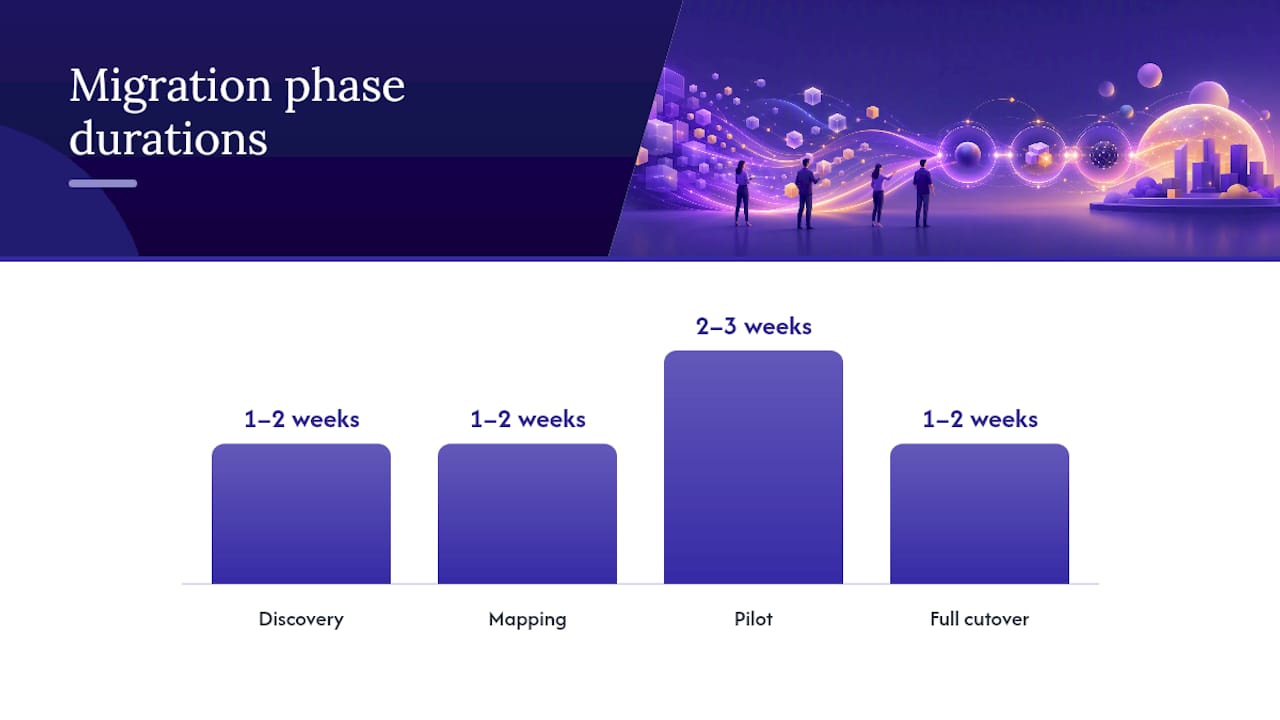
A failed migration usually traces back to skipping the pilot or mapping accounts incorrectly. Follow this sequence.
| Phase | Key Activities | Suggested Duration |
|---|---|---|
| Discovery | Audit current invoice volume, formats, and exception types | 1–2 weeks |
| Mapping | Chart-of-accounts mapping, vendor master validation | 1–2 weeks |
| Pilot | 50–100 sample invoices, measure straight-through rate | 2–3 weeks |
| Full cutover | Parallel run, exception rules tuned, training complete | 1–2 weeks |
- Export all historical invoice data and vendor master records from your current system.
- Map your existing chart of accounts to the new platform’s category structure.
- Validate your vendor master: clean duplicates, standardize names, confirm tax IDs.
- Build a sample test set of 50–100 invoices covering your most common and most problematic layouts.
- Run the pilot on that test set. Measure straight-through rate, average processing time, and error rate.
- Configure exception handling rules based on pilot findings before going live.
- Define a cutover plan with a parallel-run period and a clear fallback (keep old process running for two weeks post-cutover).
Roles: finance lead owns account mapping and pilot sign-off; IT/engineering owns API configuration and ERP sync; vendor/partner lead owns onboarding and support escalation.
Pilot success metrics to hit before full rollout:
- Straight-through rate above 80%
- Average processing time under 3 minutes per invoice
- Error rate below 5%
- Month-end close time reduced by at least one day
Pro Tip: Before cutover, test your ERP sync with a duplicate invoice submission. If the system posts it twice, your idempotency logic needs fixing — QuickBooks Online backup and restore behavior is worth understanding before you rely on any sync tool.
What security and compliance standards should you require?
Financial data automation introduces real risk if the vendor’s security posture is weak. Require these controls before signing.
Security checklist:
- SOC 2 Type II certification (not just Type I)
- Encryption in transit (TLS 1.2+) and at rest (AES-256)
- Role-based access control with least-privilege defaults
- SSO/SAML support for enterprise identity providers
- Immutable audit logs (tamper-evident, with timestamps)
- Documented data retention and deletion policies
- Incident response plan with defined notification SLAs
Due-diligence questions for vendors:
- Where is financial data stored, and is U.S. data residency guaranteed?
- When was your last third-party penetration test, and can you share the executive summary?
- How do you support customers during a financial audit (log exports, evidence packages)?
U.S. compliance considerations:
- Audit trail completeness matters for IRS recordkeeping requirements under IRC Section 6001
- Role-based approvals create the segregation-of-duties evidence auditors look for
- Immutable logs support SOX-adjacent controls even for companies not formally subject to SOX
- Data retention policies should align with your state’s business record requirements (typically 7 years for financial records)
How does Zenith-books solve the invoice automation problem?
Zenith-books covers the full automation chain: AI reads incoming vendor bills from email or uploaded PDFs, extracts the relevant fields, codes them to the correct expense categories, and posts entries without manual retyping. Bank transactions sync live to Google Sheets for real-time cash visibility, and invoices are automatically named and filed to Google Drive with searchable attachments linked to each ledger entry.
The reconciliation layer matches bank transactions against posted invoices automatically, flagging exceptions rather than passing them silently. For teams that need structured exports, Zenith-books generates standardized eSlog accounting exports compatible with downstream accounting workflows.
“Clients such as Združenje YES and BAM Chocolate report substantial time savings and streamlined operations, with reduced month-end close times and zero manual entry across transactions.” — Zenith-books
Onboarding starts with a sample invoice pilot: you submit a batch of real invoices, Zenith-books processes them, and you see extraction accuracy and coding results before committing to a full rollout. Implementation typically runs two to four weeks from pilot to live processing. Support is available through onboarding and beyond, not just at setup.
Key Takeaways
AI-powered invoice OCR combined with automatic coding, transaction matching, and reconciliation is the most practical replacement for manual bookkeeping processes — and it delivers measurable ROI from the first month.
| Point | Details |
|---|---|
| Define scope first | This category covers invoice OCR, coding, and reconciliation — not corporate cards or expense reports. |
| Pilot before cutover | Run 50–100 sample invoices and hit an 80%+ straight-through rate before going fully live. |
| Track the right metrics | Cost per invoice, straight-through rate, and month-end close duration are the three numbers that prove ROI. |
| Require SOC 2 Type II | Immutable audit logs and role-based access control are the minimum security bar for U.S. finance teams. |
| Zenith-books fits this stack | Zenith-books automates invoice capture, coding, bank reconciliation, and Google Drive filing with a pilot-first onboarding model. |
The part most teams get wrong about AI bookkeeping
The conventional wisdom says “pick the tool with the best OCR accuracy.” That framing misses the actual failure mode. Extraction accuracy matters, but it is not what causes month-end disasters. What causes them is the absence of validation rules, vendor master checks, and approval logic sitting downstream of the extraction step. A tool that reads 98% of fields correctly but has no duplicate-detection or policy-driven approval routing will still post bad entries.
The second thing teams underestimate is change management. Finance staff who have spent years in a manual process will find workarounds around any new system if they are not trained on what the automation handles and what still needs human judgment. The governance question — who owns the exception queue, who signs off on the rules configuration, who monitors confidence drift — needs an answer before go-live, not after the first reconciliation failure.
Start with the highest-volume, most rule-driven flows first: AP invoice capture and bank-to-GL reconciliation. Get those right, measure them, and then expand. Trying to automate everything at once is how pilots stall.
Zenith-books pilot: see your invoices processed before you commit
Manual invoice entry costs more than the hours it takes. It costs accuracy, audit readiness, and the month-end time your team could spend on analysis instead of data entry. Zenith-books cuts that cost directly: AI captures invoices from email, extracts and codes them automatically, matches bank transactions, and files everything to Google Drive with a clean audit trail.

The pilot is concrete: submit a real batch of invoices, see the extraction results, and validate coding accuracy against your chart of accounts before any full deployment. No long implementation project required to get a signal. Explore Zenith-books’ finance automation solutions or start immediately with the automated invoice-to-Drive filing feature to see how the capture and filing layer works on your own documents.